This feature is in Early Access and is not yet generally available. Functionality, APIs, and documentation may change before general availability.
Overview Page
What is an Overview Page
The Overview Page resource creates a centralized, guided interface within a project that walks users through the necessary configuration steps. It presents a structured checklist of required and optional setup tasks, grouped into sections by project resource (e.g., Survey, Dashboard, Distribution). Each task tracks its own completion status, guiding users through the configuration process and reducing the likelihood of missed setup steps.
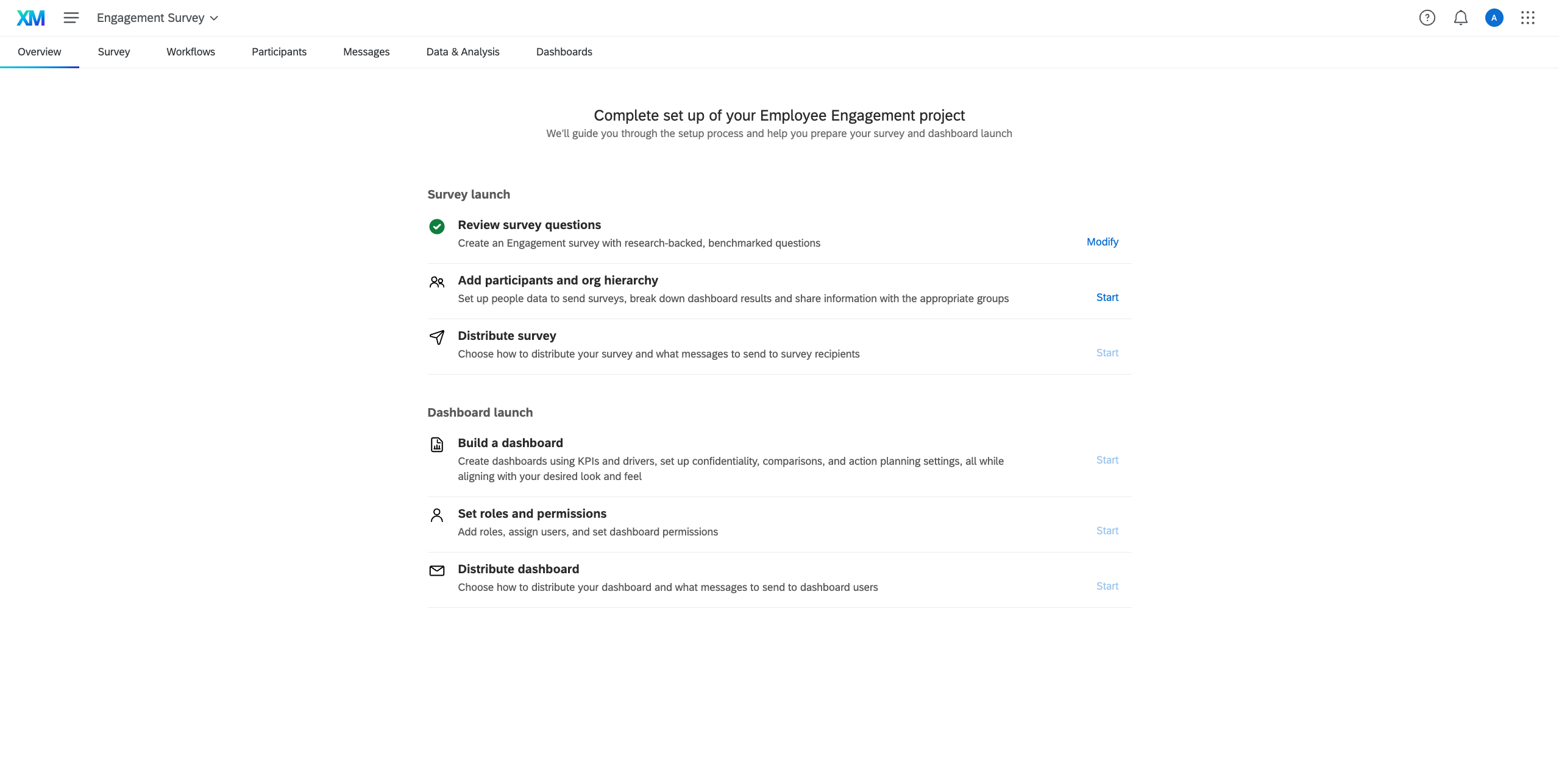
The Overview Page is currently supported for EX Employee Engagement projects.
The Overview Page is only visible to users who have the AccountPermissions.accessGuidedEngagement permission enabled. When a project is shared with collaborators, individual steps may appear as inactive for users who lack the necessary survey permissions to complete them.
Context
The Overview Page resource will generate the following field:
projectId
The projectId is the ID of the project the Overview Page was created for, and can be accessed with <step.id>.projectId.
Solution Execution
Overview Page resources are created using a "Create" step. The step must declare dependencies on any earlier steps that resolve the projectId and surveyId values, since those are interpolated into the template before creation.
{
  "id": "overview",
  "type": "Create",
  "config": {
    "apiVersion": "overview.v0",
    "templateFilePath": "Resources/overview.json"
  },
  "dependencies": ["exproject", "survey"]
}
The current apiVersion for Overview Page resources is "overview.v0".
Fallback mechanism
When a user opens the Overview tab of a project that does not yet have an Overview Page stored (for example, a project created before the Overview Page feature was deployed), the system automatically creates one from the XM Solution's registered template rather than returning an error. This means the page is always available to users without requiring any manual migration of existing projects.
JSON Structure
The Overview Page JSON file describes the page's sections, steps, and initial configuration. Below is the top-level skeleton:
{
  "projectId": "{{ $.<EX_PROJECT_STEP_NAME>.id }}",
  "surveyId": "{{ $.<SURVEY_STEP_NAME>.id }}",
  "title": "",
  "description": "",
  "sections": [
    {
      "id": "",
      "title": "",
      "dependsOn": [],
      "steps": [
        {
          "id": "",
          "title": "",
          "description": "",
          "action": "",
          "dependsOn": []
        }
      ]
    }
  ],
  "translations": {}
}
You may use this as a blank template when building your XM Solution.
Top-Level Fields
| Field | Type | Description | Required |
|---|---|---|---|
projectId | String | The associated Project ID. Typically resolved via "{{ $.<EX_PROJECT_STEP_NAME>.id }}". Required. | Yes |
surveyId | String | The ID of the primary Survey. Typically resolved via "{{ $.<SURVEY_STEP_NAME>.id }}". Required. | Yes |
title | String | The title displayed at the top of the Overview Page. | Yes |
description | String | A brief description or introductory text shown beneath the title. | Yes |
sections | Array | A list of sections that group related steps. | Yes |
dashboardId | String | Placeholder for the dashboard ID. Resolved by the backend if omitted. | No |
responseSetId | String | Placeholder for the response set ID. | No |
surveyFieldsetId | String | Placeholder for the survey fieldset ID. Resolved by the backend if omitted. | No |
Section Fields
sections[*]
| Field | Type | Description | Required |
|---|---|---|---|
id | String | Unique identifier for the section. Required. | Yes |
title | String | The title of the section displayed to the user. | Yes |
subtitle | String | Subtitle displayed below the section title. | No |
description | String | Descriptive text for the section. | No |
dependsOn | Array of Strings | IDs of sections that must be fully completed before this section is unlocked. Enforced by the UI only — the backend does not block operations based on this field. | No |
steps | Array | A list of individual steps within this section. | Yes |
Step Fields
sections[*].steps[*]
| Field | Type | Description | Required |
|---|---|---|---|
id | String | Unique identifier for the step. Required. | Yes |
title | String | The main title of the step shown to the user. | Yes |
subtitle | String | Subtitle displayed below the step title. | No |
description | String | Detailed guidance about what the user needs to do in this step. | No |
icon | String | Setting this has no effect — it is always overwritten by the icon defined by the step's action. | No |
status | String | Setting this has no effect unless the action is configured to lock on a specific status via config.lockOnStatus. | No |
action | String | Determines the step's behavior end-to-end: which conditions confirm completion, which URL the user navigates to, and which statuses are available. See Available Actions. | Yes |
dependsOn | Array of Strings | IDs of steps that must be completed before this step is unlocked. Enforced by the UI only — the backend does not block status updates based on this field. | No |
config | Object | Per-step configuration overrides. See Step Config. | No |
Step Config
sections[*].steps[*].config
The config object is optional. Most of its fields are computed by the backend; only a subset is meaningful to author in the definition.
Fields you can set: Per-status buttonLabel and icon.
Fields not author-overridable: lockOnStatus, permissionCondition, and per-status condition and urlTemplate.
Fields managed by the backend (do not set): hidden, permissionsGranted, redirectTo, and conditionData.
| Field | Type | Overridable | Description |
|---|---|---|---|
hidden | Boolean | No | If true, the step is hidden from the UI but still participates in status evaluation. Useful for precondition steps that unlock visible steps. |
lockOnStatus | String | No | When the step reaches this status, condition evaluation stops and the step remains there permanently. Accepts any status name available to the action. |
permissionCondition | String | No | A boolean expression evaluated against the caller's EX Project shareDetails.surveyPermissions. Determines whether permissionsGranted is set to true. |
statuses | Object | Partially | A map of status names to their presentation configuration. Keys are status names (e.g., "NotStarted", "InProgress", "Completed"). See Status Config. |
permissionsGranted | Boolean | No | Whether the calling user can interact with this step. Do not set. |
redirectTo | String | No | The resolved navigation URL for the step's current status. Do not set. |
conditionData | Object | No | Surfaces count values for count-backed conditions referenced by the step. Not persisted. Do not set. |
Status Config
sections[*].steps[*].config.statuses['statusName']
| Field | Type | Overridable | Description |
|---|---|---|---|
buttonLabel | String | Yes | A plain string or a translation key from the OverviewPage namespace used as the step's button label. |
icon | String | Yes | An icon identifier from the Qualtrics Design System, optionally followed by a hex color code (e.g., "active#00AA44"). |
urlTemplate | Object | No | The URL pattern for this status, sourced from the action registry. |
condition | String | No | The boolean expression that triggers a transition to this status, sourced from the action registry. |
URL Template Fields
config.statuses[statusName].urlTemplate
| Field | Type | Overridable | Description |
|---|---|---|---|
url | String | No | A URL pattern using %s as sequential placeholders. Example: "/survey-builder/%s/edit?Brand=%s&ProjectID=%s". |
variables | Array of Strings | No | An ordered list of top-level field names substituted into the url placeholders in sequence (e.g., ["SurveyID", "BrandID", "ProjectID"]). |
Available Actions
Each step must specify an action, which acts as a centrally managed template. The action defines the allowed statuses, the conditions that trigger status transitions, and the default navigation URLs. Authors can override presentation fields (buttonLabel, icon) per status inside config.statuses, but the core workflow logic remains centralized.
| Action | Description | Locks on |
|---|---|---|
createSurveyQuestions | Sends the user to the survey builder. Completes when at least one question exists. | Completed |
addParticipants | Guides the user through participant import. Shows "In Progress" while an import job is running; completes when participants exist and no import is active. | Completed |
buildDashboard | Guides the user through dashboard creation. Links to the dashboards experience once a dashboard resource exists. | None |
addSurveyInvites | Sends the user to set up email survey invitations. Completes when survey invites or any survey responses exist. | Completed |
addDashboardInvites | Sends the user to set up email dashboard invitations. Completes when dashboard-invite distributions exist. | Completed |
configureRolesPermissions | Tracks whether participants can view the dashboard. Completes once the guided flow it redirects to is finished. | Completed |
Translations
The Overview Page supports multi-language content. Authors follow the standard XM Solution translation process — the translations field in the resource is populated automatically and does not need to be authored directly.
An empty "translations": {} object must be present in the resource file for translations to be applied.