XM Plugins Deep Dive
This guide discusses the details, schema, and lifecycle phases of Qualtrics XM Plugins.
Prerequisites
Before continuing with this guide we recommend you review and complete the XM Extension Overview guide.
XM Plugin Basics
Let's start by looking at the definition, purpose, and inner workings of plugins.
What is an XM Plugin?
An XM Plugin is a collection of code, configuration files, and UX components bundled together and running on the Qualtrics XM platform to fulfill customer needs.
There are many different types of XM Plugins, which you can review them all here.
What is the Purpose of XM Plugins?
XM Plugins extend Qualtrics XM with new technical capabilities that add value to Qualtrics users. Typically XM Plugins connect Qualtrics with external systems/platforms in ways that streamline cross-platform workflows.
How do XM Plugins Work?
This depends on the XM functionality being extended. In general, a user configures an XM Plugin to be triggered based on an event within the Qualtrics system. When triggered, the Plugin's runtime functionality executes.
There is greater detail on both the configuration and runtime functionality later in this guide.
Working with iFrames
Plugins execute in an iFrame sandbox environment. All interactions with the Qualtrics service are made through the Plugin Host Library (a JavaScript library running on the Qualtrics product page).
Qualtrics product pages (e.g. Workflows) call the Host Library to create Plugins on the page by creating an iFrame with the "src" attribute pointing to the Plugin's public assets.
Those assets are a constellation of resources that can be executed in a browser, including an entrypoint (like index.html) that may reference other resources using a relative path (./bundle.js).
Developer Considerations
Using an iFrame with the sandbox attribute imposes some security-related restrictions that developers should be aware of.
Declaring Exceptions for URL Connections
You can enable fetch or XMLHttpRequests for specific URLs by adding them to manifest.json
under an array with the key validDomains:{ "appId": "APP_foo", ..."validDomains": [ "api.github.com" ]}. Each element is a domain
(specifically, a string following the syntax of "host-source", listed in the CSP definition).
Replace Requests to Internal Endpoints
All Plugins are loaded from a cookieless, external domain instead of the brand's base URL.
Resources and Libraries
It's important to note that all scripts must be bundled in the app package itself or sourced from the Qualtrics platform; loading scripts from an external CDN is not allowed.
Developers should build the app with all dependencies bundled and submit them within the app package.
What is the Plugin Client?
To facilitate communication between your Plugin and the Qualtrics XM functionality it extends, the Extension SDK provides a library named Plugin Client.
What are Plugin Types?
A Plugin Type represents a distinct part of the XM platform you can extend.
To see what Plugin Types are available run the list plugintype command:
xmt list plugintype
If you want to learn more specifics about a Plugin Type, then please let us know by clicking the blue Feedback & Support button on the bottom right corner of this page.
XM Plugin Development Lifecycle
The development lifecycle of an XM Extension consists of several phases, which we walk through here:
Phase 1: Plugin Creation
In the Quick Start guide you created an XM Extension with the command xmt create plugin.
This command downloads an workflows_task Plugin template which includes the configuration file config.json.
Config.json Parameters
The core config.json file properties are defined here:
| Name | Type | Editable | Description | Example |
|---|---|---|---|---|
| id | String | No | The unique identifier for each Plugin | "PLUG_cabc5b34-507d-48db-b904-b096XYXYf8df" |
| type | String | No | The XM Plugin Type | "workflows_task" |
| version | String | Yes | Your XM Plugin version, which should follow the semantic versioning industry standard and must be updated | “1.0.5” |
| schema | Object | No | The schema used for validation | "$schema":"http://json-schema.org/draft-07/schema" |
| hidden | Boolean | Yes | If true, this plugin will be hidden from user selection, but existing resources using the plugin will still work. | true |
| metadata.tags | String | Yes | Any special tags or keywords that could be used by future functionality for the purpose of filtering/sorting | [“XM Directory”, “rideshare”, "schedule"] |
| metadata.worker | String | Yes | No | Indicates what type of backend execution occurs |
Each XM Plugin Type defines other required and optional properties in its config.json file, and each has a different template and create different files and directories. Specific details on Plugin Types can be found in their corresponding Plugin guides, listed previously in the section What are Plugin Types?.
Phase 2: Plugin Development
Development instructions and practices vary based on which Plugin Type you use. You can find an advanced guide for each available Plugin Type in the XM Plugin Overview.
Phase 3: Plugin Management
Your XM Extension may require updates to its settings and functionality from time to time. These instructions guide you on how to perform common XM Plugin management tasks:
| Action | When | How |
|---|---|---|
| How do I rename my Plugin? | Before submitting a new version of your extension for review, you can rename a Plugin for clarity, branding changes, etc. | Edit the public/translations/EN.json file (and any other translation files you have) and change the value in the strings.name.text key to the new name. |
| How do I edit my Plugin's description? | Before submitting a new version of your extension for review, you can revise a Plugin's description to reflect changes in the new version, branding changes, etc. | Edit the public/translations/EN.json file (and any other translation files you have) and change the text in the strings.description.text key. |
| Manage Plugin Metadata | Whenever your filter criteria (tags) or backend execution (worker) requirements change. | Edit the config.json file and change the text in the metadata.tags and metadata.worker keys. |
| Update Plugin Version | Every time you are ready to submit a new version of your Plugin | TBD |
| Deprecate Plugin | When you are replacing a Plugin with an incompatible Plugin, but need to keep existing resources working with the current Plugin. | Set the hidden property to true in the config.json file. The plugin won't be listed when users create new resources. |
Phase 4: Plugin Validation
Validate any Plugin located in the /plugins directory of your Extension by running the validate command.
When you should validate your Extension:
- After you make changes to it (before version control commit)
- Before submission
Phase 5: Plugin Removal
You can find instructions for deleting a Plugin in the xmt CLI documentation
XM Plugin Runtime Lifecycle
The runtime lifecycle of an XM Plugin is composed of a configuration and an execution phase:
Phase 1: Configuration
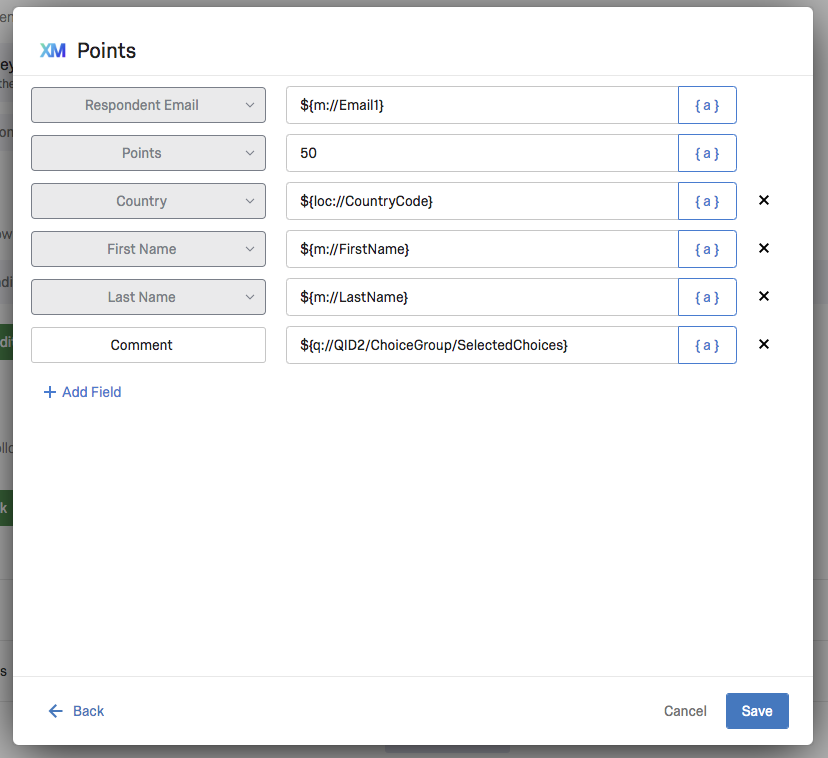
When a user selects an XM Extension and corresponding Plugin(s), they receive a series of UI screens for step-by-step configuration of the Plugin.
The exact configuration steps are specific to the Plugin Type and you can find more detail on this in the corresponding docs in Step 3: Plugin Guides.
The user of your Plugin usually inputs values or makes selections during their configuration. Those user configurations, coupled with your built-in configuration logic, enable the Plugin to communicate with external systems/platforms or augment XM Platform functionality.
Here's an example of Plugin configuration:
Phase 2: Execution
Execution of an Workflows Task Plugin is initiated with a trigger event occurring in the Qualtrics system or from an Workflows Event Plugin. Your Plugin Type determines what happens before, during, and after Plugin execution.
The entry point for Workflows Tasks and Workflows Events Plugins is src/index.html. Reporting Widgets are a little different, but you can find all the details in the corresponding docs under Step 3: Plugin Guides.
That's It
Huzzah! You reviewed and learned all about XM Plugins, including what they are, what purpose they serve, what types exist, and their lifecycle phases.
What's Next
Review this list of available plugins that you can build