XM Extension Certification
Overview
In order to list, publish, and distribute your extension on the Qualtrics XM Marketplace, your extension must pass XM extension certification. The certification process ensures that your extension meets all certification requirements to provide an exceptional experience for customers and maintain Qualtrics’ industry leading platform standards.
Prerequisites
-
Your organization must be a part of the Qualtrics Partner Network (QPN)
Currently, only QPN members are able to request certifications. If your organization is not part of the QPN, please visit our Qualtrics Partner Portal and apply for program membership. Please note that application does not guarantee acceptance into the QPN.
-
You must have access to the Qualtrics Partner Portal
Certification requests are placed from within the Qualtrics Partner Portal. If you do not have access, please reach out to a practice lead at your organization or use the QPN Assistant survey to reach our QPN team members.
-
You must have access to the Qualtrics Developer Portal
The certification process will require you to log into your developer account. If you do not currently have a developer account, please visit the Qualtrics Developer Portal and sign in with your existing brand credentials.
-
Your developer email must match your Qualtrics Partner Portal login email
In order to ensure your developer account has full access to partner functionality, your developer portal email address must match your Qualtrics Partner Portal email address.
-
You must be part of a development team that has access to the extension
You are only able to submit certification requests for extensions where you are part of a team. Please see our support documentation on Team Management.
-
You must have a submitted full version (not prerelease)
Certifications can only be submitted for full versions. Prerelease versions cannot be submitted for certification. Please see our documentation on extension submission for more details.
For more details on the XM marketplace listing and enablement process, please see Licensing and Enabling XM Extensions.
Certification Process: What to Expect
The overall goal of the certification process is to ensure customers have a seamless end to end experience and can set up and use your extension in a self-serve manner. During certification our certification team validates that your extension meets all the certification requirements listed below.
Extension certification can include any part of the extension from admin configuration to execution as long as the user is in the Qualtrics platform. If there’s an external connection like in a workflow task, once we receive a successful response, we expect that the external system will continue processing as the external system is not within our control.
Part 1: Simulation
The first step in the certification process is for our team to simulate what an end to end customer experience would be if they were setting up the extension for the first time without significant knowledge of any external systems. We do this to ensure customers are able to rely on externally available documentation to accomplish their tasks. During this process, we will follow the extension documentation to the letter while making minimal assumptions on what the expected functionality should be. For example, even if we see that a field is labeled “Respondent email,” we will not pipe in a respondent’s email unless instructed to by the documentation.
Part 2: Policy Validation
The next step is for our certification team to validate your extension against each policy. If your extension does not meet the policy requirement, our team will note why and how to fix the issue.
Part 3: Reporting
Upon completion, you should expect a detailed document outlining areas that require attention and which policies have or have not been satisfied. This can be accessed and downloaded through the Qualtrics Partner Portal.
Certification Tips
Start Early
The majority of the policies are intended for developers. However, a subset of the policies will require collaboration with other teams in your organization. Therefore, it’s recommended to start the process early to ensure cross functional teams have ample time to prepare for a successful launch. As an example, while it is the developer’s responsibility to include the extension description in the submission package, it may be a business development or marketing team’s responsibility to draft and approve the content.
Browser Compatibility: A Common Pitfall
One policy developers often overlook when creating their Extension is 4.18, which lists the browsers and operating systems your Extension must be fully compatible with to be certified. Please carefully review this list and ensure your Extension functions on the browsers and operating systems included in it.
Request a Certification Review
Once your Certification Review registration is received it will go to the end of the queue. Depending on registration volume, it may take up to 4 weeks for your Certification Review to be completed.
If at any point during these steps, you run into any issues, please ensure all the prerequisites are met. If you still need assistance, please reach out through the QPN Assistant or the blue Feedback & Support button on the Developer Portal.
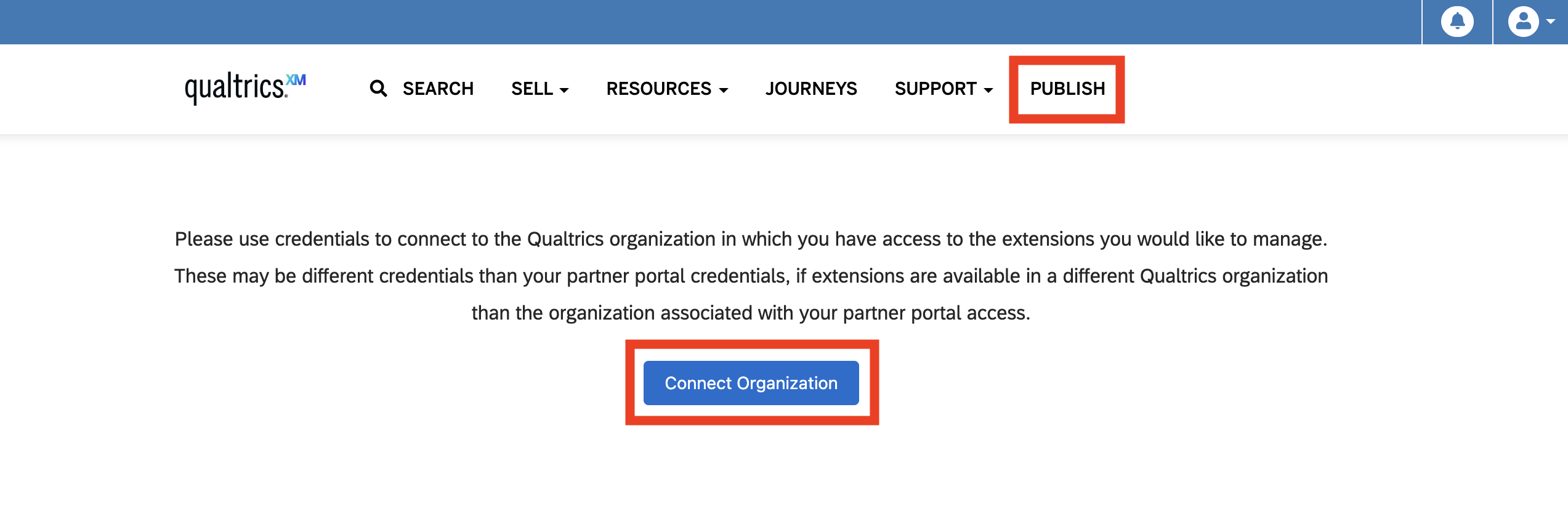
Once your XM Extension is ready to be reviewed, you may request certification from within the Qualtrics Partner Portal. Once logged into the Partner Portal, select Publish in the top navigation bar within. Select the Connect Organization button and and sign in with your Qualtrics Developer Platform credentials, which may be the same as your Partner Portal credentials.
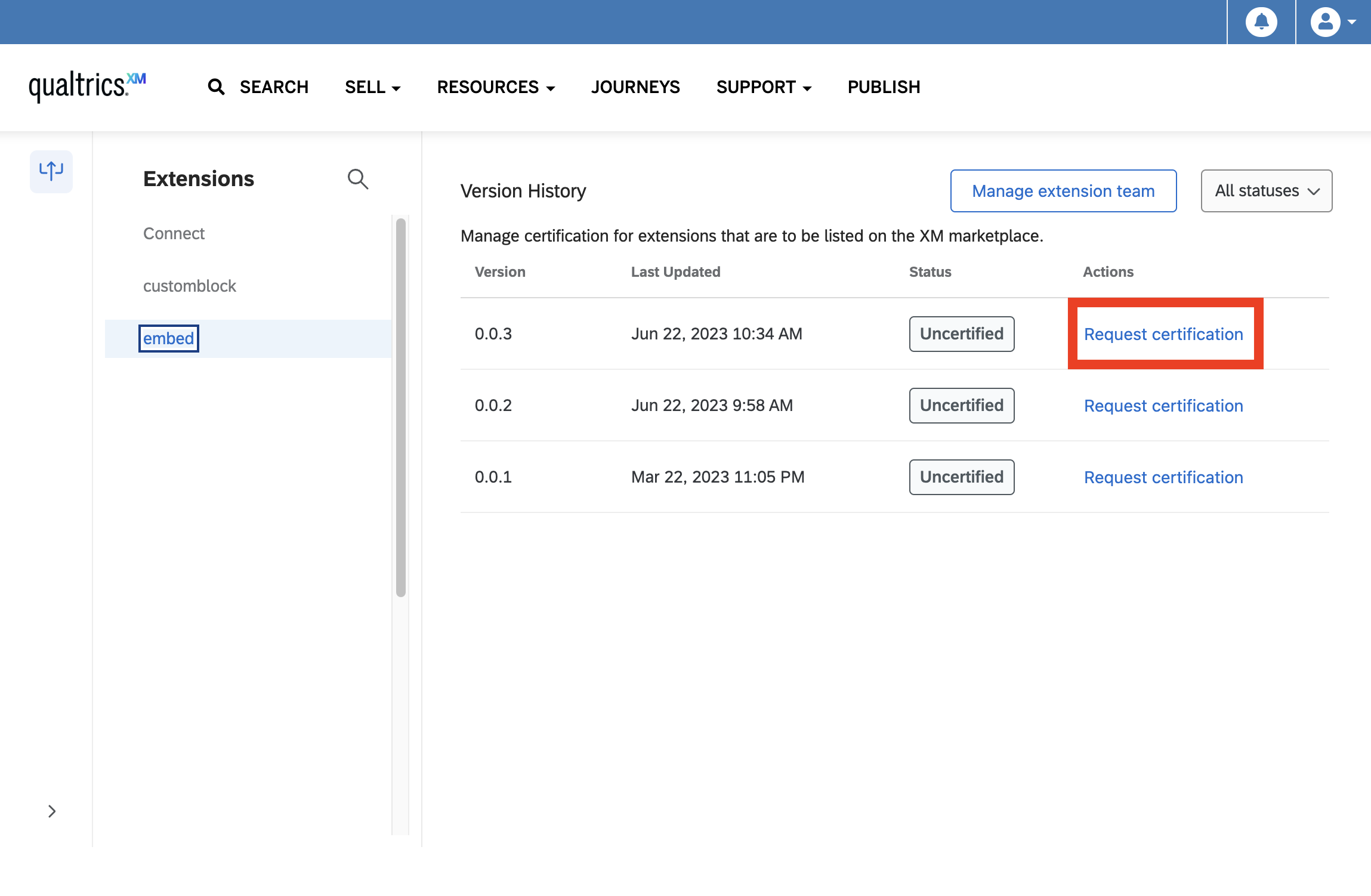
You will now be presented with each of your submitted Extensions that may be eligible for certification. If an extension does not show any versions, it is because a production version of the extension has not been submitted yet. Prerelease extension versions cannot be certified and published.
Select an Extension that has a submitted production version, then select Request certification within the Actions column to open the Qualtrics XM Extension Certification Review request form. Notably, certification and publishing only applies to a version of an Extension. Each subsequent version of an extension must go through the certification process before it can be published to Qualtrics users and updated in the marketplace.
If a different member of your team, or a member of another organization, will be leading the certification process for your extension, you will need to ensure that they have been added to the Team for the extension. For more information on inviting users to collaborate with on your app, visit the following support documentation.
Getting Help
At any time during the process, you can post questions to our community of experts in the XM Community or request an office hours appointment with our Developer Relations team through QPN Assistant.
Certification Policies
While the list of policies may seem lengthy, bear in mind the following:
- Most of the policies are straightforward and inherent in best practices. In other words, ensuring compliance should not require a lot of extra effort.
- Developer Support is there to answer any questions via the QPN Assistant or the blue Feedback & Support button on the Developer Portal.
XM Extension certification policies are divided into the following sections:
- Extension Value
- Content and Localization
- Purchase Process
- Predictability and Security
- Terms, Data, and Privacy
- Content Standards
- Functionality and Use
- Maintenance of Functionality
- General
UX
Review this diagram to see how many of the properties in a manifest.json are displayed in the Qualtrics UI.
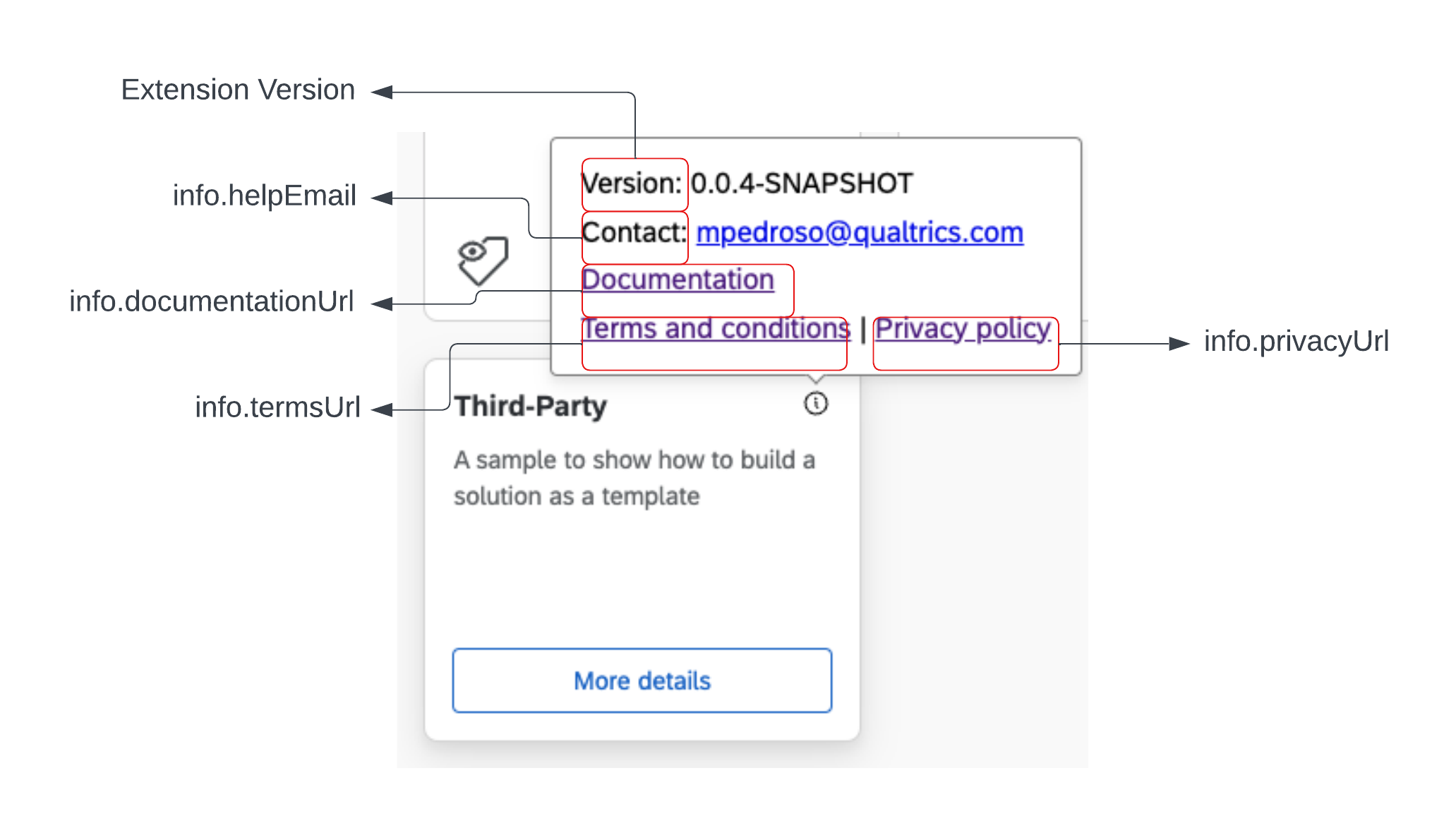
Ensure that your Extension has all of the required manifest.json properties filled out properly.
Please review these UX guidelines and ensure that the Plugins in your Extension follow them.
Your Extension should contain a logo representing the relevant company, service, or platform.
Policies
1. Extension Value
| Policy Number | Description |
|---|---|
| 1.1 | Your extension must offer unique value or utility within the extension experience that extends Qualtrics functionality for its customers. |
| 1.2 | Your extension must work according to its specified description and must be in a finished state. |
| 1.3 | If you offer a trial or free version of your extension, it must reasonably resemble the functionality of your extension’s paid version. |
2. Content and Localization
| Policy Number | Description |
|---|---|
| 2.1 | You must specify which languages you support in your extension at the time of submission. |
| 2.2 | Your extension must support the English language. |
| 2.3 | Extensions listed in multiple languages must be easily identified and understood according to the list of supported languages. |
| 2.4 | Your must properly localize your extension (descriptions, screenshots, title, etc.) for each submitted language. |
| 2.5 | Your extension must not falsely declare language support. |
| 2.6 | The experience provided by an extension must be reasonably similar in each supported language. |
3. Purchase Process
| Policy Number | Description |
|---|---|
| 3.1 | You must clearly notify users in your extension description if you require any additional for your extension to operate as advertised or for added extension functionality. |
| 3.2 | If you have a free or trial extension that will require additional functionality to operate, you must clearly specify this in your extension description and you must notify Qualtrics so we can coordinate the purchase process. |
| 3.3 | Your paid extension must follow the Qualtrics commerce requirements. |
| 3.4 | If Qualtrics removes your extension from the Marketplace, or otherwise deletes instances of your extension in accordance with these policies, then you must provide refunds to customers accordingly, and Qualtrics may in its discretion deduct such refund amounts from any pending payouts to your account. |
| 3.5 | Your extension must call out the limitation for Paid and Free versions, these limitations could be in the form of volume,users,software or hardware. |
4. Predictability and Security
| Policy Number | Description |
|---|---|
| 4.1 | Your extension must behave predictably and as a user might reasonably expect. It must not stop responding, end unexpectedly, or contain noticeable programming errors. You must promptly fix any errors identified by you, a customer, or Qualtrics. |
| 4.2 | Updates to your extension must not decrease extension functionality in a way that would be unexpected by a reasonable customer. |
| 4.3 | The functionality of your extension must be consistent with its description, documentation, and any other associated metadata. |
| 4.4 | You must provide Qualtrics with instructions, resources, and links in the “testing notes” of the submission form sufficient for Qualtrics to fully validate and test your extension. For example, if your extension requires a login and password, you must provide a login for Qualtrics to use that provides sufficient access for complete validation and testing. |
| 4.5 | Your extension must not make unexpected changes to a customer's data. |
| 4.6 | Your extension must not jeopardize or compromise the security or functionality of Qualtrics, a customer, or any third-party products. |
| 4.7 | Your extension must be free of viruses, malware, or any other malicious or harmful software. |
| 4.8 | Your extension must not launch functionality outside of the extension experience without the explicit permission of the user. |
| 4.9 | No action should take more than two seconds to respond without some type of warning or loading UX. |
| 4.10 | Extensions must not consume an unreasonable amount of memory or other user resources. Extensions must not negatively impact the performance of a typical customer's environment. |
| 4.11 | Extension user experience must not look unfinished and must follow Qualtrics recommendations and best practices. |
| 4.12 | Extensions must be available at any time. Maintenance windows with planned downtimes should be avoided or minimized. Extensions should come as close as reasonably possible to zero downtime. Zero downtime describes a service that (1) has no or very limited perceived service downtimes from the end-user’s perspective, (2) makes updates or patches happen transparently to the user without moving the application into a maintenance mode, and (3) can be used by end users at any time. |
| 4.13 | Your extension must follow the Qualtrics security guidelines to allow a safe execution of your extension. Among other requirements, there must be no built-in backdoors (i.e., no hidden options that intentionally bypass authorization checks). |
| 4.14 | Extensions must not contain any type of advertisement. |
| 4.15 | Extensions that depend on external accounts or services must provide clear instructions to sign in and out of those accounts or services. An in-extension sign-up experience is not required, as the sign-up process will be managed by the customer’s organization outside of the extension and not by the individual user. |
| 4.16 | Your extension must provide a seamless first run experience, with a clear value proposition. If users must sign in or sign up, the value proposition must be clear to the user before they do so. |
| 4.17 | The UI (buttons, links, text fields) of your extension must be intuitive and obvious in their purpose. Do not require the user to read support content to perform basic operations. |
| 4.18 | Your extension must be fully functional on the following operating systems and browsers:
|
| 4.19 | Your extension’s package must be correctly formatted and conform to the latest manifest schema. This is currently manifest schema version 1.0. |
| 4.20 | Your XM Extension must adhere to design guidelines and must not have issues that impede the customer experience within Qualtrics. |
| 4.21 | Domains outside of your organization's control and tunneling services cannot be included in the valid domains in your manifest. Valid domains must be declared during submission and certification in the manifest. A list of domains that your extension is allowed to communicate with, either from the user’s browser or a backend proxy service. |
| 4.22 | A plugin must provide value beyond simply hosting an existing website. |
| 4.23 | Content inside of the plugin must be contextually the same for all users and not scoped for individual use. |
| 4.24 | Content should not have excessive chrome or layered navigation. Headers, footers, and branding should adhere to design guidelines. |
| 4.25 | Any branding included inside the plugin should adhere to the specific guidelines provided for that plugin. |
5. Terms, Data and Privacy
| Policy Number | Description |
|---|---|
| 5.1 | You must submit Terms of Service that govern the use of your extension and the relationship between you and the end customer. This must be a legally binding agreement between you and the customer that can be electronically accepted, with terms no less protective of Qualtrics’ rights than those contained in the agreements between you and Qualtrics. It must be consistent with standard terms and market practice for this type of agreement. |
| 5.2 | You must submit a Privacy Policy that accurately describes your privacy practices in relation to the extension. The policy must be clearly titled as such and must clearly relate to your extension or overall service. Documentation that refers solely to your website is not acceptable. The content of the policy must be under your direct control and must contain, at a minimum, what customer data is collected and stored, where the data is collected (production and backup), what privacy controls are protecting the data, and how the data is used. If your extension does not collect or transmit user information, you must still link to a statement declaring this. |
| 5.3 | Your extension, Terms of Service, and Privacy Policy must comply with all applicable laws, including GDPR and CCPA. |
| 5.4 | Your extension must obtain consent to collect, store and publish sensitive information. |
| 5.5 | Your extension must not obtain or store customer data without notifying the user or the brand admin. |
| 5.6 | Your extension must not pass or transmit customer data without notifying the user. |
| 5.7 | Your extension must not implement geo-blocking of customers without explicitly stating this in the description. |
| 5.8 | All data transferred over the HTTP protocol must be encrypted with TLS protocol version 1.2 or higher and a valid SSL certificate which has been issued by a trusted certificate authority (i.e., HTTPS must always be used). |
| 5.9 | Extensions may not open pop-up windows unless they are triggered by explicit user interaction. Any pop-up windows that are triggered by user interaction must not be blocked by the browser's pop-up blocker when the pop-up blocker is set to the default value. |
| 5.10 | Your extension cannot request unreasonably high permissions or full-control permission. |
| 5.11 | You must provide functionality to delete a customer's data from your environment upon request of the customer. The customer must have the right to request the destruction of his own data, and you must implement that request. |
| 5.12 | Customer data must be separated from the data of other customers. All data belonging to a specific brand (including business data, log files, log entries, configuration files, system details) must not be visible to or accessible by any other brand. Data exchange between two or more brands is not permitted. |
| 5.13 | You must comply with applicable laws and regulations regarding retention and deletion of customer data stored in the developer system. |
| 5.14 | Customer data deletion must not be performed using only logical deletion (just marking data as erased)--you must ensure physical deletion consistent with NIST 800-88 or similar standards. Change log entries for deletion must not disclose the content of the erased data. |
6. Content Standards
| Policy Number | Description |
|---|---|
| 6.1 | Your extension must not contain adult content. |
| 6.2 | Your extension must not contain content that advocates discrimination, hatred, or violence based on membership in a particular racial, ethnic, national, linguistic, religious, or other social group, or based on a person's gender, age, or sexual orientation. |
| 6.3 | Your extension must not perform any illegal activity, be designed for the purpose of illegal activity, or contain content or functionality that encourages or facilitates illegal activity. |
| 6.4 | Your extension must not contain or display content that a reasonable person would consider to be obscene. |
| 6.5 | Your extension must not contain content that is defamatory, libelous, slanderous, or threatening. |
| 6.6 | Your extension must not contain content that encourages, facilitates or glamorizes excessive or irresponsible use of alcohol, tobacco products, drugs or weapons. |
| 6.7 | Your extension must not contain content that encourages, facilitates or glamorizes extreme or gratuitous violence, human rights violations, or the creation or use of weapons against a person or animal. |
| 6.8 | Your extension must not contain excessive or gratuitous profanity. |
| 6.9 | You must have all legal rights to use any names, contents, creative works, trademarks, logos, code, online services, APIs, or other intellectual property that are present in your extension. You may not use Qualtrics’ or any third party’s names, logos, trademarks or other intellectual property, or suggest any affiliation between you and Qualtrics or a third party, without express written permission. |
| 6.10 | Your extension must not encourage, promote, or enable piracy of copyrighted content. |
| 6.11 | Your extension must not be designed or marketed to perform, instruct, or encourage tasks that could cause physical or psychological harm to a customer or any other person. |
| 6.12 | Your extension must comply with all applicable laws in the regions in which it is available. |
7. Functionality and Use
| Policy Number | Description |
|---|---|
| 7.1 | The description and metadata you submit with your extension must be accurate |
| 7.2 | Your extension must have a unique name. |
| 7.3 | Your short and long description must not be the same. Additionally, your short description must not be repeated within the long description. |
| 7.4 | Your extension’s title, description, and images must adhere to recommended guidelines, reflect its functionality, and may not mislead the user. Do not rely exclusively on familiarity with a brand or service to convey the purpose of your extension. If you make changes to your extension such that the functionality does not match the description, you must resubmit your extension. |
| 7.5 | The images submitted with your extension must reflect its functionality and must not mislead the user. They should be legible and clearly show the value proposition of the extension. |
| 7.6 | The capabilities you declare must relate to the core functions and description of your extension. |
| 7.7 | You must provide at least one screenshot of your extension. |
| 7.8 | Your extension’s packages must be correctly formatted and conform to the current manifest schema. |
| 7.9 | Your extension must not be a duplicate of an extension you already submitted. |
| 7.10 | Your extension must include the extension name, version information, and easily discoverable technical support contact information. |
| 7.11 | Your extension name may not include "extension" or "plug-in" or derivatives |
| 7.12 | You must specify a valid support URL in the info.documentationUrl property in your extension manifest. The support documentation provided should include configuration information and the appropriate contact information to route support requests. It MUST be publicly accessible although it MAY require a login to access it. |
| 7.13 | You must specify a valid email contact in the help element of your extension manifest. |
| 7.14 | If you wish to submit multiple variations of an extension (for example, where different functionalities are unlocked at different price points), you must submit these separately, with separate extension IDs. |
| 7.15 | The package can remain the same across the multiple extension listings. |
| 7.16 | We recommend, as a best practice, that you notify users of multiple extensions or listings in the description for each. This ensures users are aware that different cost/functionality tiers are available. |
| 7.17 | You may not use the names of Qualtrics products or services in your extension or title without explicit permission in writing. |
| 7.18 | As a best practice, there should be some troubleshooting information available for a brand admin to look into any ‘known issues’ in case that would be necessary. |
| 7.19 | If a new extension version introduces any breaking change, it must inform all affected customers. It must go through certification again. |
| 7.20 | The demo submitted via the request form should demonstrate the end-to-end functionality, including the setup and configuration of the platform. |
| 7.21 | Credentials needed to perform the account configuration should be provided in the certification request form. |
| 7.22 | Your extension must include your organization's logo. |
8. Maintenance of Functionality
| Policy Number | Description |
|---|---|
| 8.1 | If you update your extension pricing or licensing terms, you must continue to offer the original functionality to the existing customer base at the original pricing. New prices and/or licensing terms may only apply to new users. |
| 8.2 | If you update your extension pricing from free to paid, existing users must receive the same level of functionality as before the update. |
| 8.3 | If you update your extension from supporting site licenses for free to not supporting them, existing users must continue to be supported for free. |
| 8.4 | If you withdraw your extension from the Qualtrics Marketplace, you must ensure any external web services and/or web pages that support the extension will continue to function for 90 days. Failure to do so will make you responsible for refund liability to your customers. |
| 8.5 | Extensions may convert from free to subscription pricing. If you update your extension or pricing from free to subscription, existing users must receive the same level of functionality as before the update. |
| 8.6 | If your extension behavior or functionality changes due to an external dependency like API or any web component then you must inform Qualtrics about it and resubmit your extension for certification. Failure to do so might result in revocation of the extension. |
9. General
| Policy Number | Description |
|---|---|
| 9.1 | Qualtrics may remove any Extension from the Qualtrics Marketplace and from its users’ accounts at any time if the Extension violates one or more of these policies or if Qualtrics otherwise determines, at its sole discretion, that removal is in the best interest of Qualtrics or its customers. |
| 9.2 | These policies are subject to any legal agreements in place between you and Qualtrics in all respects and should be interpreted in the context of those agreements. The headings provided in these policies are for convenience only and do not limit or alter the meaning of their corresponding sections. As used in these policies, the term “extension” refers to your extension, plugin, or other similar item. |
| 9.3 | Qualtrics may modify or amend these policies at any time. It is your responsibility to check these policies regularly and ensure the ongoing compliance of your extensions. |
Next Steps
Once your XM Extension version is certified, you can publish it with these steps to make it available to your customers.