XM Extension Glossary
This glossary contains only terms related to the Qualtrics Developer Platform and XM Extensions.
Please review the Qualtrics product and its documentation to learn and understand its terminology and functionality.
B
E
Extension
An XM Extension, informally. See XM Extension.
Extension Certification
The process of approval required prior to publication. See Extension Certification Policies.
Extension Distribution
You can distribute your Extension with others via the following methods:customers:
Share
This xmt command permits you to collaborate your Extension during development with other XM Developers.
If you create a bespoke Extension for a single customer, you may also use this approach to deliver it to them.
Extension Lifecycle
The phases from creation to publishing, and potentially removal of the Extension:
- Creation
- Management
- Validation
- Submission
- Certification
- Publishing
- Removal
Learn more in the Extension Lifecycle section of Understanding XM Extensions.
Extension Framework
The Extension Framework is the infrastructure on the Qualtrics platform that runs the Extension and Plugins and enables them to communicate to the underlying Qualtrics product.
Extension Package
The bundled XM Extension, its XM Plugins, and all supporting files required to implement and publish a given app.
The set of code and metadata files for an Extension that is bundled prior to being submitted. It contains an Extension Manifest and the collection of XM Plugins developed for the Extension.
Extension SDK
The tooling, documentation, and runtime that enable both 1st-Party and 3rd-Party developers to build, execute, and maintain XM Extensions.
Extension Teams
A group of people that consists of a collection of registered XM Extension Developers associated with a single XM Extension via an assigned role.
Teams represent the development and product stakeholders involved in the build and maintenance phases of an XM Extension.
Extension Types
Extensions can be either public or private. All Extensions are private by default when created.
Public Extensions can be further categorized by whether they were created by a 1st-party or 3rd-party.
Private
These are the two private XM Extension scenarios where an XM Extension is created by a:
- Qualtrics customer for their own use
- Qualtrics delivery partner for a single XM Customer
Public 1st-Party
These are XM Extensions created and maintained by Qualtrics Product teams for Qualtrics customers.
Public 3rd-Party
- Created by XM Innovation Partners for joint XM Customers
Extension Version
An instance of the Extension that is created after it is submitted to the Extension Registry. Each Extension Package submitted results in a new Extension Version.
F
First-party
First-party (aka 1P) signifies Qualtrics developers. So, any first-party Extensions are created and maintained by Qualtrics development teams.
L
logo
You can and should customize your Extension with the logo of your company or service. Any logo you provide should adhere to these requirements:
- File type: SVG
- Frame size: 32px
- Frame rounded corner radius: 4px
M
manifest.json
The Extension Manifest contains important information about your XM Extension, its capabilities, and its relevant assets. You can find it in the root directory of your Extension with the filename manifest.json.
P
package.json
The npm file that lists all of the dependencies, devDependencies, metadata about your project, and helpful development commands accessed by invoking npm run. (See the package.json page for more detail.)
Plugin
An XM Plugin, informally. See XM Plugin.
Plugin Template
The set of files and directory structure developers use as the starting point to developing a custom Plugin. You create templates for any Plugin type using the xmt CLI tool.
Plugin Types
A specific place or functionality in a product of the XM Platform that developers can extend and integrate with.
See the list of available plugins.
Plugin Validation
The formal process for confirming your XM Plugin adheres to the published requirements set forth by Qualtrics.
Prerelease extension development
A prerelease is any Extension version that has a label appended following the version such as 0.0.1-SNAPSHOT (recommended), 0.0.1-prerelease, or 0.0.1-rc1, or whichever syntax makes the most sense to your team.
Follow these steps develop your extension with a prerelease version:
- Terminal 1 (plugin directory): Run the command
npm start - Terminal 2 (extension directory): Run the command
xmt develop extension
Prerelease versions are to be used during development for quick iterative testing, and they differ from release versions (one without a prerelease identifier) in these three ways:
- A prerelease version may only be submitted using
xmt develop extension. - A prerelease version will be overwritten when using
xmt develop extension. - A prerelease version may not be certified or published.
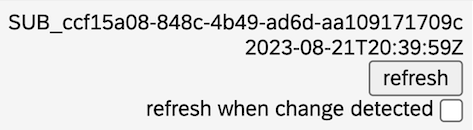
- A prerelease version of a frontend plugin displays an overlay on an iframe that shows the last submission ID, submission date, and a checkbox to enable auto refresh when
xmt develop extensionis running locally.
When developing a prerelease version, you can refresh the iframe by clicking the refresh button in the overlay without refreshing the entire web page. Optionally you can enable auto-refresh by checking the checkbox in the prerelease overlay:
The legacy method for performing local development was via the xmt run command. It has been deprecated and replaced with the xmt develop extension command.
postcss.config.js
A module configuration for postcss-preset-env, which enables developers to use modern CSS and takes care of browser compatibility/polyfills automagically.
Private Extension
An XM Extension that is not accessible publicly, although it is available for sharing to specific brands after submission. We call this practice sharing or side-loading because that Extension will be accessible only to specified brands (after sharing it) and this process will be triggered by invitation only to the Brand Admin which will have to approve the request.
The developer could then have multiple brands shared to any given Extension. The developer retains the option to make any private Extension public through the established publishing process.
Public (directory)
The folder where your source code is built and bundled by webpack. It contains the entry point HTML and a translations directory of json files that specify standard display text for the Plugin.
Q
(QDP) Qualtrics Developer Platform
(QDS) Qualtrics Design System
The Qualtrics Design System. QDS encompasses graphics libraries and specifications for UI components.
R
React
A free and open-source front-end JavaScript library for building user interfaces or UI components.
Qualtrics provides React-specific components and interfaces for XM Extensions as part of the Extensions SDK. See also the React website.
S
Semantic Versioning Specification
The Semantic Versioning specification is a rigorous framework for assigning and incrementing version numbers in software. It's a standard that should be followed by XM developers when assigning or updating XM Extension versions.
Share
An enablement mechanism meant for test/preview brands. It can be initiated from the dev portal or XMT and allows you the brand to get access to any version of the Extension (as opposed to just the latest published version).
src (directory)
The local directory that contains your source code for a Plugin. It holds all the logic and UX components for your Plugin.
T
Third-party
Third-party Apps (aka 3P apps) are those Extensions built by external developers such as an Independent Software Vendor (ISV) or a System Integrator (SI).
Tile
The rectangular graphic that represents each Extension in the Extension selector, or represents a plugin on a plugin selection page. The text in a tile includes the name of the Extension or plugin and a short description of functionality. Developers specify the text displayed for plugins in .json files in the translations directory — one file for each supported (localized) user language.
translations (directory)
The public/ directory also comes pre-packaged with a translations/EN.json file, which is discussed in the Working with Translations guide.
W
Webpack
Webpack is the industry-standard front-end build tool that bundles your css, JavaScript, html, and images into a few files (or sometimes a single one).
webpack.config.js
The JavaScript file that contains the Webpack configurations for bundling your Extension together and outputting it to the public/ directory.
widgets
Elements that display a dynamic, data-driven visualization in a web page. The XM SDK provides resources that let you develop custom widgets using the Reporting Widgets Plugin framework.
workflow
The general category of functionality performed by Workflows Task Plugins.
X
XM Developers
Any developer, either first-party or third-party, that has created a developer account on the Qualtrics Developer Portal
XM Extension
A container or package for XM Plugins that contains all of the required metadata about the extension functionality, including the marketing, support, terms and conditions, privacy policy, and languages.
An XM Extension can contain one or more XM Plugins.
XM Plugin
Learn more about XM Plugins via this overview.
XMT
XMT stands for eXtension Management Toolkit, the CLI tool you use to build, test, maintain, and deploy your XM Extensions.
Review the different commands available: