XM Extension Manifest Deep Dive
Summary
Essential information about your Extension is contained in the manifest.json, including values that help you maintain your Extension and expand its functionality.
Here are some common fields you will see in this file:
- An
idthat is a long globally-unique identifier of your Extension - A
versionfield that is the source-of-truth for you Extension version - An
infoobject containing customer-facing information about your company and your Extension
Prerequisites
You should be familiar with these concepts before reviewing the details on the manifest.json file
Limitations
There are no current limitations to the manifest.json file.
Tips and Tricks
Review these helpful knowledge hints to avoid common pitfalls and follow proven practices:
- If you copy your Extension, be sure to update the
idkey with a different value - Be aware that some fields can be modified by certain xmt commands
Details
The manifest.json file is required and created for you automatically when you create a new Extension. It is located in the root directory of your Extension.
Information from this file is shown to logged-in Qualtrics users in various locations, most prominently on the Extension Admin page. It is crucially important to keep the information in your manifest.json current to avoid customer confusion and pain.
Example Manifest
Here is an example of a manifest.json file:
{
    "id": "APP_12345678-abcd-efgh-ijkl-123456789012",
    "version": "2.1.0",
    "schemaVersion": "0.0.5",
    "info": {
        "termsUrl": "https://example.com/terms",
        "privacyUrl": "https://example.com/privacy",
        "documentationUrl": "https://example.com/docs",
        "helpEmail": "help@example.com",
        "organizationName": "Example",
        "websiteUrl": "https://example.com/your-extension"
    },
    "connections": [
        {
            "name": "Instagram",
            "scheme": "basic",
            "target": "instagram"
        }
    ],
    "validDomains": [
        "*.example.com"
    ],
    "adminControls": {
        "addValidDomains": true
    },
    "qualtricsScopes": [
        "read:surveys",
        "write:surveys"
    ],
    "configurations": {
        "apiEndpoint": {
            "type": "string",
            "defaultValue": "https://api.example.com",
            "validationRegex": "^https://.*"
        },
        "enableDebugMode": {
            "type": "boolean",
            "defaultValue": false,
            "validationRegex": "^(true|false)$"
        },
        "maxRetries": {
            "type": "number",
            "defaultValue": 3,
            "validationRegex": "^[0-9]+$"
        }
    },
    "pluginTypeTranslationKeys": {
        "workflows_task": {
            "description": "WorkflowsTaskDescriptionTranslationKey",
            "longDescription": "WorkflowsTaskLongDescriptionTranslationKey"
        },
        "<plugin_type>": {
            "description": "PluginTypeDescriptionTranslationKey",
            "longDescription": "PluginTypeLongDescriptionTranslationKey"
        }
    }
}
Manifest Properties
This table contains in-depth information on each of the available properties in the manifest.json file:
| Property Name | Type | Required | Editable | Description | Example |
|---|---|---|---|---|---|
| id | String | Yes | No | The unique Identifier for your Extension. This must be present and valid or no workflows can be performed. | "APP_c17b43b9-019d-49e3-8122-5a43e74dcXXX" |
info.privacyUrl | String | Yes | Yes | The URL to your company’s privacy policy | Qualtrics privacy policy |
info.termsUrl | String | Yes | Yes | The URL to your company’s terms of service | Qualtrics terms of service |
info.helpEmail | String | Yes | Yes | A support email address that customers can send questions/issues to | "support@qualtrics.com" |
info.documentationUrl | String | Yes | Yes | The URL to the support documentation that instructs users on how to set up and use your Extension. It MUST be publicly accessible although it MAY require a login to access it. | SalesForce + Qualtrics integration |
info.organizationName | String | Yes | Yes | Your company's name | "Qualtrics" |
info.websiteUrl | String | No | Yes | The URL to a landing/marketing page for your Extension | SalesForce + Qualtrics |
version | String | Yes | Yes | Your XM Extension version, which should follow the semantic versioning industry standard | “0.1.4” |
schemaVersion | String | Yes | No | The semantic version of the manifest.json configuration file that gets created automatically | “0.0.5” |
validDomains | Array of Strings | Yes | Yes | List of domains that your extension is allowed to communicate with, either from the user's browser or a backend proxy service. Follows the matching spec defined here | "*.your-domain.com" |
adminControls.addValidDomains | boolean | No | Yes | Allows Brand Administrators to configure extra validDomains for the backend proxy service. | true |
qualtricsScopes | Array of Strings | No | Yes | A list of required OAuth scopes needed to access the Qualtrics Public API. The full list of available scopes can be found here. | ["read:surveys"] |
configurations | Object | No | Yes | A set of configurable properties for your extension. Each configuration has a type, default value, and validation regex. See Configurations for more detailed examples | See example above |
connections | Null / Object | Yes | Yes | Authentication settings for external APIs that get created by xmt create connection and automatically inserted into your manifest.json file. These authentication settings can be used by any plugins of your extension. See Setting up Authentication for more detailed examples | See example above |
pluginTypeTranslationKeys | Null / Object | No | Yes | References to translation keys to override description for a given plugin type | See example above |
During development and testing you may provide placeholder values for some of the required fields (please remember to replace them with legitimate values before requesting certification)
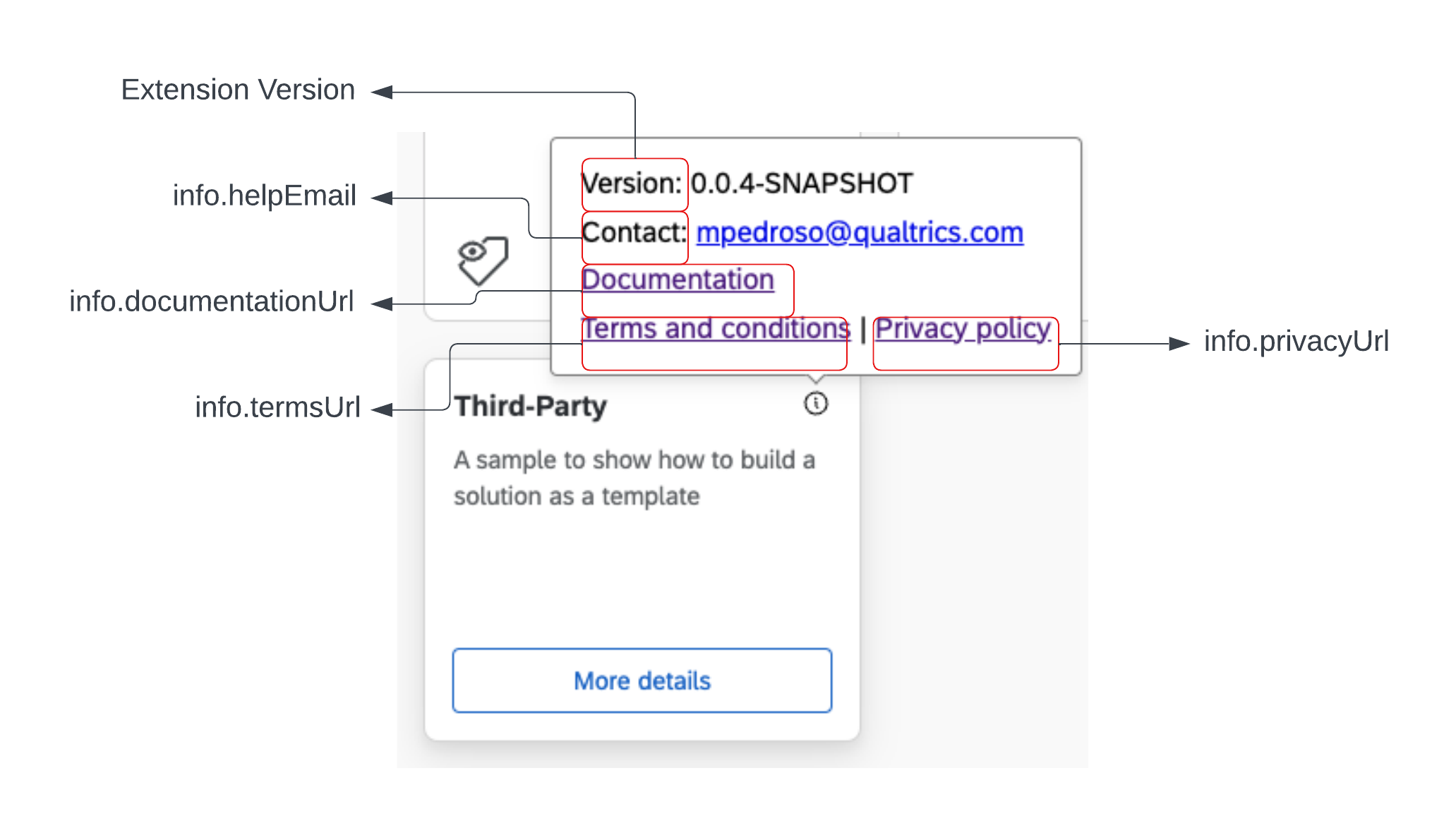
Manifest Properties in the UI
This diagram shows how many of the properties found in your Extension's manifest.json are displayed in the Qualtrics UI:
Updating Qualtrics OAuth 2.0 Scopes
Brand Admins are required to consent to all necessary Qualtrics scopes when first installing an XM Extension before it's available to the brand's users. OAuth scopes added after a Brand Admin initially consents will not be automatically approved even if the brand receives the new version of your XM Extension that requires additional OAuth scopes. Instead, the Brand Admins will be prompted to consent to new OAuth scopes the next time they view their XM Extensions in the Admin UI.
Consequently, you should take careful consideration before adding OAuth scopes to your XM Extension. If you need to make changes, ensure your Plugin is backwards compatible. You can use the FetchError thrown by qualtricsApiFetch2 to check for 403 responses coming from the Qualtrics Public API in the case that the brand's instance of your XM Extension doesn't have the necessary OAuth scopes.
Related Content
- Extension Configurations - Learn how to define configurable properties in your manifest