Extension Configurations Deep Dive
Summary
Extension Configurations enable dynamic state for your Extension and Plugins, allowing you as a developer to make configuration changes to your Extension that affect the behavior of its associated Plugins based on the versioned Plugin code you have already published. It's like a simple key-value data store like SQLite for your Extension.
The configurations field in your manifest.json allows you to define configurable properties that can be populated or overridden from a user interface without requiring a full extension lifecycle of submitting, certifying, and publishing.
Prerequisites
Before continuing with this guide we recommend you review and complete:
Background
Making changes to an extension requires going through the whole extension lifecycle of submitting, certifying, and publishing. We want to reduce the time to develop an extension and allow developers like you to make changes to their extension without altering their codebase.
Details
The configurations field in your manifest.json file allows you to define configurable properties that can be overridden by those who have been granted developer access to your Extension. Each key in the configurations object represents a configuration that can be modified without requiring a new extension version.
Example Configuration
Here is an example of configurations in a manifest.json file:
{
    "id": "APP_12345678-abcd-efgh-ijkl-123456789012",
    "version": "2.1.0",
    "configurations": {
        "apiEndpoint": {
            "type": "string",
            "defaultValue": "https://api.example.com",
            "validationRegex": "^https://.*"
        },
        "enableDebugMode": {
            "type": "boolean",
            "defaultValue": false,
            "validationRegex": "^(true|false)$"
        },
        "maxRetries": {
            "type": "number",
            "defaultValue": 3,
            "validationRegex": "^[0-9]+$"
        },
        "userPreferences": {
            "type": "json",
            "defaultValue": {"theme": "dark", "notifications": true},
            "validationRegex": "^\\{.*\\}$"
        },
        "allowedDomains": {
            "type": "array",
            "defaultValue": ["example.com", "test.com"],
            "validationRegex": "^\\[.*\\]$"
        }
    }
}
Configuration Properties
This table contains in-depth information on each of the available properties for configurations:
| Property Name | Type | Required | Description | Example |
|---|---|---|---|---|
type | String | Yes | The data type of the configuration. Valid values are: string, boolean, number, json, array | "string" |
defaultValue | String/Number/Boolean/Array/Object | Yes | The default value for the configuration. Can be any of the supported types: string, number, boolean, array, or object | "https://api.example.com" or 42 or true or ["item1", "item2"] or {"key": "value"} |
validationRegex | String | No | A regular expression pattern that validates developer override when creating an override. If not provided, system falls back to default type validation | "^https://.*" |
Configuration Types
String Configuration
"stringConfig": {
    "type": "string",
    "defaultValue": "defaultString",
    "validationRegex": "^[a-zA-Z0-9_]+$"
}
Boolean Configuration
"booleanConfig": {
    "type": "boolean",
    "defaultValue": true,
    "validationRegex": "^(true|false)$"
}
Number Configuration
"numberConfig": {
    "type": "number",
    "defaultValue": 42,
    "validationRegex": "^\\d+$"
}
JSON Configuration
"jsonConfig": {
    "type": "json",
    "defaultValue": {"key": "value", "enabled": true},
    "validationRegex": "^\\{.*\\}$"
}
Array Configuration
"arrayConfig": {
    "type": "array",
    "defaultValue": ["item1", "item2", "item3"],
    "validationRegex": "^\\[.*\\]$"
}
Tips and Tricks
Review these helpful knowledge hints to avoid common pitfalls and follow proven practices:
- Type Validation: Even without a
validationRegex, the system will validate that the override matches the expected type - Default Values: Always provide meaningful default values that work out-of-the-box
- Regex Patterns: Use specific regex patterns for complex types like JSON and arrays to ensure proper formatting
- Configurations cannot be removed once added to the manifest. New versions of the extension must contain all of the configurations defined in previous versions to ensure backwards compatibility.
There is a limit of 50 configurations per Extension.
Validation Rules
- The
validationRegexis applied when developers create overrides for your extension configurations - If no
validationRegexis provided, the system falls back to default validation which asserts that the override is of the same type as the configuration - The regex pattern should match the expected format of the configuration value
- For complex types like JSON and arrays, consider using more specific regex patterns to ensure proper formatting
Creating Overrides
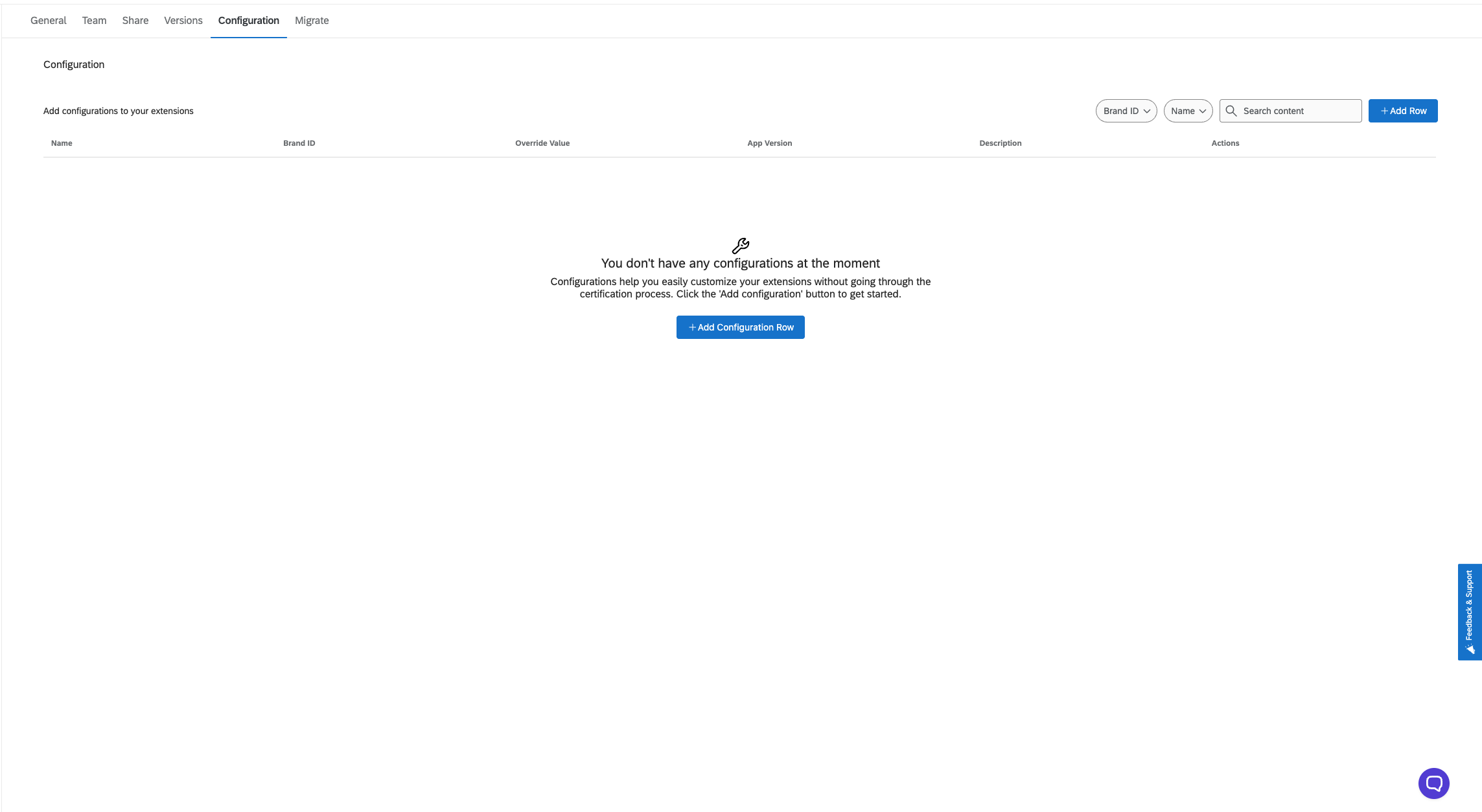
Once you have set up configurations in your extension and submitted it, there will be a new tab in the Developer Portal for your extension named Configuration. You can create configuration overrides for specific brands and app versions. Configuration overrides can only be created for released version.
Using Configurations in Plugins
Once you've defined configurations in your manifest, you can access them in your plugins using the getConfig method provided by the Plugin Client.