Manual Screen Changes
While Screen Name Auto Capture handles most use cases automatically, our SDK also offers options to manually report screen changes, which are useful in the following scenarios:
- Capturing screen changes in setups where Screen Name Auto Capture isn't currently supported, e.g. React Native apps without React Navigation v5.0.0+.
- Supplementing the Screen Name Auto Capture with additional screen change reporting.
- Capturing navigation changes when Screen Name Auto Capture is disabled.
If you choose not to use Screen Name Auto Capture, you will have to manually code every single screen change.
1. Add Reporting Code
You can manually report screen change events using dedicated SDK methods by providing screen names for both appearances and disappearances.
These methods should be set up for every screen you want to have available in the App Insights Project to set up Sequencing Logic.
Code Examples
- iOS
- Android
- React Native
SwiftUI
import QualtricsExperience

struct HomeView: View {
    var body: some View {
        VStack {
            // ...
        }
        .onAppear {
            Qualtrics.reportScreenAppearance("HomeView")
        }
        .onDisappear {
            Qualtrics.reportScreenDisappearance("HomeView")
        }
    }
}
UIKit
import QualtricsExperience

class HomeViewController: UIViewController {
    // ...

    override func viewDidAppear(_ animated: Bool) {
        super.viewDidAppear(animated)
        Qualtrics.reportScreenAppearance("HomeViewController")
    }

    override func viewDidDisappear(_ animated: Bool) {
        super.viewDidDisappear(animated)
        Qualtrics.reportScreenDisappearance("HomeViewController")
    }

    // ...
}
Jetpack Compose
@Composable
fun SettingsScreen() {
    DisposableEffect(Unit) {
        Qualtrics.reportScreenAppearance("SettingsScreen")
        onDispose {
            Qualtrics.reportScreenDisappearance("SettingsScreen")
        }
    }
    // ...
}
View System
class SettingsFragment : Fragment() {
    // ...

    override fun onResume() {
        super.onResume()
        Qualtrics.reportScreenAppearance("SettingsFragment")
    }

    override fun onPause() {
        super.onPause()
        Qualtrics.reportScreenDisappearance("SettingsFragment")
    }

    // ...
}
import {
    reportScreenAppearance,
    reportScreenDisappearance
} from '@qualtrics-experience/core';

function ProfileScreen() {
    // ...

    useEffect(() => {
        reportScreenAppearance("ProfileScreen");

        return () => {
            reportScreenDisappearance("ProfileScreen");
        };
    }, []);

    // ...
}
2. Collect Screen Names
The SDK sends every reported screen name to App Insights Project, making them accessible in Sequencing Logic configuration and allowing you to display intercepts based on user navigation.
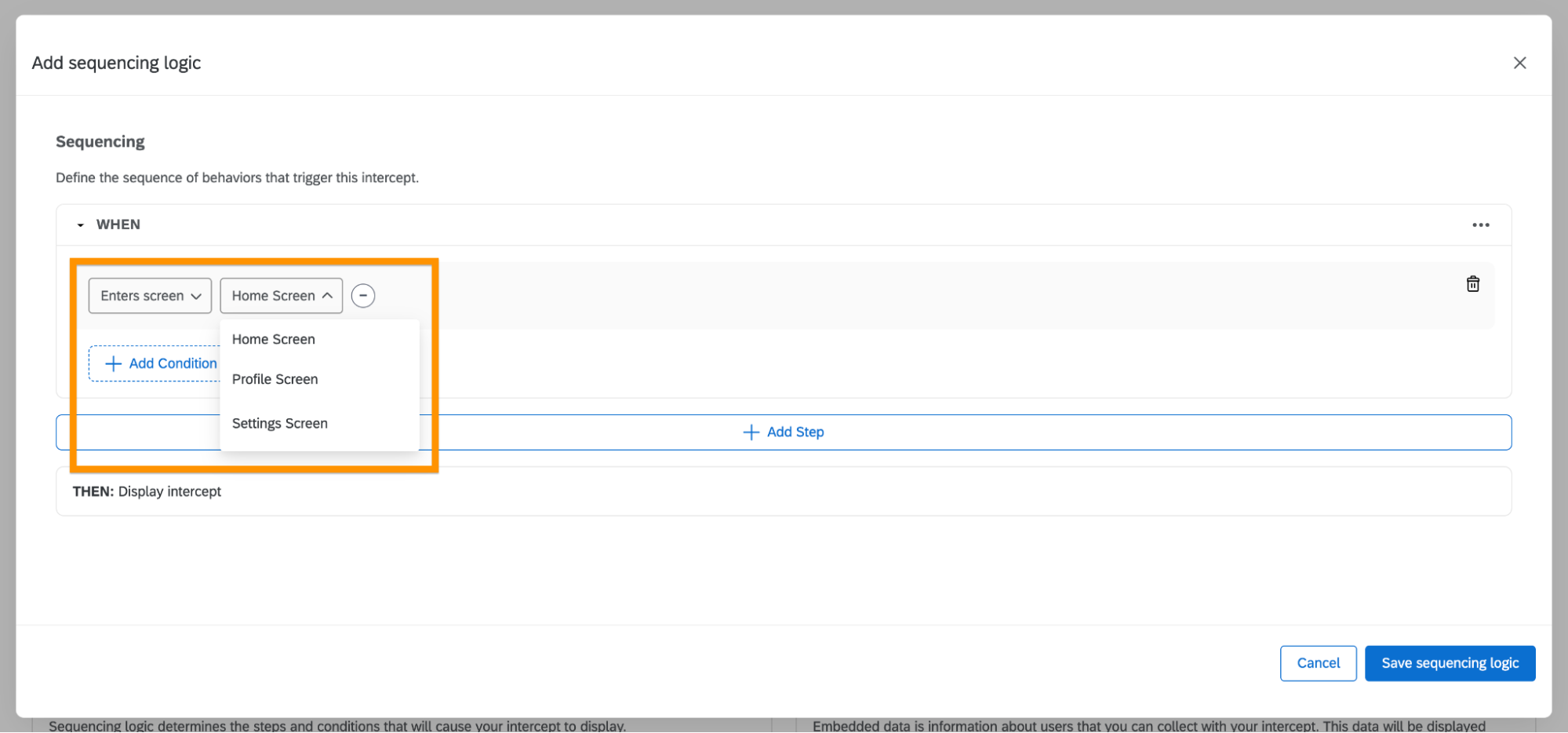
To ensure all app screen names appear in the App Insights Project, visit every screen in your application where you call screen appearance methods. Screen names that haven't been reported won't be available in the dropdown menu.