Custom Events
Custom events enable you to track specific user actions, such as adding items to a cart or completing a tutorial. These events are essential for mapping user journeys and triggering specific intercepts based on behavior patterns.
Implementing Custom Events in Code
Custom events can be reported using a dedicated SDK method. Learn more about available methods in the API Reference.
Code Examples
- iOS
- Android
- React Native
import QualtricsExperience

Qualtrics.reportEvent("add_to_cart")
Qualtrics.reportEvent("checkout_started")
Qualtrics.reportEvent("purchase_completed")
Qualtrics.reportEvent("video_played")
Qualtrics.reportEvent("video_paused")
Qualtrics.reportEvent("video_completed")
import { reportEvent } from '@qualtrics-experience/core';

reportEvent("tutorial_started");
reportEvent("profile_created");
reportEvent("onboarding_completed");
Uses of Custom Events
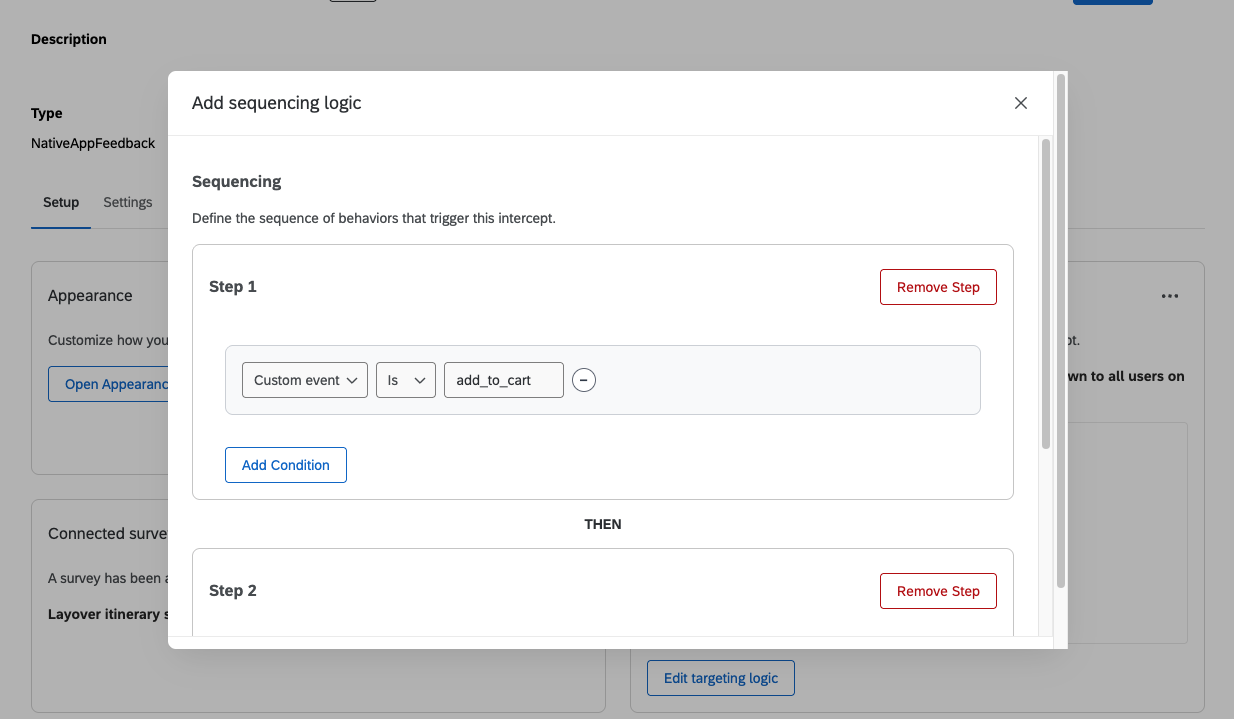
Sequencing
Custom events can be incorporated into intercept sequencing logic. Custom events allow you to create an event for an action, such as clicking the checkout button. Custom events can be added into the sequence as seen below.