Theming Creatives through the Mobile App SDK
The theming API is supported since SDK versions:
- Android SDK: v2.10.0
- iOS SDK: v2.13.0
This API allows developers to manage Qualtrics theme settings in the code, through the Qualtrics Mobile SDK (software development kit).
Developers can implement consistent Qualtric theme with Dark Mode support on the SDK level.
Both Embedded App Feedback and Mobile App Prompt can have code-level theme applied.
The Theme API is only supported in the Android SDK and iOS SDK.
As of today, you can theme colors and fonts of the Qualtrics Creative UI.
UI configuration in the Product
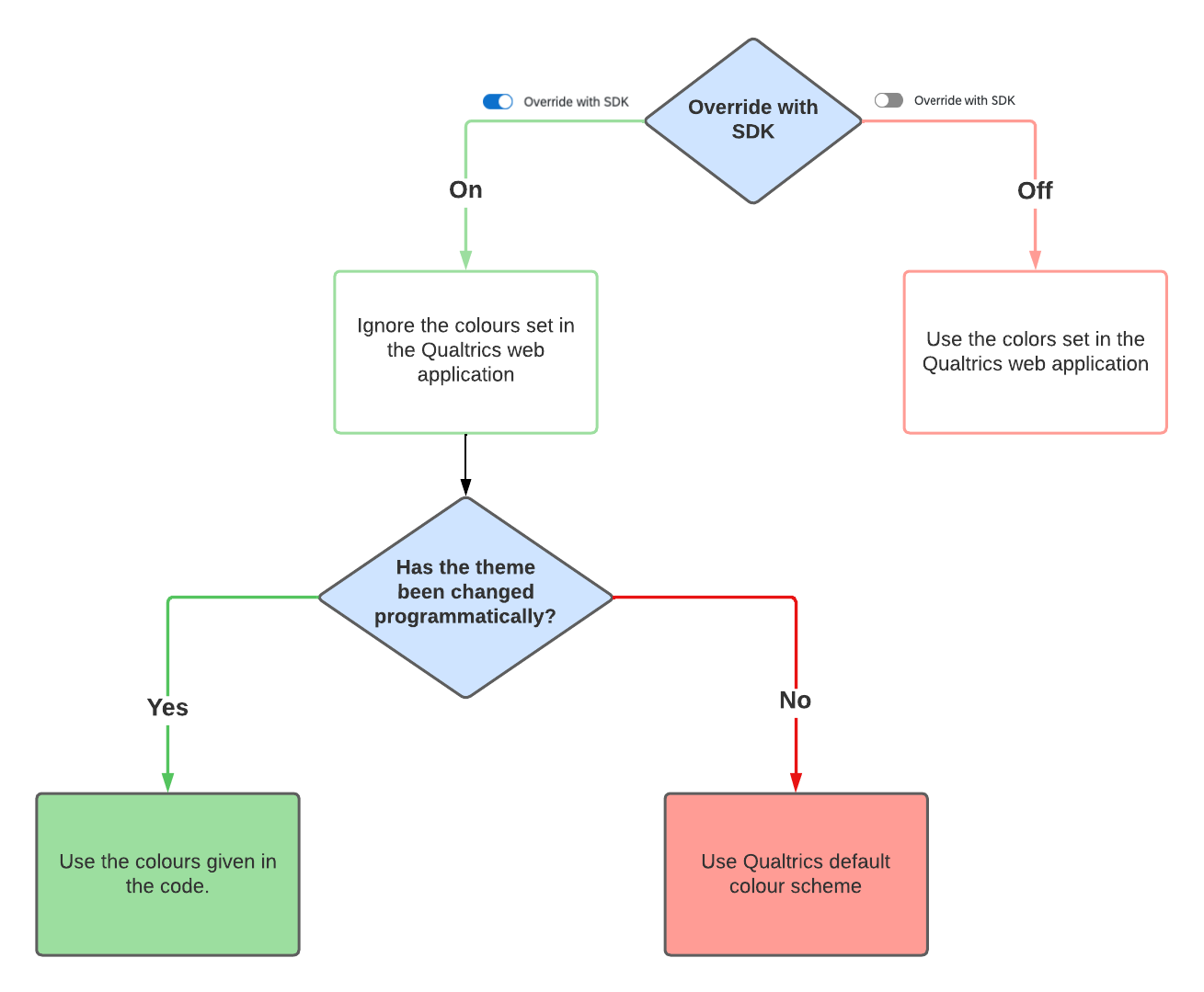
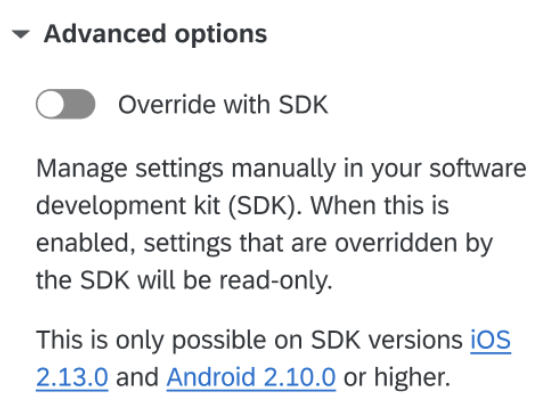
By default, the creatives will have look-and-feel defined through UI by the Program Admin. To use the theme defined through the SDK, Program Admin needs to enable the "Override with SDK" advanced option through the UI.
Define color assets
Mobile SDK uses color assets for Theming.
- Android
- iOS
Add color assets to the colors.xml file. Name the colors however you like.
<!-- src/main/res/values/colors.xml -->
<color name="colorSurface">@color/white</color>
<color name="colorOnSurface">#000000</color>
<color name="colorPrimary">#7517FF</color>
<color name="colorOnPrimary">#FFFFFF</color>
<color name="colorSecondary">#F4FF89</color>
<color name="colorOnSecondary">#000000</color>
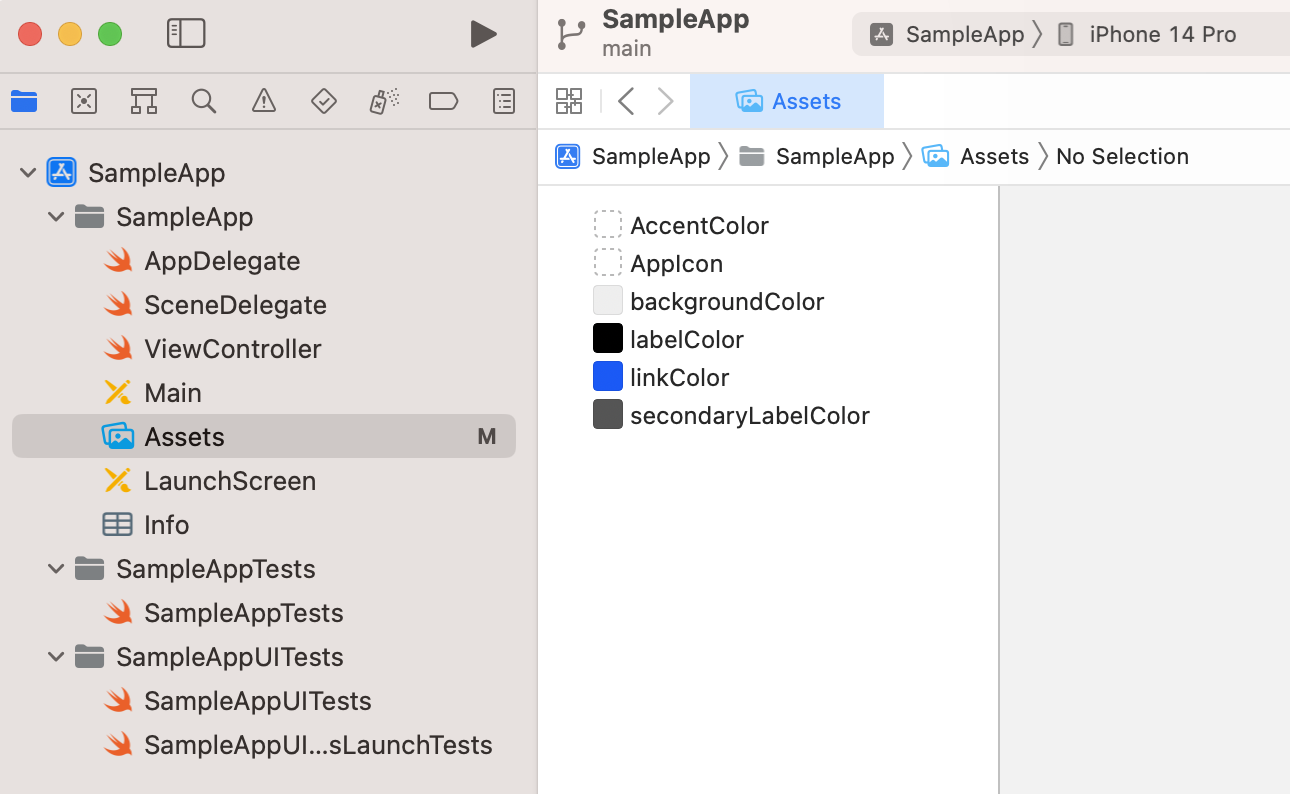
Create Adaptive Color Set assets to define colors. Name them however you like.
Add Adaptive Color Set assets - follow the Docs from Apple.
Dark mode support
- Android
- iOS
You can setup the Qualtrics theme in a way that respond to light/dark theme changes.
Provide the "night"-qualified version of the colors.xml resource file. Define alternative colors there. Remember to give them the same names as in the base colors.xml file.
<!-- src/main/res/values-night/colors.xml -->
<color name="colorSurface">#101010</color>
<color name="colorOnSurface">#F0F0F0</color>
<color name="colorPrimary">#F4FF89</color>
<color name="colorOnPrimary">#101010</color>
<color name="colorSecondary">#7517FF</color>
<color name="colorOnSecondary">#F0F0F0</color>
Read more: Android Developer Documentation: Providing night-qualified resources
Can I skip configuring dark mode?
If you decide not to add the "night" variant, the creative will be displayed with the default color variants.
You can setup the Qualtrics theme in a way that responds to light/dark mode changes.
Mobile SDK uses Adaptive Color Set assets. To make creatives respond to light-dark mode changes, you need to set the "Dark Appearance" as well.
Make sure to define both "Any Appearance" and "Dark Appearance" of the Adaptive Color Set assets.
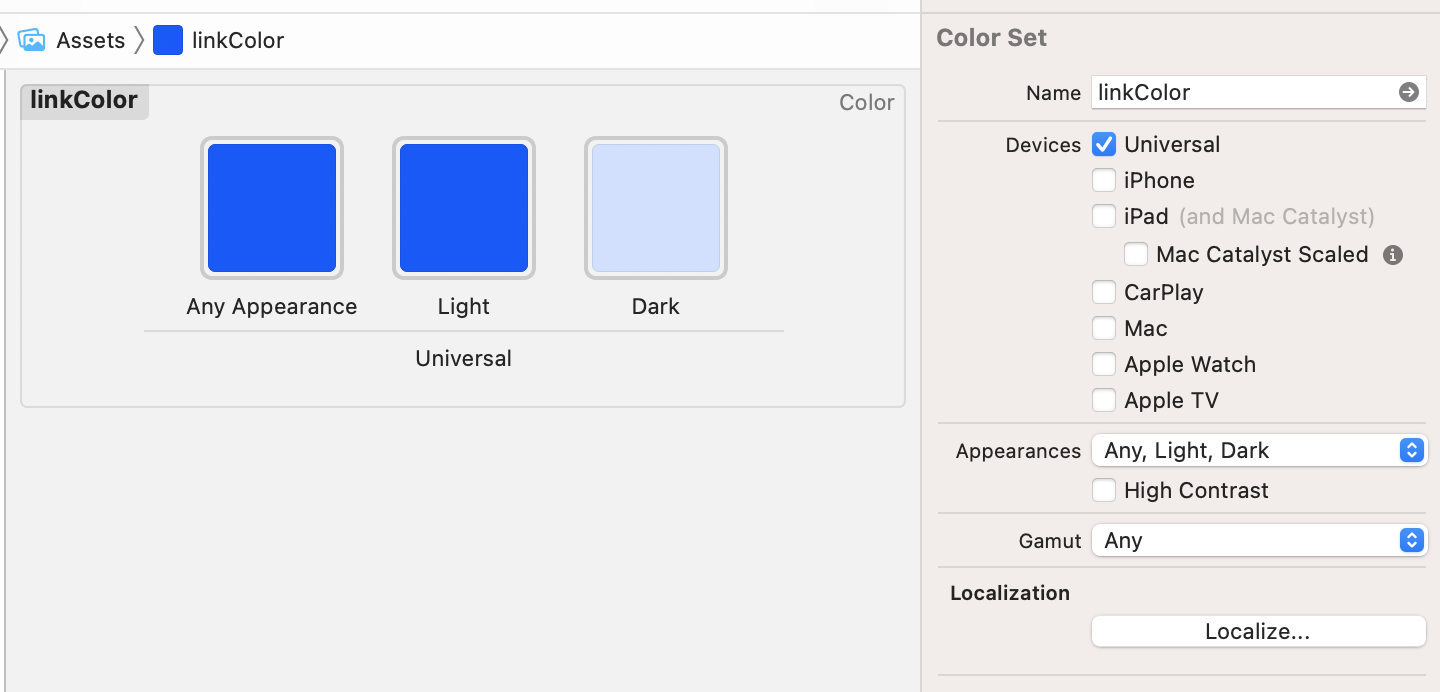
Read more: Apple Developer Documentation: Supporting Dark Mode in Your Interface
Can I skip configuring dark mode?
If you decide not to configure "Dark Appearance", the creative will be displayed with the "Any Appearance" colors regardless of the mode.
Build your theme
Find the reference mapping of theme attributes to creative UI here.
- Android
- iOS
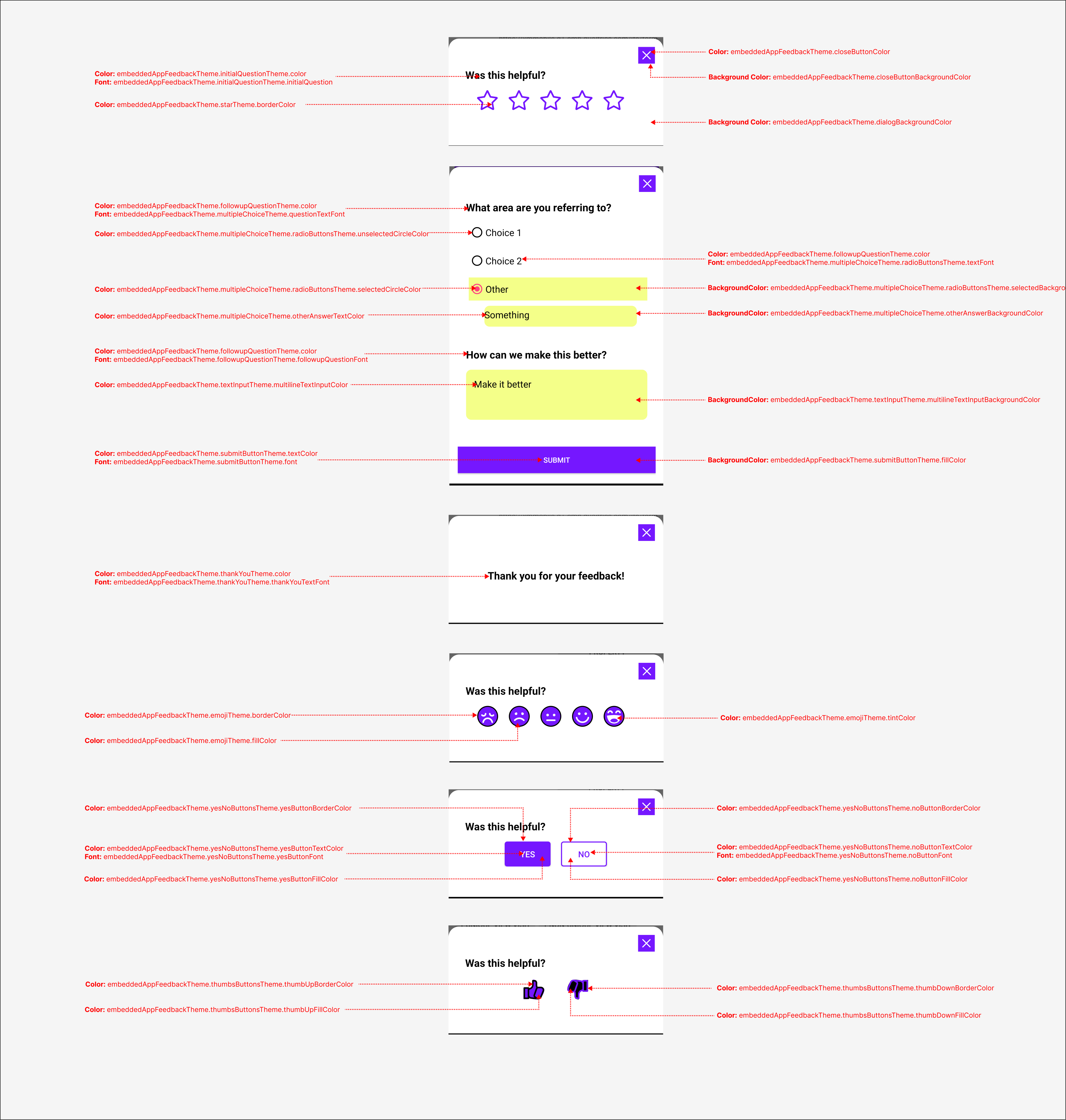
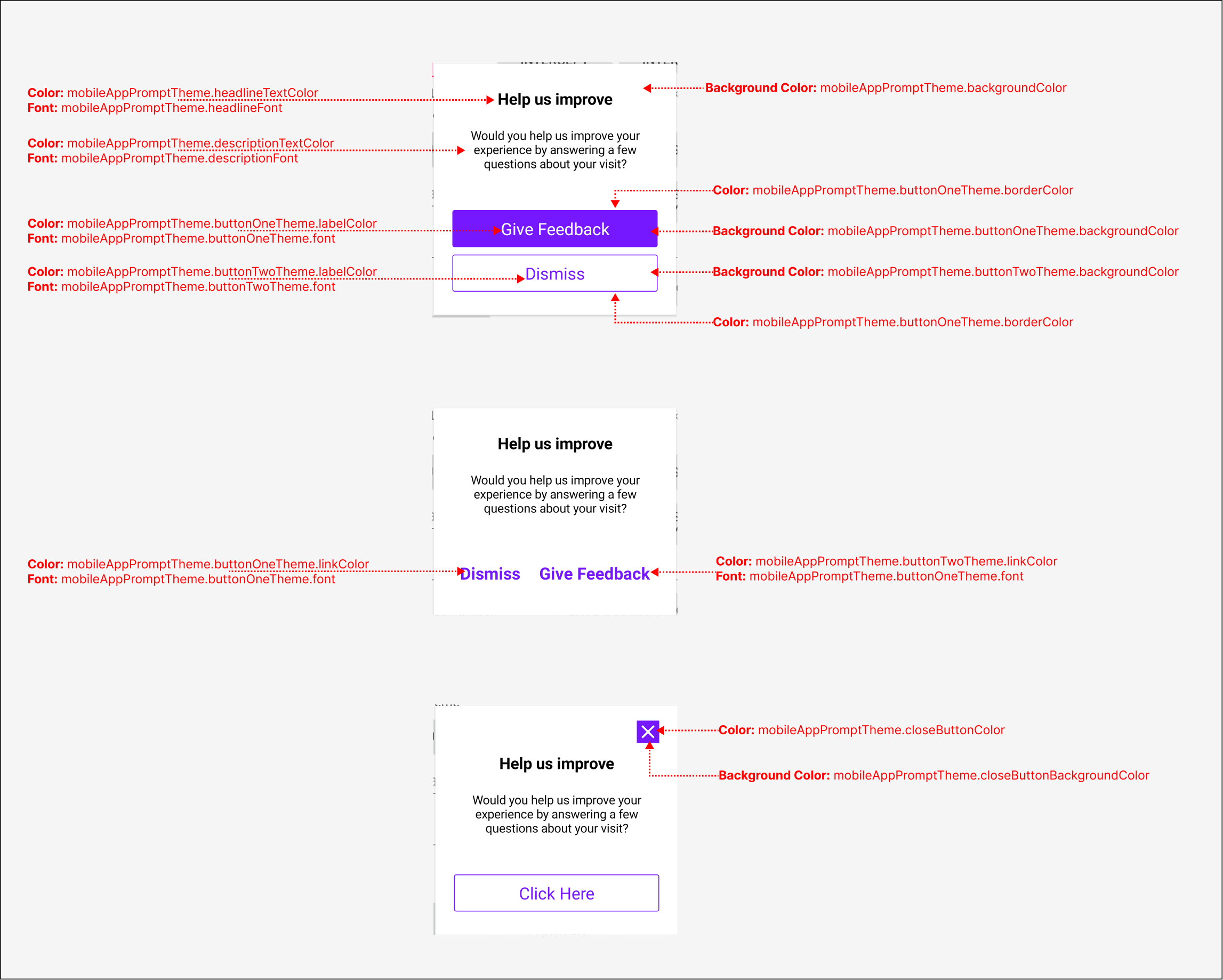
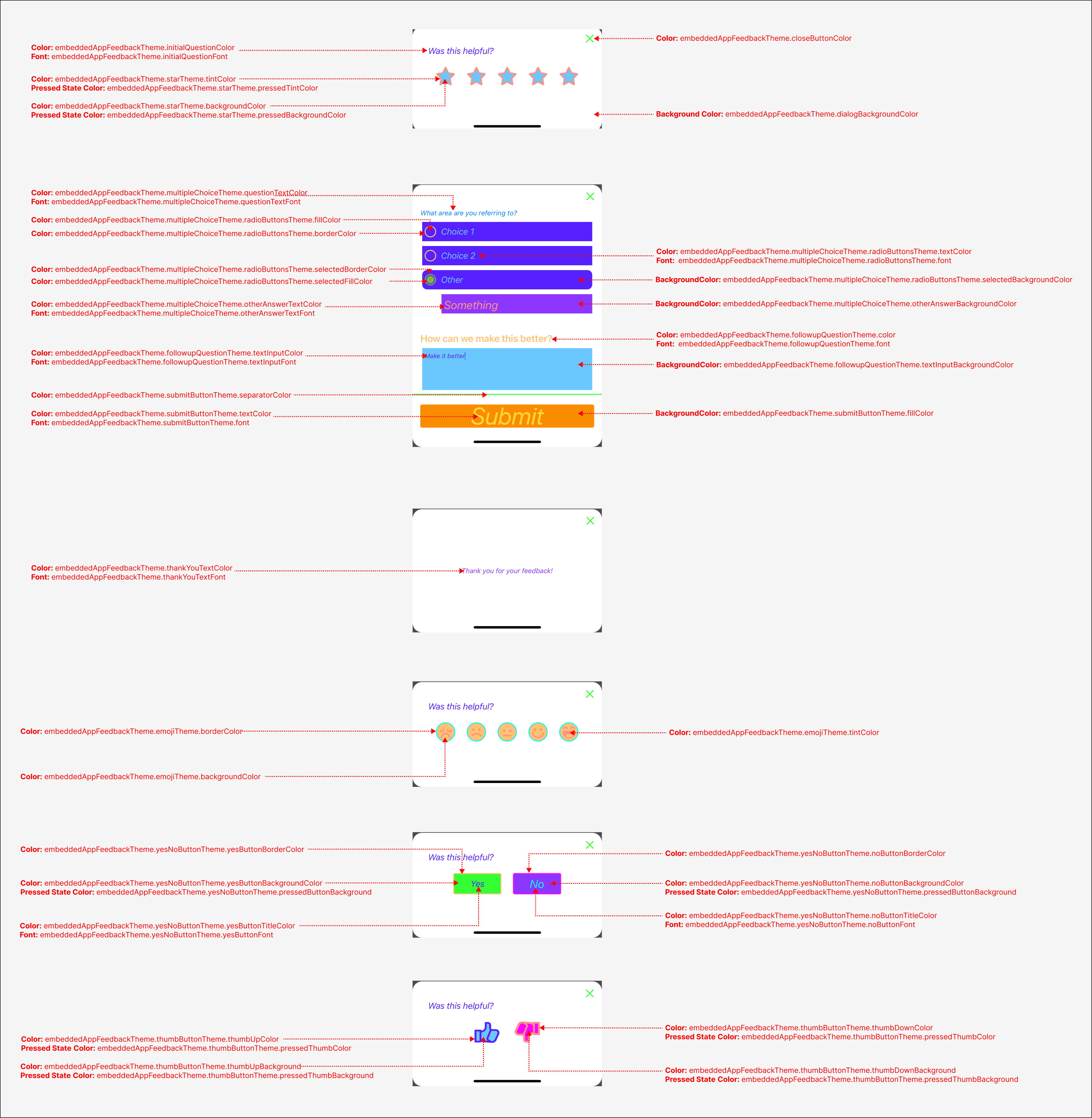
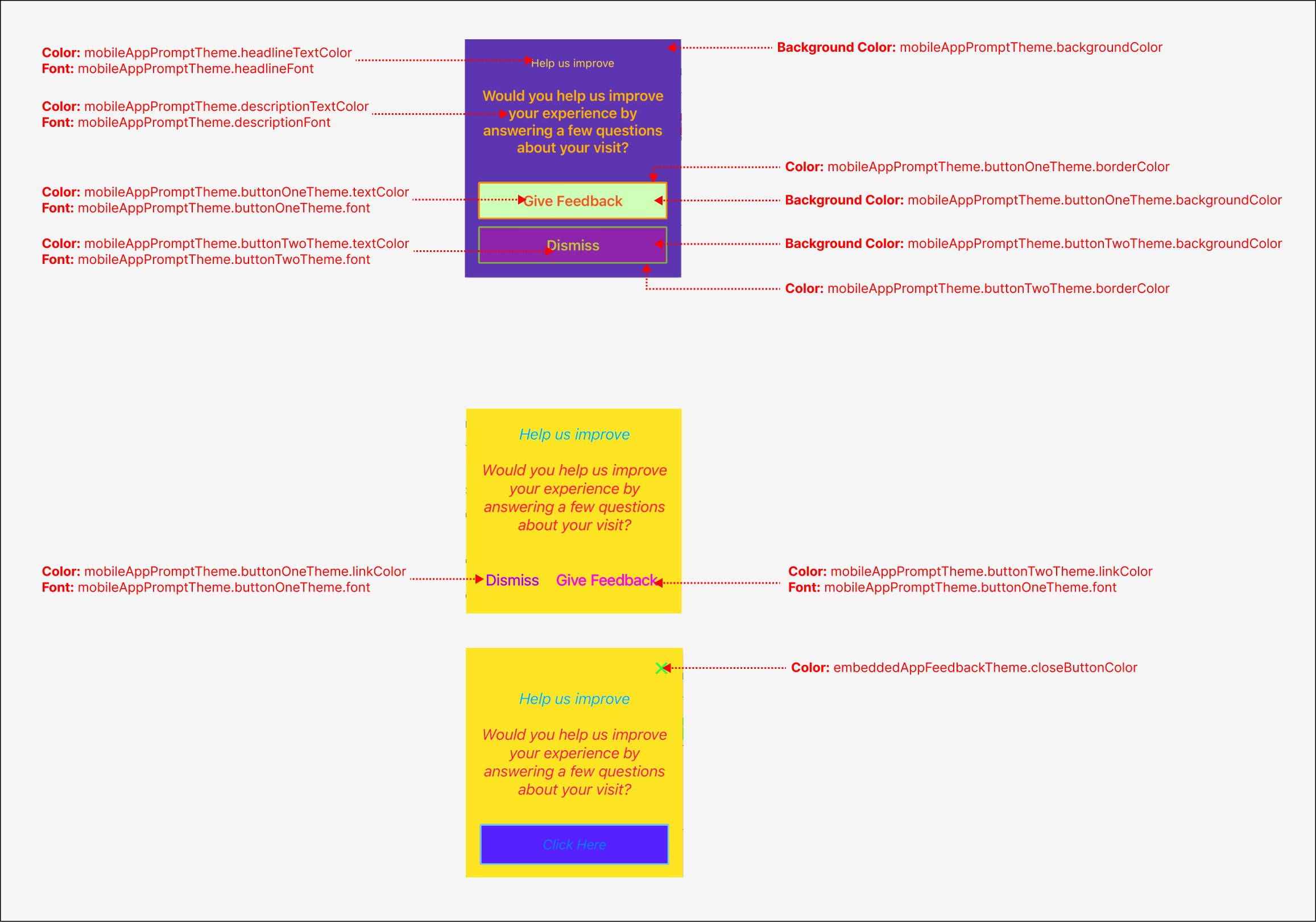
- Android
- iOS
Build Mobile App Prompt theme on Android
import com.qualtrics.digital.theming.fonts.FontTheme
import com.qualtrics.digital.theming.prompt.MobileAppPromptTheme
import com.qualtrics.digital.theming.prompt.ButtonTheme

val appPromptCreativeTheme = MobileAppPromptTheme(
    backgroundColor = R.color.colorSurface,
    headlineTextColor = R.color.colorOnSurface,
    headlineFont = FontTheme(R.font.twinkle_star_regular, 32),
    descriptionTextColor = R.color.colorOnSurface,
    descriptionFont = FontTheme(R.font.roboto_regular, 8),
    closeButtonColor = R.color.colorOnPrimary,
    closeButtonBackgroundColor = R.color.colorPrimary,
    buttonOneTheme = ButtonTheme(
        labelColor = R.color.colorPrimary,
        font = FontTheme(R.font.bruno_ace_sc_regular, 24),
        backgroundColor = R.color.colorSurface,
        borderColor = R.color.colorPrimary,
        linkColor = R.color.colorPrimary
    ),
    buttonTwoTheme = ButtonTheme(
        labelColor = R.color.colorSurface,
        font = FontTheme(R.font.bruno_ace_sc_regular, 24),
        backgroundColor = R.color.colorPrimary,
        borderColor = R.color.colorPrimary,
        linkColor = R.color.colorPrimary
    )
)
Build Embedded App Feedback theme on Android
import com.qualtrics.digital.theming.embedded.EmbeddedAppFeedbackTheme
import com.qualtrics.digital.theming.embedded.FollowupQuestionTheme
import com.qualtrics.digital.theming.embedded.InitialQuestionTheme
import com.qualtrics.digital.theming.embedded.MultipleChoiceTheme
import com.qualtrics.digital.theming.embedded.RadioButtonsTheme
import com.qualtrics.digital.theming.embedded.SubmitButtonTheme
import com.qualtrics.digital.theming.embedded.ThankYouTheme
import com.qualtrics.digital.theming.embedded.response.*

val embeddedFeedbackCreativeTheme = EmbeddedAppFeedbackTheme(
  dialogBackgroundColor = R.color.colorSurface,
  closeButtonColor = R.color.colorOnPrimary,
  closeButtonBackgroundColor = R.color.colorPrimary,
  initialQuestionTheme = InitialQuestionTheme(
      color = R.color.colorOnSurface,
      initialQuestion = FontTheme(R.font.twinkle_star_regular, 32),
      yesButton = FontTheme(R.font.bruno_ace_sc_regular, 24),
      noButton = FontTheme(R.font.bruno_ace_sc_regular, 24)
  ),
  followupQuestionTheme = FollowupQuestionTheme(
      color = R.color.colorOnSurface,
      followupQuestionFont = FontTheme(R.font.twinkle_star_regular, 32),
      followupQuestionTextInputFont = FontTheme(R.font.roboto_regular, 8)
  ),
  thankYouTheme = ThankYouTheme(
      color = R.color.colorOnSurface,
      thankYouTextFont = FontTheme(R.font.twinkle_star_regular, 32),
  ),
  yesNoButtonsTheme = YesNoButtonsTheme(
      yesButtonTextColor = R.color.colorOnPrimary,
      yesButtonBorderColor = R.color.colorPrimary,
      yesButtonFillColor = R.color.colorPrimary,
      yesButtonFont = FontTheme(R.font.bruno_ace_sc_regular, 24),
      noButtonTextColor = R.color.colorPrimary,
      noButtonBorderColor = R.color.colorPrimary,
      noButtonFillColor = R.color,
      noButtonFont = FontTheme(R.font.bruno_ace_sc_regular, 24),
  ),
  thumbsButtonsTheme = ThumbsButtonsTheme(
      thumbUpBorderColor = R.color.colorSurface,
      thumbUpFillColor = R.color.colorPrimary,
      thumbDownBorderColor = R.color.colorPrimary,
      thumbDownFillColor = R.color.colorSurface
  ),
  emojiTheme = EmojiTheme(
      borderColor = R.color.colorOnSurface,
      fillColor = R.color.colorPrimary,
      tintColor = R.color.colorOnPrimary
  ),
  starTheme = StarTheme(
      borderColor = R.color.colorPrimary
  ),
  multipleChoiceTheme = MultipleChoiceTheme(
      questionTextFont = FontTheme(R.font.roboto_regular, 8),
      otherAnswerTextColor = R.color.colorOnSecondary,
      otherAnswerTextFont = FontTheme(R.font.roboto_regular, 8),
      otherAnswerBackgroundColor = R.color.colorSecondary,
      radioButtonsTheme = RadioButtonsTheme(
          textFont = FontTheme(R.font.roboto_regular, 8),
          selectedCircleColor = R.color.colorOnSecondary,
          selectedBackgroundColor = R.color.colorSecondary,
          unselectedCircleColor = R.color.colorOnSurface,
      )
  ),
  submitButtonTheme = SubmitButtonTheme(
      textColor = R.color.colorOnPrimary,
      fillColor = R.color.colorPrimary,
      font = FontTheme(R.font.bruno_ace_sc_regular, 24)
  ),
  textInputTheme = TextInputTheme(
      multilineTextInputColor = R.color.colorOnSecondary,
      multilineTextInputBackgroundColor = R.color.colorSecondary,
  )
)
Build the Qualtrics theme on Android
import com.qualtrics.digital.QualtricsTheme

val theme = QualtricsCreativeTheme(
  appPromptCreativeTheme = appPromptCreativeTheme,
  embeddedFeedbackCreativeTheme = embeddedFeedbackCreativeTheme,
);
Build Mobile App Prompt theme on iOS
let buttonOne = ButtonTheme.init(
    textColor: UIColor(named: "color2")!,
    linkColor: UIColor(named: "color6")!,
    font: UIFont.italicSystemFont(ofSize: 6),
    backgroundColor: UIColor(named: "color10")!,
    borderColor: UIColor(named: "color1")!
)
let buttonTwo = ButtonTheme.init(
    textColor: UIColor(named: "color3")!,
    linkColor: UIColor(named: "color5")!,
    font: UIFont.italicSystemFont(ofSize: 36),
    backgroundColor: UIColor(named: "color6")!,
    borderColor: UIColor(named: "color1")!
)
let mobileAppPromptTheme = MobileAppPromptTheme.init(
    backgroundColor: UIColor(named: "color8")!,
    headlineTextColor: UIColor(named: "color7")!,
    headlineFont: UIFont.italicSystemFont(ofSize: 8),
    descriptionTextColor: UIColor(named: "color4")!,
    descriptionFont: UIFont.italicSystemFont(ofSize: 30),
    closeButtonColor: UIColor(named: "color9")!,
    buttonOneTheme: buttonOne,
    buttonTwoTheme: buttonTwo
)
Build Embedded App Feedback theme on iOS
let thumbsTheme = ThumbButtonTheme.init(
    thumbUpColor: UIColor(named: "color10")!,
    thumbUpBackground: UIColor(named: "color1")!,
    thumbDownColor: UIColor(named: "color4")!,
    thumbDownBackground: UIColor(named: "color5")!,
    pressedThumbColor: UIColor(named: "color6")!,
    pressedThumbBackground: UIColor(named: "color7")!
)
let yesNoTheme = YesNoButtonTheme.init(
    yesButtonTitleColor: UIColor(named: "color10")!,
    yesButtonFont: UIFont.italicSystemFont(ofSize: 8),
    yesButtonBackgroundColor: UIColor(named: "color9")!,
    yesButtonBorderColor: UIColor(named: "color8")!,
    noButtonTitleColor: UIColor(named: "color7")!,
    noButtonFont: UIFont.italicSystemFont(ofSize: 24),
    noButtonBackgroundColor: UIColor(named: "color6")!,
    noButtonBorderColor: UIColor(named: "color5")!,
    pressedButtonColor: UIColor(named: "color4")!,
    pressedButtonBackground: UIColor(named: "color3")!
)
let starTheme = StarButtonTheme.init(
    backgroundColor: UIColor(named: "color1")!,
    tintColor: UIColor(named: "color2")!,
    pressedTintColor: UIColor(named: "color10")!,
    pressedBackgroundColor: UIColor(named: "color7")!
)
let emojiTheme = EmojiButtonTheme.init(
    backgroundColor: UIColor(named: "color8")!,
    borderColor: UIColor(named: "color7")!,
    tintColor: UIColor(named: "color4")!
)
let submitTheme = SubmitButtonTheme.init(
    textColor: UIColor(named: "color6")!,
    font: UIFont.italicSystemFont(ofSize: 50),
    fillColor: UIColor(named: "color7")!,
    separatorColor: UIColor(named: "color9")!
)
let radioButtons = RadioButtonTheme.init(
    textColor: UIColor(named: "color1")!,
    font: UIFont.italicSystemFont(ofSize: 8),
    borderColor: UIColor(named: "color3")!,
    selectedBorderColor: UIColor(named: "color9")!,
    backgroundColor: UIColor(named: "color10")!,
    selectedBackgroundColor: UIColor(named: "color3")!,
    fillColor: UIColor(named: "color8")!,
    selectedFillColor: UIColor(named: "color7")!
)
let multipleChoiceTheme = MultipleChoiceTheme.init(
    questionTextColor: UIColor(named: "color2")!,
    questionTextFont: UIFont.italicSystemFont(ofSize: 4),
    otherAnswerTextColor: UIColor(named: "color4")!,
    otherAnswetTextFont: UIFont.italicSystemFont(ofSize: 24),
    otherAnswerBackgroundColor: UIColor(named: "color6")!,
    radioButtonsTheme: radioButtons
)
let followupQuestionTheme = FollowupQuestionTheme.init(
    color: UIColor(named: "color8")!,
    textInputColor: UIColor(named: "color10")!,
    textInputFont: UIFont.italicSystemFont(ofSize: 3),
    textInputBackgroundcolor: UIColor(named: "color1")!
)
let embeddedAppFeedbackTheme = EmbeddedAppFeedbackTheme.init(
    dialogBackgroundColor: UIColor(named: "color3")!,
    dialogShadowColor: UIColor(named: "color6")!,
    closeButtonColor: UIColor(named: "color9")!,
    initialQuestionColor: UIColor(named: "color10")!,
    initialQuestionFont: UIFont.italicSystemFont(ofSize: 8),
    thankYouTextColor: UIColor(named: "color6")!,
    thankYouTextFont: UIFont.italicSystemFont(ofSize: 4),
    followupQuestionTheme: followupQuestionTheme,
    thumbsButtonsTheme:  thumbsTheme,
    yesNoButtonsTheme: yesNoTheme,
    starTheme: starTheme,
    emojiTheme: emojiTheme,
    submitButtonTheme: submitTheme,
    multipleChoiceTheme: multipleChoiceTheme
)
Build the Qualtrics theme on iOS
let theme = QualtricsTheme.init(
    mobileAppPromptTheme: mobileAppPromptTheme,
    embeddedAppFeedbackTheme: embeddedAppFeedbackTheme
)
Set your theme
- Android
- iOS
Qualtrics.instance().initialize(/* ... */)
Qualtrics.instance().setCreativeTheme(theme)
Qualtrics.shared.initialize(/* ... */)
Qualtrics.shared.setCreativeTheme(to: theme)
Backward compatibility
See the decision logic behind which styling is applied to your creative below: