OAuth Authentication (Client Credentials)
This guide describes how to use OAuth 2.0 with the Qualtrics APIs. You can use OAuth 2.0 instead of the API Token (as described in Authentication) to access the Qualtrics APIs. Use the Client Credentials OAuth grant when you want to call the Qualtrics API as the user who generated the client_id and client_secret, instead of using the API token.
Authentication with OAuth
There are two steps required to use OAuth:
1. Request a Bearer Token
POST your client ID and client secret to the OAuth endpoint to receive a valid bearer token. The endpoint for the bearer token is https://iad1.qualtrics.com/oauth2/token Your token is valid for one hour, so you need to request a token each time you want to use a Qualtrics API, or you need to handle the error resulting from token expiration and request a new one. See Expired Token Server Response for an example response when the token has expired.
curl --location --request POST 'https://ca1.qualtrics.com/oauth2/token' \
--header 'Authorization: Basic <your basic auth here>' \
--form 'grant_type="client_credentials"' \
--form 'scope="manage:all"'
Which will return something like:
{"access_token":"2840b4b4-8ab5-4226-a521-2b007fd8b262","token_type":"Bearer","expires_in":3599,"scope":"manage:all"}
Set Scopes For Tokens
Bearer token requests do not automatically inherit the scopes assigned to the client. Be sure to set them explicitly as above.
You can include scopes other than scope="manage:all", and you can include multiple scopes in one request. For example, include a scope of scope="read:surveys read:organizations" to only grant the client view permissions for surveys and organizations.
curl --location --request POST 'https://ca1.qualtrics.com/oauth2/token' \
--header 'Authorization: Basic <your basic auth here>' \
--form 'grant_type="client_credentials"' \
--form 'scope="read:surveys read:organizations"'
Which will return something like:
{"access_token":"2840b4b4-8ab5-4226-a521-2b007fd8b262","token_type":"Bearer","expires_in":3599,"scope":"read:surveys read:organization"}
2. Use the Token with Each API Call
Use a valid bearer token to authorize the use of the Qualtrics APIs. Normally, the Qualtrics APIs require the use of the API token in the HTTP header X-API-TOKEN. OAuth uses the Authorization HTTP header instead, as shown below:
Authorization: Bearer '2840b4b4-8ab5-4226-a521-2b007fd8b262' # from above example
Creating Your Client ID and Client Secret
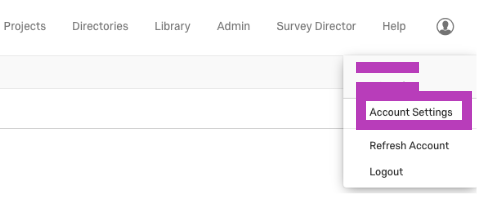
In order to use OAuth Client Credentials, you must first setup your user with a client ID and a client secret. To do this, login to qualtrics.com and select Account Settings.
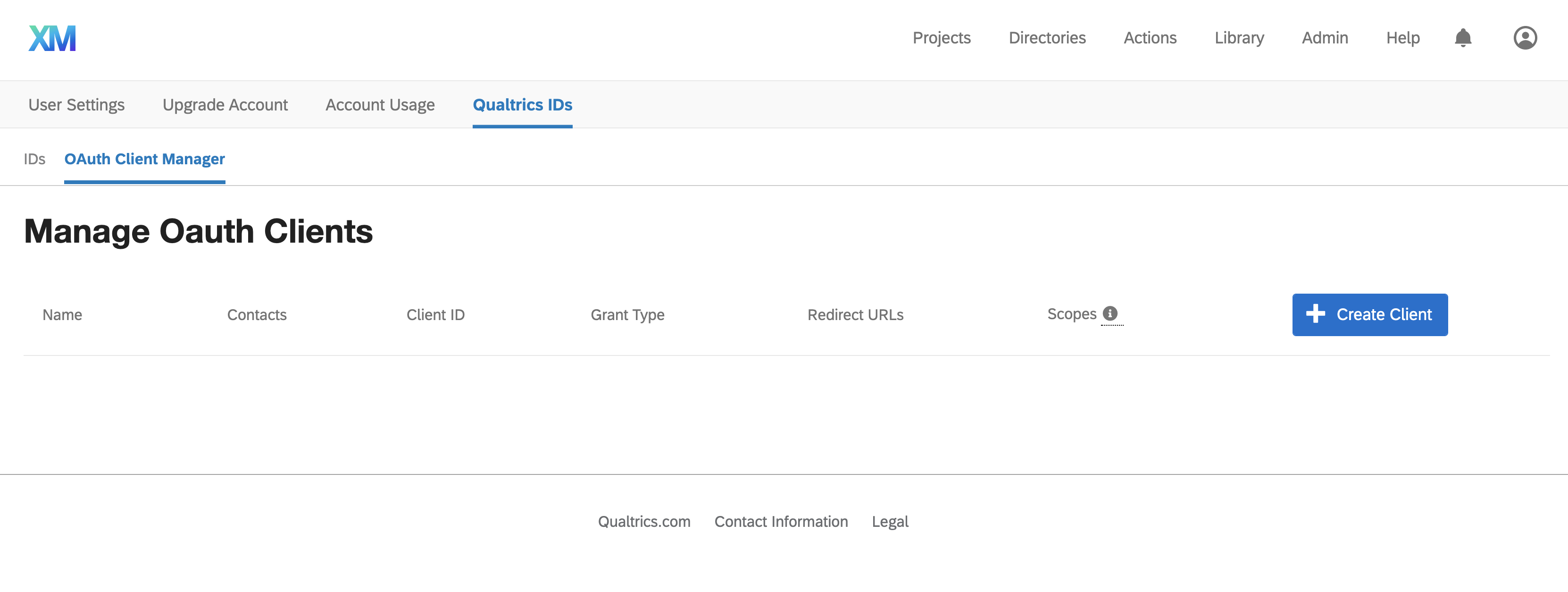
Then select OAuth Client Manager.
This section contains your OAuth client IDs. Click Create Client and follow the screens below to create a new one.
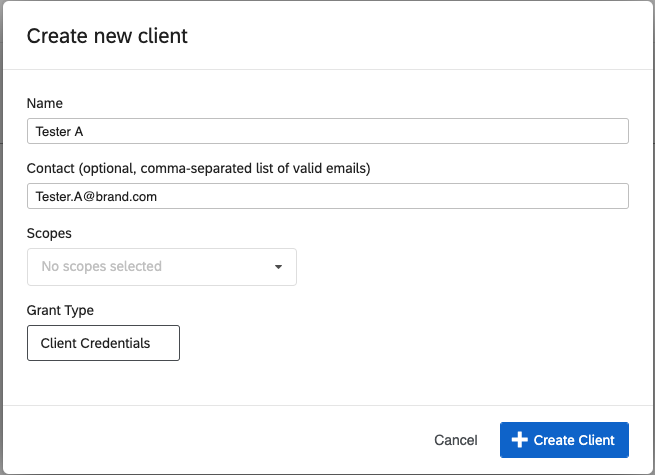
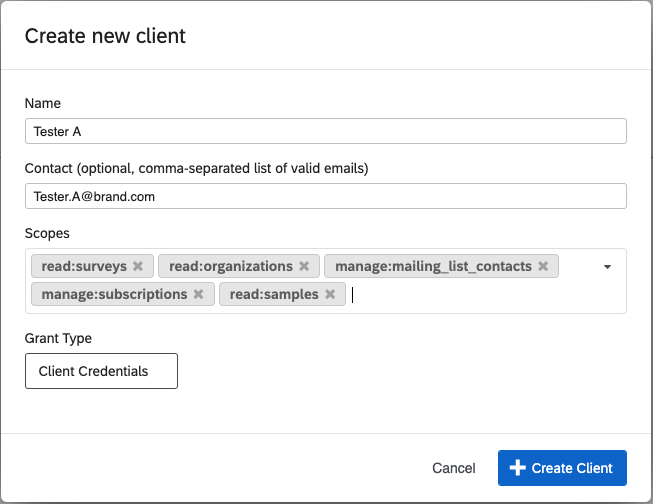
Enter name and optional contact email as shown below and make sure the grant type is Client Credentials.
Next, choose scopes either by finding them in the dropdown or searching for them as shown below.
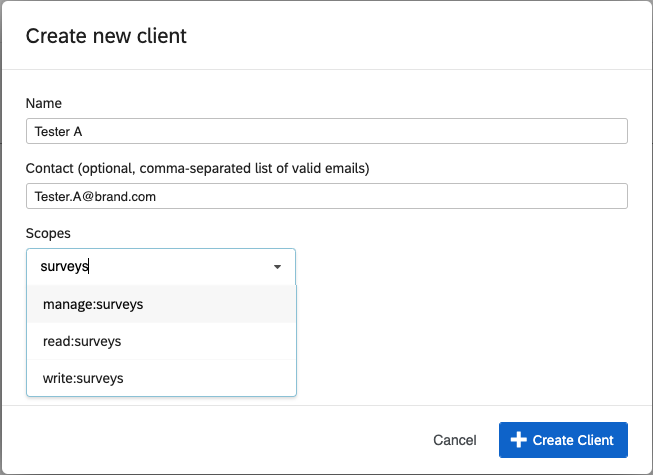
Select the scope you want by clicking on the scope in the dropdown. Continue for all the scopes you wish the client to have.
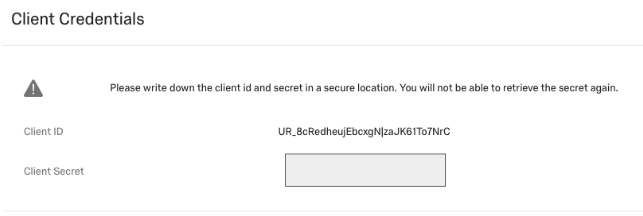
Finally, click create client and note the client ID and secret. Copy it now as you cannot display it again later.
Obtaining a Bearer Token
Before making any API call, you must obtain a Bearer Token. Below are several example of ways to get your token.
Secure your secrets!
The code samples below use secrets you should keep secure. Make sure you don't hardcode these or pass them around in plain text. Anyone with your client Id and secret can act as you when calling Qualtrics APIs. Take care.
curl --location --request POST 'https://ca1.qualtrics.com/oauth2/token' \
--header 'Authorization: Basic <your basic auth here>' \
--form 'grant_type="client_credentials"' \
--form 'scope="manage:all"'
Code and Qualtrics Support
Our support team does not offer assistance or consultation on custom coding, but you can always try asking our community of dedicated users. If you’d like to know more about our custom coding services you can commission, please contact your Qualtrics Account Executive.
import requests
import os

clientId = "{clientId}"
clientSecret = "{clientSecret}"
dataCenter = "{your data center id}"

def getToken():
    baseUrl = "https://{0}.qualtrics.com/oauth2/token".format(dataCenter)
    data = {'grant_type': 'client_credentials','scope': 'manage:all'}

    r = requests.post(baseUrl, auth=(clientId, clientSecret), data=data)

    return r.json()['access_token']

print(getToken())
# Get Token with the OAuthLib
#
# For this sample, install the dependencies with:
#
# pip install oauthlib
# pip install requests_oauthlib

import os
from oauthlib.oauth2 import BackendApplicationClient
from requests_oauthlib import OAuth2Session

clientId = "{clientId}"
clientSecret = "{clientSecret}"
dataCenter = "{your data center id}"

token_url = 'https://{0}.qualtrics.com/oauth2/token'.format(dataCenter)

def getToken():

  client = BackendApplicationClient(client_id=clientId)
  scope = ['manage:all']
  oauth = OAuth2Session(client=client, scope=scope)
  token = oauth.fetch_token(token_url=token_url, client_id=clientId, client_secret=client_secret)

  return token['access_token']

print(getToken())
# Java example uses unirest library

package myGroup;

import kong.unirest.HttpResponse;
import kong.unirest.Unirest;

public class App
{
    public static String datacenter = "{your data center id}";
    public static String clientId = "{clientId}";
    public static String clientSecret = "{clientSecret}";

    public static void main( String[] args )
    {
        HttpResponse<String> response = Unirest.post("https://st3.qualtrics.com/oauth2/token")
        .header("content-type", "application/x-www-form-urlencoded")
        .body(
            String.format(
                "grant_type=client_credentials&client_id=%1$s&client_secret=%2$s&scope=manage:all",
                clientId,
                clientSecret)
                )
        .asString();

        System.out.println( response.getBody() );
    }
}
An example response object is as follows:
{
   "access_token": "your access token",
   "expires_in": 3599,
   "scope": "manage:all",
   "token_type": "bearer"
}
The expires_in field indicates the number of seconds until token expiration.
The token returned from the Python OAuth library is slightly different:
{
  "access_token": "your access token",
  "expires_in": 3599,
  "scope": [
    "manage:all"
  ],
  "token_type": "bearer",
  "expires_at": 1521498141.7638242
}
Using Your Bearer Token with the Qualtrics APIs
The following example shows how to use the token with the List Surveys API.
The Python example calls the getToken() function defined in the previous section, and the cURL example uses the token on the command line.
import os
import requests

# Setting user Parameters
dataCenter = "{your data center id}"

bearerToken = getToken() # call the function defined in the previous code example
baseUrl = "https://{0}.qualtrics.com/API/v3/whoami".format(dataCenter)
headers = {
    "authorization": "bearer " + bearerToken,
    }

response = requests.request("GET", baseUrl, headers=headers)
print(response.text)
Expired Token Server Response
If your OAuth token has expired, you will receive a response to API calls as shown below:
{
  "meta": {
    "error": {
      "errorCode": "AUTH_6.0",
      "errorMessage": "invalid_client"
    },
    "httpStatus": "401 - Unauthorized",
    "requestId": "bed93eee-a684-44b7-8cdc-128251874a45"
  }
}
Differences Between OAuth and the API Token
This section discusses the practical differences between the API token as discussed in Authentication and the OAuth bearer token.
Duration
The API token is valid until you regenerate a new token in the web interface. The OAuth bearer token is only valid for one hour (60 minutes). Best practice for OAuth bearer tokens is to use one until you receive an expired response from using it. Then request a new valid token for your next Qualtrics API call.
Previous tokens are not invalidated when you request a new token and the previous token's validity continues for the full hour.
HTTP Header
The API token is sent to the server with the X-API-TOKEN header as shown below:
X-API-TOKEN: '<your api token>'
The OAuth bearer token appears instead in the Authorization header:
Authorization: Bearer '<your OAuth bearer token>'
Security
The examples in this guide show the client ID and client secret stored in environment variables, which is better than hardcoding them in the source code, but all code (including malicious code) running with that same environment has access to the environment and thus your client ID and client secret. A better approach is to store the values in an encrypted password vault (such as Keychain or 1Password).
The client ID and client secret should never be stored in apps distributed to users (such as mobile or desktop apps). Both values could be extracted from the client binaries and used to generate tokens to access the Qualtrics APIs using your credentials and thus have access to all of your survey responses, surveys, contact lists, and other confidential information. Treat your client ID and client secret as if they were a username and password.