Mutual Transport Layer Security (mTLS)
Contact Your Account Representative before setting up mTLS
Mutual TLS setup is a involved process that requires collaboration with the Qualtrics API Engineering Team. Please receive approval from your account representative before setting up this feature.
Overview
Mutual Transport Layer Security (mTLS) authentication ensures both the API caller and Qualtrics Public API servers encrypt and secure traffic in both directions. This adds an additional layer of security on top of the standard API authentication mechanisms (such as API Token or OAuth). mTLS does not replace API token or OAuth authentication, both must still be presented when mTLS is enabled. Once enabled, all requests must present the correct client certificate for requests to succeed. If a caller makes a request using an invalid or missing client certificate, Qualtrics blocks the request.
Each certificate has an expiry time of one year and you should rotate the certificate before this time elapses. If the provided certificate expires within 60 days, you will find an extra "notice" field under the response "meta" object indicating you should regenerate the certificate. For example:
{"result":{...},"meta":{"requestId":"...","httpStatus":"200 - OK","notice":"The client certificate presented with this call expires within 60 days. Please generate a new client certificate to use with this call."}}
Up to 10 active certificates can be in use at any one time. This limit is organization-wide (not per user or per division). For organizations with many systems or users, the recommended approach is to issue certificates per system or integration rather than per individual person. Qualtrics will deny new certificate creation once 10 certificates exist until old ones are deleted. You must manually delete certificates, certificate expiry does not automatically remove them from the count.
mTLS Enablement
Enablement of Mutual Transport Layer Security is a process that can take several months. Be sure to plan sufficient time for your development efforts.
Verify User Readiness for mTLS
Enabling mTLS impacts ALL users who access your public APIs. Ensure that all users in your organization who access your APIs can support mTLS before enabling this feature.
Certificate Management
Certificates are managed via four API endpoints. All operations require the calling user to be a Brand Admin and the organizationId in the request path must match the brand ID of the authenticated user's organization.
Create Client Certificate
POST /API/v3/organizations/{organizationId}/clientcertificates
Submits a Certificate Signing Request (CSR) to Qualtrics for signing. On success, returns the signed certificate and an id (the SHA-256 thumbprint of the certificate). The certificate is stored and associated with your organization for mTLS enforcement.
curl --request POST \
  --url 'https://<INSERT_DC>.qualtrics.com/API/v3/organizations/<INSERT_ORGANIZATIONID>/clientcertificates' \
  --header 'Content-Type: application/json; charset=utf-8' \
  --header 'X-API-TOKEN: <INSERT_API_TOKEN>' \
  --data '{
    "certificateRequest": "-----BEGIN CERTIFICATE REQUEST-----\nLine1data\nLine2data\n-----END CERTIFICATE REQUEST-----"
  }'
Request body:
{
  "certificateRequest": "-----BEGIN CERTIFICATE REQUEST-----\nLine1data\nLine2data\n-----END CERTIFICATE REQUEST-----"
}
Response (200 OK):
{
  "result": {
    "certificate": "-----BEGIN CERTIFICATE-----\n...\n-----END CERTIFICATE-----",
    "id": "<sha256-thumbprint-hex>"
  },
  "meta": { "httpStatus": "200 - OK", "requestId": "<uuid>" }
}
The id field is the SHA-256 thumbprint of the certificate. You will use this value as the certificateId in GET and DELETE requests.
CSR requirements:
- The CSR must be a valid PKCS#10 certificate signing request in PEM format.
- Organization Name: must be set to your
brandID. - Common Name: must be set to
mutualtls.<DC>.qualtrics.com(for example,mutualtls.iad1.qualtrics.com). A Common Name that does not match this exact format will cause the PKI service to reject the request with anMSS_1.0error. - In the JSON request body, replace all line breaks in the PEM with
\nescape sequences so the entire CSR is a single JSON string value.
Error codes:
| Code | Cause |
|---|---|
MSS_0.4 | Not a brand admin. |
MSS_0.1 | The organizationId in the path does not match your organization's brand ID. |
MSS_0.2 | The certificateRequest field was not provided or was empty. |
MSS_0.3 | Your organization already has 10 active certificates. Delete one or more before creating a new one. |
MSS_1.0 | Certificate signing failed. Most commonly caused by a malformed CSR or a Common Name that does not match mutualtls.<DC>.qualtrics.com exactly. Verify your CSR and retry. |
MSS_1.1 | Internal error computing the certificate thumbprint. Contact Qualtrics support. |
List Client Certificates
GET /API/v3/organizations/{organizationId}/clientcertificates
Returns a list of certificate IDs (thumbprints) registered to your organization. This endpoint returns only certificate IDs, not certificate content or expiry dates. To inspect a certificate or check its expiry date, use Get Client Certificate.
curl --request GET \
  --url 'https://<INSERT_DC>.qualtrics.com/API/v3/organizations/<INSERT_ORGANIZATIONID>/clientcertificates' \
  --header 'X-API-TOKEN: <INSERT_API_TOKEN>'
Response (200 OK):
{
  "result": {
    "elements": [
      { "id": "<sha256-thumbprint-hex>" }
    ]
  },
  "meta": { "httpStatus": "200 - OK", "requestId": "<uuid>" }
}
Error codes:
| Code | Cause |
|---|---|
MSS_2.0 | Not a brand admin. |
MSS_2.1 | The organizationId in the path does not match your organization. |
Get Client Certificate
GET /API/v3/organizations/{organizationId}/clientcertificates/{certificateId}
Returns the full PEM certificate for the given certificate ID. Use this endpoint to inspect the certificate, verify its expiry date, or recover the certificate if it was not saved during creation.
curl --request GET \
  --url 'https://<INSERT_DC>.qualtrics.com/API/v3/organizations/<INSERT_ORGANIZATIONID>/clientcertificates/<INSERT_CERTIFICATEID>' \
  --header 'X-API-TOKEN: <INSERT_API_TOKEN>'
To extract the expiry date from the returned certificate, save the PEM to a file and run:
openssl x509 -noout -dates -in myCert.cert
Response (200 OK):
{
  "result": {
    "certificate": "-----BEGIN CERTIFICATE-----\n...\n-----END CERTIFICATE-----"
  },
  "meta": { "httpStatus": "200 - OK", "requestId": "<uuid>" }
}
Error codes:
| Code | Cause |
|---|---|
MSS_3.0 | Not a brand admin. |
MSS_3.1 | The organizationId in the path does not match your organization. |
MSS_3.2 | No certificate found with the given ID. |
Delete Client Certificate
DELETE /API/v3/organizations/{organizationId}/clientcertificates/{certificateId}
Deletes the certificate from Qualtrics and revokes it in the PKI Certificate Revocation List. After deletion, the certificate will no longer be accepted for mTLS calls and is removed from your organization's count against the 10-certificate limit. Deletion is permanent and cannot be undone.
curl --request DELETE \
  --url 'https://<INSERT_DC>.qualtrics.com/API/v3/organizations/<INSERT_ORGANIZATIONID>/clientcertificates/<INSERT_CERTIFICATEID>' \
  --header 'X-API-TOKEN: <INSERT_API_TOKEN>'
Error codes:
| Code | Cause |
|---|---|
MSS_4.0 | Not a brand admin. |
MSS_4.1 | The organizationId in the path does not match your organization. |
MSS_4.2 | No certificate found with the given ID. |
Steps for Setting up mTLS
Follow these steps and review the screenshots to set up mTLS:
-
Use the following command to generate the myPrivateKey.pem and myCSR.csr files:
openssl req -new -keyout myPrivateKey.pem -out myCSR.csr. -
Come up with a PEM pass phrase and verify.
-
Answer the questions.
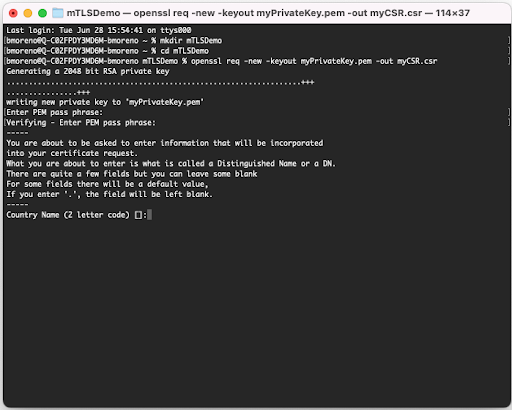
- For organization name use your
brandID. - Common name must be set to
mutualtls.<DC>.qualtrics.com. - You can skip the challenge password.
- For organization name use your
-
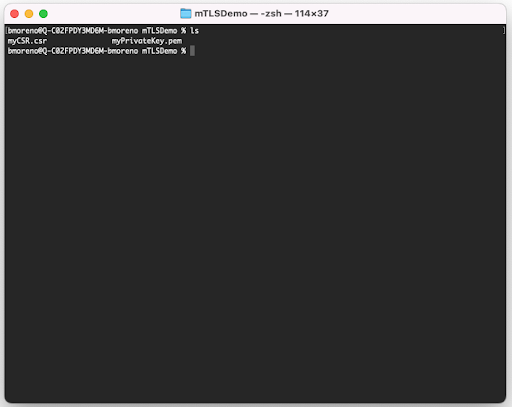
The PEM and CSR files are generated to your working directory.
-
Call the create client certificate endpoint with your generated myCSR.csr file.
Your curl should look like:
curl --request POST \
  --url 'https://<INSERT_DC>.qualtrics.com/API/v3/organizations/<INSERT_ORGANIZATIONID>/clientcertificates' \
  --header 'Content-Type: application/json; charset=utf-8' \
  --header 'X-API-TOKEN: <INSERT_API_TOKEN>' \
  --data '{
    "certificateRequest": "-----BEGIN CERTIFICATE REQUEST-----\n…\n-----END CERTIFICATE REQUEST-----"
}'Note: In the
certificateRequestbody parameter, insert your generated myCSR.csr file edited so that all the lines are combined into one line and the lines are separated by\n. For example, if this is your myCSR.csr file: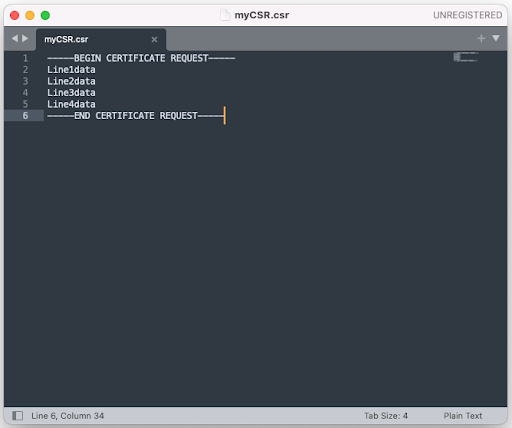
Then your curl request should look like:
curl --request POST \
  --url 'https://<INSERT_DC>.qualtrics.com/API/v3/organizations/<INSERT_ORGANIZATIONID>/clientcertificates' \
  --header 'Content-Type: application/json; charset=utf-8' \
  --header 'X-API-TOKEN: <INSERT_API_TOKEN>' \
  --data '{
    "certificateRequest": "-----BEGIN CERTIFICATE REQUEST-----\nLine1data\nLine2data\nLine3data\nLine4data\n-----END CERTIFICATE REQUEST-----"
}' -
Upon running that curl command the call should return status code
200 OKwith a response body containing a field namedcertificate, which contains the certificate to use for making API calls with mTLS.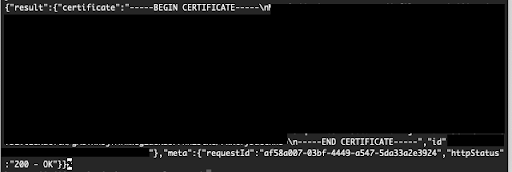 For example:
{"result":{"certificate":"-----BEGIN CERTIFICATE-----\nSomeNewData1\nSomeNewData2\nSomeNewData3\nSomeNewData4\n-----END CERTIFICATE-----","id":"028abd6ba464a62aa5dc3191420d9b312e32d9eb"},"meta":{"requestId":"af58a007-03bf-4449-a547-5da33a2e3924","httpStatus":"200 - OK"}} -
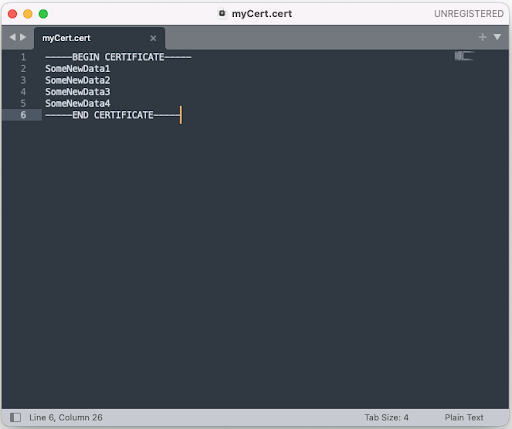
Copy all of the content into a file myCert.cert , replacing all the
\ncharacters with actual line breaks.For example, the file created from the above example result should look like:
- Set up your test API call using
GET /API/v3/whoamion themutualtlssubdomain. This endpoint returns information about your authenticated user and is a convenient, low-risk call for verifying your certificate and authentication are working correctly.
Note: the base URL must use the
mutualtlssubdomain:https://mutualtls.<INSERT_DC>.qualtrics.com. For the whoami test call, the full URL ishttps://mutualtls.<INSERT_DC>.qualtrics.com/API/v3/whoami.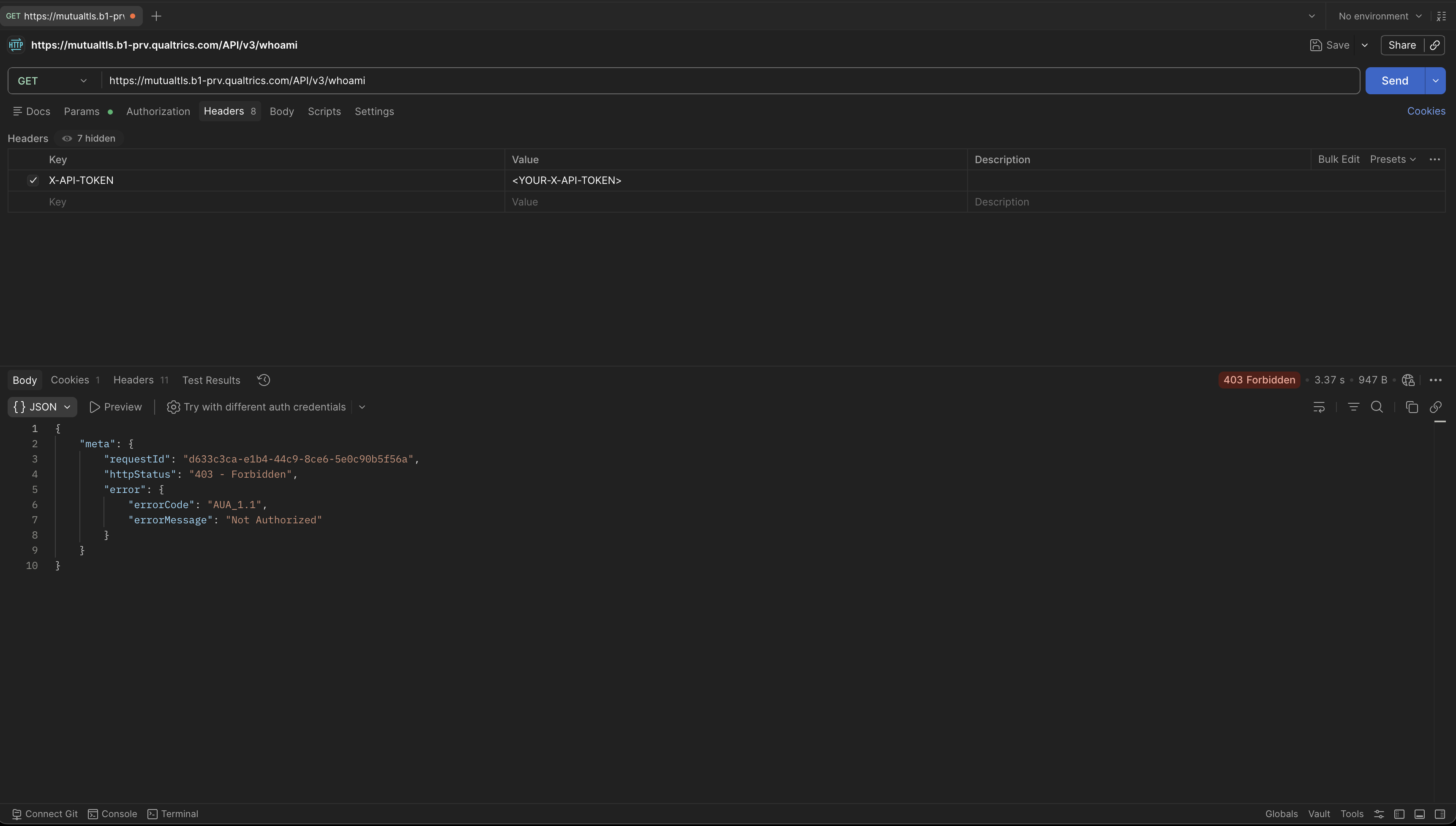
-
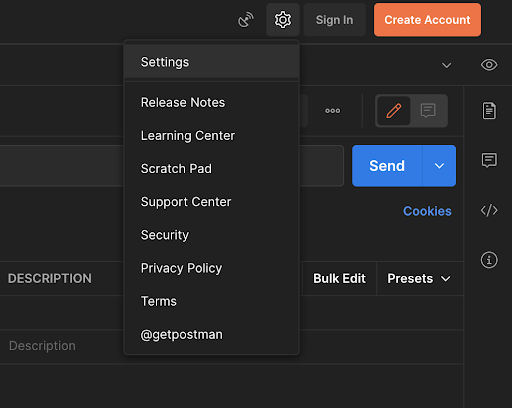
Click the gear icon at the top of the screen and then click settings.
-
Select the Certificates tab.
- Click Add Certificate.
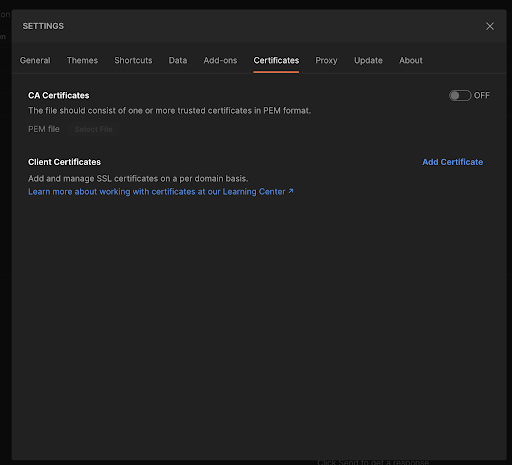
On the Add Certificate screen, complete these steps:
- Under the host field add the base url.
For example: mutualtls.<INSERT_DC>.qualtrics.com. - Under CRT file select the newly created CERT file from step 7.
- Under KEY file select the myPrivateKey.pem file from step 1.
- In the passphrase box enter your passphrase used in step 2.
- Click Add.
- Set up your test API call using
Pre-Enablement Validation (Step 8)
Before enabling mTLS for your brand, complete this validation step to confirm your client certificate is being presented correctly. This step is expected to return AUA_1.1—that error is the confirmation that Qualtrics received and evaluated your certificate.
-
Validate certificate presentation: make a call to
mutualtls.<INSERT_DC>.qualtrics.comwith your client certificate configured. This call should fail withAUA_1.1.curl --request GET \
--url 'https://mutualtls.<INSERT_DC>.qualtrics.com/API/v3/whoami' \
--header 'X-API-TOKEN: <INSERT_API_TOKEN>' \
--cert myCert.cert \
--key myPrivateKey.pem \
--pass '<INSERT_PASSPHRASE>'An
AUA_1.1here confirms that Qualtrics received and evaluated your certificate. This is the expected and intended pre-enablement result.If this call returns a
403Access Denied error instead ofAUA_1.1: your certificate is not reaching Qualtrics. Check the following:- The certificate is configured for the correct host (
mutualtls.<INSERT_DC>.qualtrics.com). - Your HTTP client is actually sending the certificate. Some clients silently skip certificate presentation when the passphrase is incorrect or the file format is not recognized.
Once this step returns
AUA_1.1, you are ready to enable mTLS. - The certificate is configured for the correct host (
-
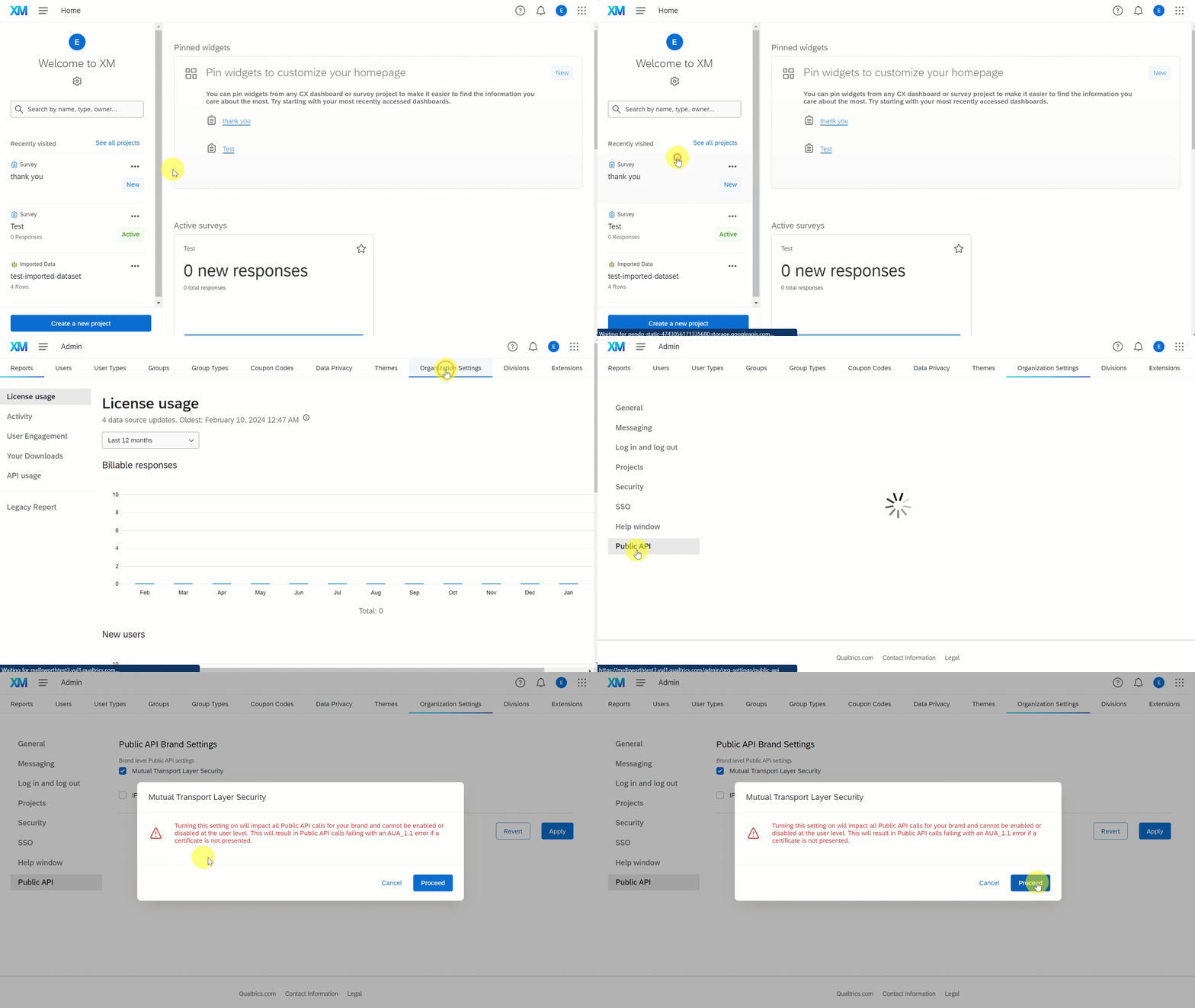
To enable mTLS for your brand:
- From the Qualtrics Home Screen, select Admin > More > Organization Settings > Public API.
- Select Mutual Transport Security Layer. A confirmation box with warning message appears.
- Read the warning message, select Proceed to confirm enablement of mTSL.
- Don't forget to click on Apply so the changes take effect.
Verify User Readiness for mTLS
Enabling mTLS impacts ALL users who access your public APIs. Ensure all users in your organization who access your APIs can support mTLS before enabling this feature.
Note: This setting change may take up to 60 minutes to propagate across all infrastructure. You may observe inconsistent behavior during this window. Plan your cutover to avoid critical operations during the propagation period.
-
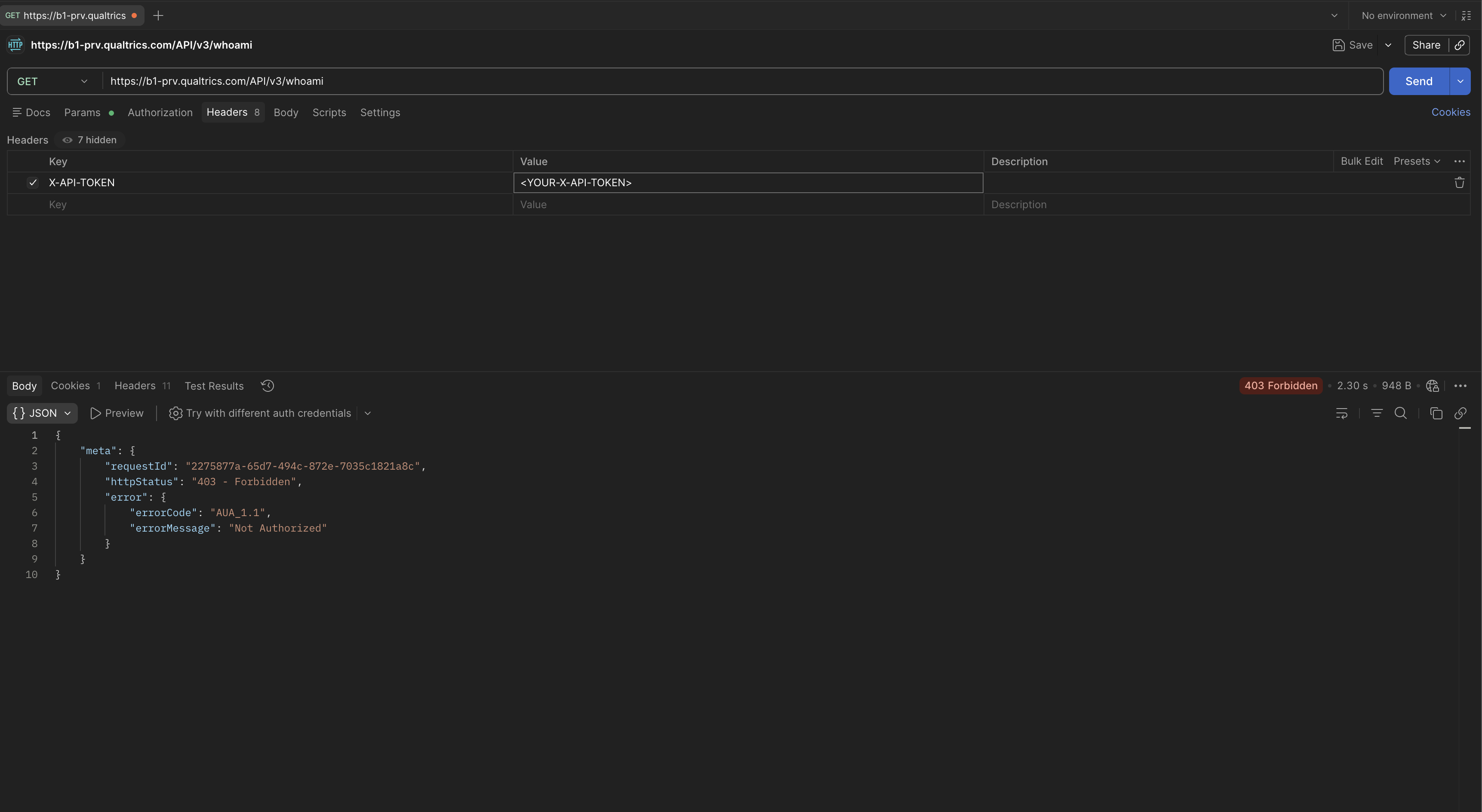
Once Mutual TLS is enabled for your brand, attempt a call to the standard subdomain without a certificate. This call should fail with
AUA_1.1because all calls now require Mutual TLS via themutualtlssubdomain.curl --request GET \
--url 'https://<INSERT_DC>.qualtrics.com/API/v3/whoami' \
--header 'X-API-TOKEN: <INSERT_API_TOKEN>'
-
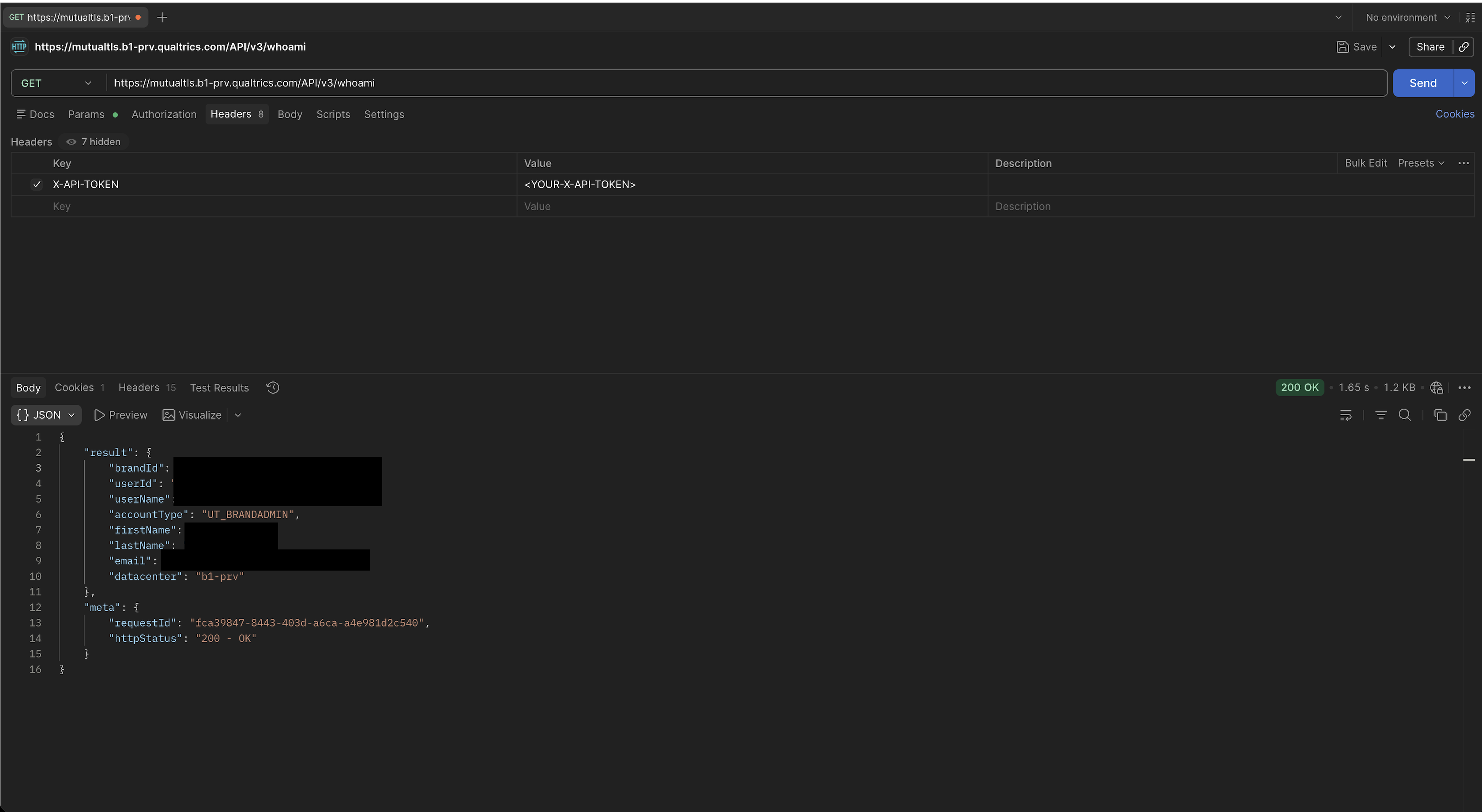
Re-attempt the same call using the
mutualtlssubdomain and providing the certificate. This call should now succeed.curl --request GET \
--url 'https://mutualtls.<INSERT_DC>.qualtrics.com/API/v3/whoami' \
--header 'X-API-TOKEN: <INSERT_API_TOKEN>' \
--cert myCert.cert \
--key myPrivateKey.pem \
--pass '<INSERT_PASSPHRASE>'
CONGRATULATIONS! You have successfully enabled Mutual TLS for your Brand!
Diagnosing AUA_1.1 Errors
The AUA_1.1 error is returned in several distinct scenarios. Use this table to identify what is causing the error based on whether mTLS is enabled, which endpoint was called, and whether a certificate was presented.
| mTLS Enabled | Endpoint Called | Certificate Presented | Result | What It Means |
|---|---|---|---|---|
| No | mutualtls.{dc}.qualtrics.com | No | 403 | The mutualtls subdomain always requires a client certificate; certless requests are rejected with a 403 before reaching Qualtrics. |
| No | mutualtls.{dc}.qualtrics.com | Yes | AUA_1.1 | Expected. Certificate was received and evaluated—confirms certificate presentation is working. This is the step 8 validation signal. |
| Yes | mutualtls.{dc}.qualtrics.com | No | 403 | Certificate required but not presented; rejected with a 403 before reaching Qualtrics (not AUA_1.1). Check client certificate configuration. |
| Yes | mutualtls.{dc}.qualtrics.com | Yes | 200 OK | Expected. Fully working mTLS state. |
| Yes | {dc}.qualtrics.com | Either | AUA_1.1 | Wrong endpoint. When mTLS is enabled, all calls must use the mutualtls.{dc}.qualtrics.com subdomain. |
If you receive AUA_1.1 with mTLS enabled and believe you are presenting a valid certificate, check in this order:
- Confirm you are calling
mutualtls.<DC>.qualtrics.com, not<DC>.qualtrics.com. - Check that the certificate has not expired. Retrieve the certificate using Get Client Certificate and run
openssl x509 -noout -dates -in myCert.cert. - Confirm the certificate is still registered. Call List Client Certificates and verify the certificate ID appears in the list.
- Check for network infrastructure (proxies, load balancers, ZScaler) that may be stripping the client certificate. See Common Problems.
- For paginated API responses: next page URLs returned in the response body use the standard
{dc}.qualtrics.comdomain. You must manually substitute themutualtlssubdomain before following these URLs, using them as-is when mTLS is enabled will produceAUA_1.1.
Certificate Lifecycle Management
Each certificate is valid for one year. Plan your rotation schedule so a valid replacement is registered and validated (step 8) before the existing certificate expires. The 60-day expiry notice in response metadata gives you a window to rotate without service interruption.
Checking certificate expiry:
The List Client Certificates endpoint returns only IDs, it does not include expiry dates. To check when a certificate expires, retrieve its full PEM via Get Client Certificate and inspect it:
openssl x509 -noout -dates -in myCert.cert
Recommended rotation approach:
- Generate a new CSR and call Create Client Certificate to register the new certificate.
- Validate the new certificate using step 8.
- Update your systems to use the new certificate.
- Delete the old certificate using Delete Client Certificate.
This order ensures the old certificate remains active until the new one is confirmed working, preventing service disruption.
Complete Error Code Reference
Certificate Management Errors (MSS_*)
| Code | Cause | Resolution |
|---|---|---|
MSS_0.1 | The organizationId in the path does not match the brand ID of the authenticated user. | Ensure you are using your own brand ID and are authenticated as a user belonging to that organization. |
MSS_0.2 | The certificateRequest field is missing or empty. | Include the CSR in the request body. |
MSS_0.3 | Your organization has reached the 10-certificate limit. | Delete one or more existing certificates to make room. |
MSS_0.4 | The calling user is not a brand admin. | Certificate management operations require brand admin privileges. |
MSS_1.0 | Certificate signing failed. | Verify the CSR is valid PEM format and the Common Name is exactly mutualtls.<DC>.qualtrics.com. If the error persists, contact Qualtrics support. |
MSS_1.1 | Internal error computing the certificate thumbprint. | Contact Qualtrics support. |
MSS_2.0 | Not a brand admin (list operation). | As above. |
MSS_2.1 | The organizationId does not match your organization (list operation). | As above. |
MSS_3.0 | Not a brand admin (get operation). | As above. |
MSS_3.1 | The organizationId does not match your organization (get operation). | As above. |
MSS_3.2 | No certificate found with the given ID (get operation). | Verify the certificate ID using List Client Certificates. |
MSS_4.0 | Not a brand admin (delete operation). | As above. |
MSS_4.1 | The organizationId does not match your organization (delete operation). | As above. |
MSS_4.2 | No certificate found with the given ID (delete operation). | Verify the certificate ID using List Client Certificates. |
PKI Errors (VC_*)
These errors surface when Qualtrics' internal PKI service rejects the operation. They appear nested inside an MSS_1.0 error.
| Code | Cause | Resolution |
|---|---|---|
VC_0.1 | The CSR was rejected by the PKI service. | Verify the CSR with openssl req -verify -in myCSR.csr -noout. Most common cause: malformed PEM format or incorrect Common Name. |
VC_0.2 | Unexpected status from the PKI signing service. | Contact Qualtrics support. |
VC_0.3 | A connectivity error occurred contacting the signing service. | Retry the request. If the error persists, contact Qualtrics support. |
mTLS Enforcement Error
| Code | Cause |
|---|---|
AUA_1.1 | mTLS enforcement failure. See Diagnosing AUA_1.1 Errors for the complete set of scenarios that produce this error. |
Common Problems
- If you run into issues where your certificate is not getting passed for your outgoing API calls to Qualtrics, please double check the underlying security system installed on your server.
- If you are using ZScaler for your underlying security system, please work with the ZScaler Support team to add an exception for your use case, as you will need to bypass the default SSL Inspection policy provided by ZScaler.
- Other TLS-inspecting proxies, reverse proxies, load balancers, and API gateways can also strip client certificates. Review your full network path for any component that terminates and re-initiates TLS connections, and configure those components to pass through client certificates without inspection.
- Some HTTP clients do not send the certificate if the passphrase entered does not match the one used during key generation, and do not surface a visible error. Verify your passphrase by running:
openssl rsa -in myPrivateKey.pem -check
Important Things to Note
- Turning on Mutual TLS impacts ALL Public API calls for your brand, it can not be enabled or disabled at the user level.
- mTLS adds an additional layer of security on top of existing authentication. API tokens and OAuth credentials are still required when mTLS is enabled, mTLS does not replace them.
- Certificate management operations require the calling user to be a Brand Admin. The
organizationIdin all certificate management requests must match your own brand ID. - You must call to create the client certificate prior to turning on the Mutual TLS feature.
- The 10-certificate limit is organization-wide. Expired certificates that have not been manually deleted still count against this limit.
- From the time the Mutual TLS feature is turned on or turned off, this setting change may take up to 60 minutes to take effect.
- It is possible for network infrastructure to strip out required headers needed to pass the mutual tls certificate, be aware that enabling this feature may involve network configuration changes.
- A call to
mutualtls.\<INSERT_DC>.qualtrics.comwithout a client certificate is rejected with an HTTP403error before the request reaches Qualtrics, regardless of whether Mutual TLS is enabled for your brand. Themutualtlssubdomain always requires a client certificate. - If Mutual TLS is NOT enabled for the calling brand AND a call is made to
mutualtls.\<INSERT_DC>.qualtrics.comthat does pass a certificate, this call will fail with an AUA_1.1 error. This is a good way for clients to verify that they are correctly passing a certificate before enabling Mutual TLS. - If Mutual TLS is enabled for the calling brand AND a call is made to
mutualtls.\<INSERT_DC>.qualtrics.comthat DOES NOT pass a certificate, the request is rejected with an HTTP403error before it reaches Qualtrics. - If Mutual TLS is enabled for the calling brand AND a call is made to
\<INSERT_DC>.qualtrics.com, this call will always fail with an AUA_1.1 error. - Some public API calls return a next URL to call (usually for pagination). Note that while these URLs do not contain the
mutualtls.<INSERT_DC>.qualtrics.comprefix, the next page does require themutualtlssubdomain (that is, you can not use the URL exactly as it's returned in the API response).