Base URL and Datacenter IDs
The base API url consists of the qualtrics hostname for your organization followed by /API
The scheme must be https.
Example base url:
https://yourdatacenterid.qualtrics.com/API
How to Find your Datacenter
-
Login to your Qualtrics account
-
Go to your Qualtrics IDs page:
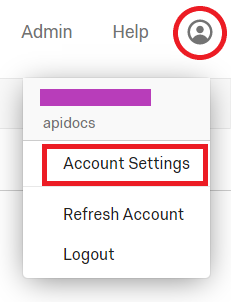
-
In the User box, find your datacenter ID
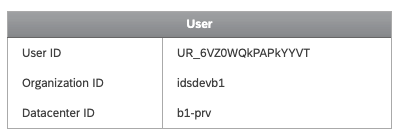
Your API hostname should be in the following format (replace bracketed values in URL with your brand's information):
{yourdatacenterid}.qualtrics.com
Always Make Public API Calls to Your Host Data Center
The Datacenter ID indicates your host data center. You must make all public API requests to your host data center or the request will fail.
What if I Use the Wrong Datacenter?
API calls using OAuth are forwarded by proxy to the data center where the client_id and client_secret were created.
API calls may still work if you use X-API-TOKEN (less secure) and call the wrong datacenter. If this happens, your request will be proxied to the correct datacenter. This significantly extends the time it takes for you to receive a response. You will know your request was proxied since the meta field will contain the following notice:
{
  "result": {},
  "meta": {
    "httpStatus": "200 - OK",
    "requestId": "b698813c-bde1-4734-85e6-931b2db3e83a",
    "notice": "Request proxied. For faster response times, use this host instead: yourdatacenterid.qualtrics.com"
  }
}
Vanity Domains Work with Our Public API Calls
You can use vanity domains to make calls to our Public APIs. Vanity domains do not redirect and will remain on their host datacenter. Read more about vanity domains in Qualtrics Vanity URLs Guide.