OAuth Authentication (Auth Code)
This guide explains how to use OAuth 2.0 via the AuthCode grant with Qualtrics APIs and also provides a code example as a reference implementation.
OAuth Authorization Explained
The Qualtrics platform supports two types of OAuth, which support different scenarios. The Client Credentials grant and the Authorization Code grant. The Client Credentials grant, described below, is used by backend automations to make calls as the user account which created the credentials. This is usually used by Qualtrics customers to make API calls to access their Qualtrics data. In contrast, the Authorization Code grant is more likely to be used by Partners or Application developers, where the user will first provide consent to the Partner or Application to make calls on their behalf.
-
With oauth Client Credentials, you post the client_id and client_secret to the URL
https://env.qualtrics.com/oauth2/tokento obtain a valid access token (like a session ticket) which you can then use to call other Qualtrics APIs. This login mechanism uses the same credentials for all users. -
The Authorization Code, aka three legged approach, lets you launch the Qualtrics login screen so that any user can login with their own Qualtrics ID to obtain a valid access token. They can then use that access token in subsequent steps in your application.
Creating the Client ID and Client Secret
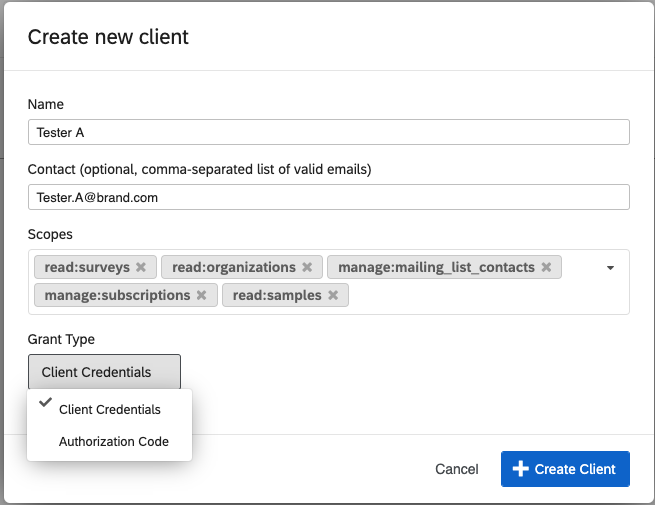
Grant Type Drop Down Only Visible to Brand Administrators
If you do not see the
Grant Typedrop down below, it is because you are not a brand administrator. The drop down is still there, and it's default value isClient Credentialswhich will allow you to continue with the example.
-
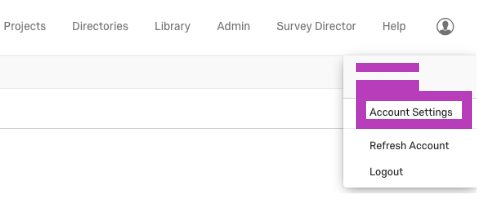
Login to qualtrics.com then select Account Settings.
-
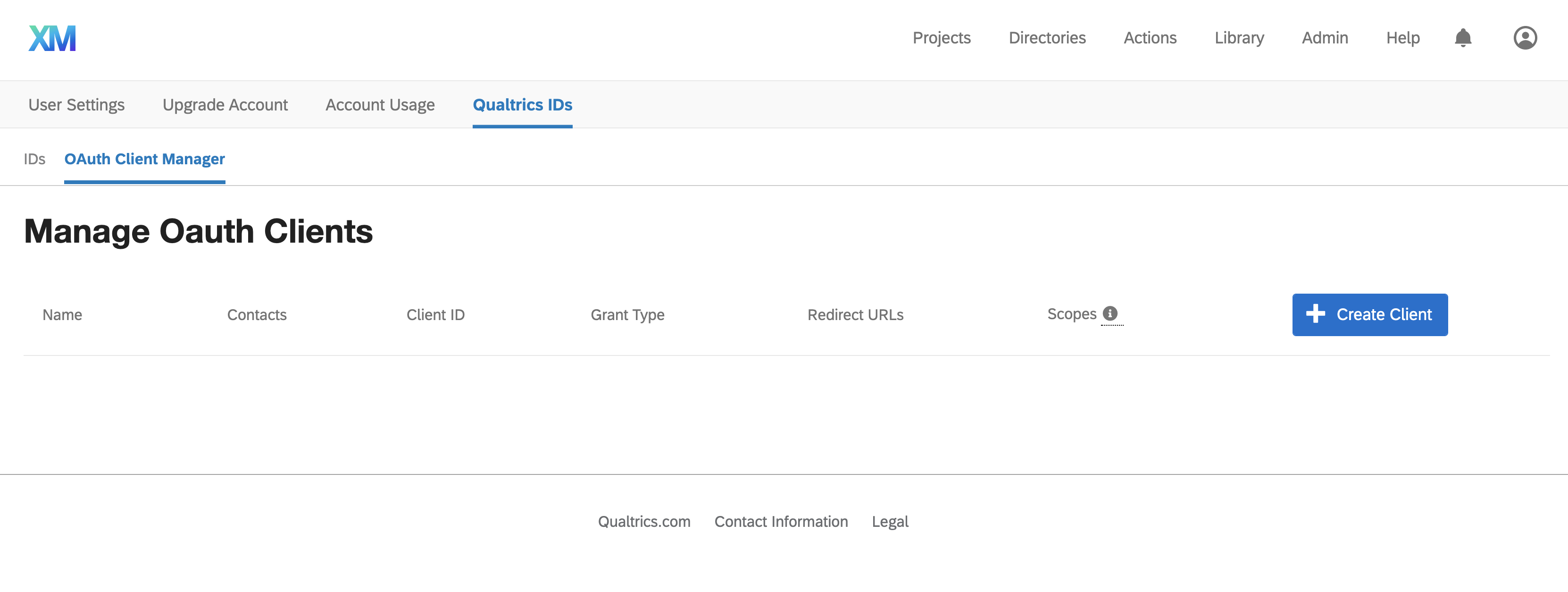
Then select OAuth Client Manager.
-
Click Create Client
-
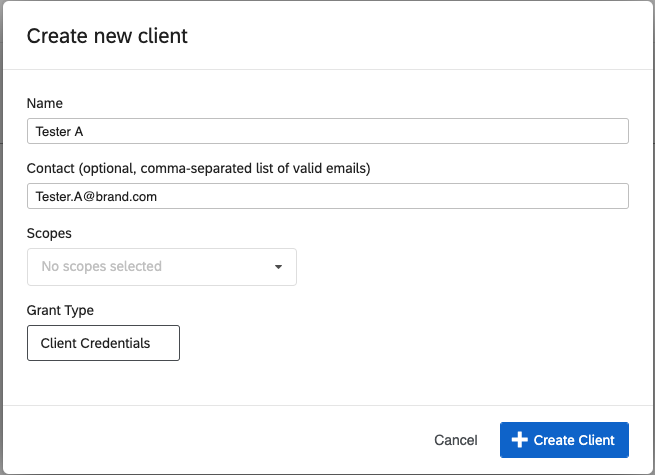
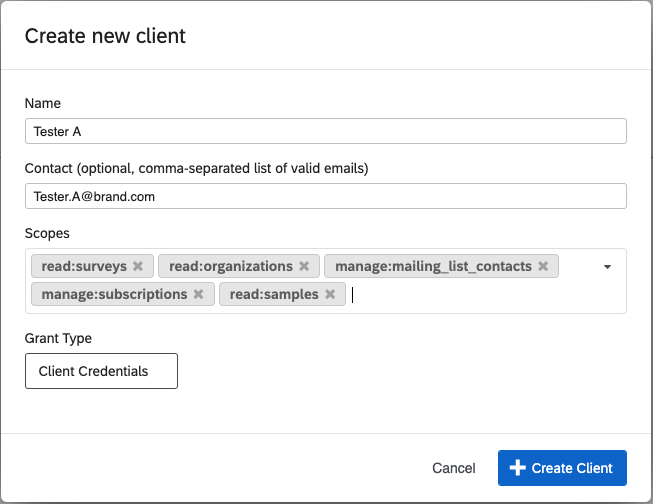
Enter name and contact information as done below
-
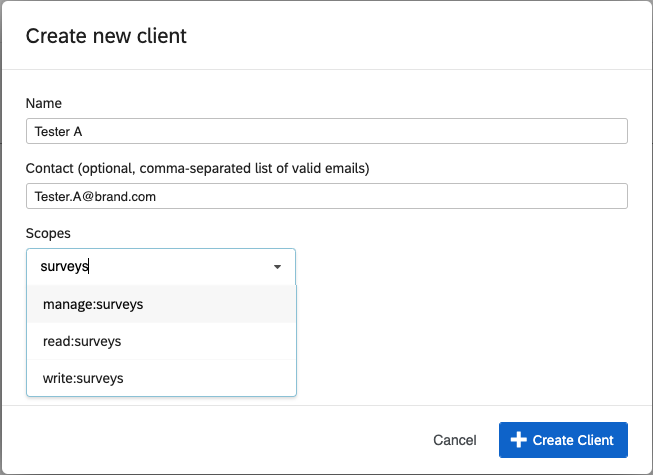
Next, choose scopes from the dropdown either by finding them in the list or searching for them.
-
Select the scope you want by clicking on the scope in the dropdown. Continue for all the scopes you wish the client to have.
-
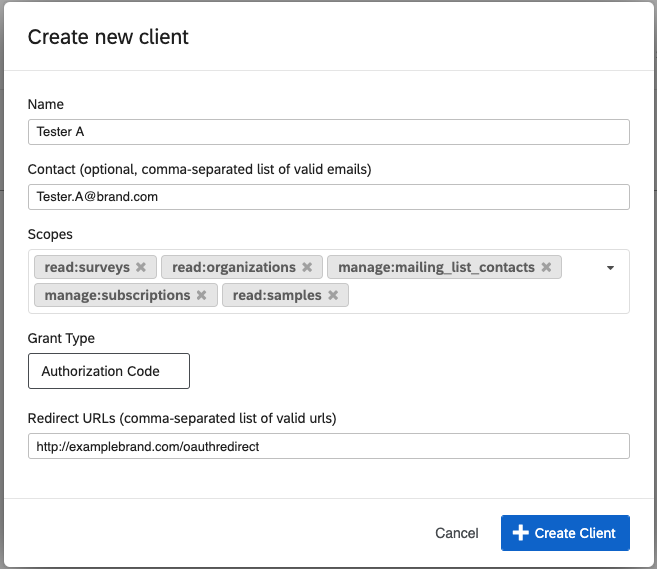
Select the Grant Type Authorization Code
-
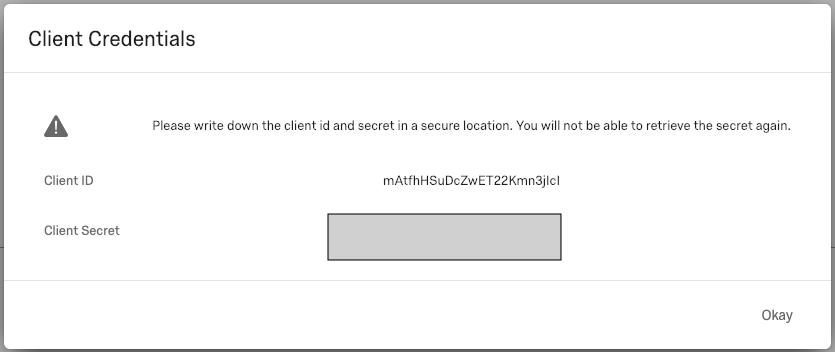
Finally, click create client and note the client ID and secret. Copy it now as you cannot display it again later.
Use Same Data Center when You call API
Note the data center assigned to your account, e.g.,
https://apidocs.iad1.qualtrics.com. which in this example is iad1. This data center ID is shown in the URL when you login to Qualtrics. The client_id and client_secret are valid only when you call the API on that data center, meaning the domain and subdomain must match. This a requirement of the OAuth 2.0 standard.
User that Grants Permission must have API Access
The user whose client_id and client_secret you are using must have API Access.
Requirements for your Endpoint Application
You application needs to redirect inbound calls to, e.g.; https://co1.qualtrics.com/oauth2/auth?client_id=c1r9YQNUuJ2iu6WP49INCT4Z&response_type=code&state=2052ccd1b1c24524ae710817ec960e8e&scope=manage:all&redirect_uri=https://samplelistener.com/requestOAuthForUser.
The arguments are explained below.
| parameter | description |
|---|---|
| client_id | Obtained when you set up the app in Qualtrics Oauth manager |
| redirect_uri | URL of this listener. Do not URL encode. https://samplelistener.com/requestOAuthForUser |
| response_type | Must be code |
| state | Any random string |
| scope | Scope of the access request. |
Using the Sample Program
Below is an example HTTPS listener, written in Java. In order to use this you will need to register a domain and have an SSL certificate issued by a third-party. A self-signed certificate will not work. At the bottom we illustrate how to store a certificate in a keystore that the Java program can use.
To run this code you need to download log4j-1.2.17.jar. Then run the commands below.
Code and Qualtrics Support
Our support team does not offer assistance or consultation on custom coding, but you can always try asking our community of dedicated users. If you’d like to know more about our custom coding services you can commission, please contact your Qualtrics Account Executive.
javac -cp .:log4j-1.2.17.jar qualtricsCallback.java
sudo java -cp .:log4j-1.2.17.jar qualtricsCallback
The program logs to log4j-application.log So you need a file log4j.properties:
# Root logger option
log4j.rootLogger=DEBUG, stdout, file

# Redirect log messages to console
log4j.appender.stdout=org.apache.log4j.ConsoleAppender
log4j.appender.stdout.Target=System.out
log4j.appender.stdout.layout=org.apache.log4j.PatternLayout
log4j.appender.stdout.layout.ConversionPattern=%d{yyyy-MM-dd HH:mm:ss} %-5p %c{1}:%L - %m%n

# Redirect log messages to a log file, support file rolling.
log4j.appender.file=org.apache.log4j.RollingFileAppender
log4j.appender.file.File=log4j-application.log
log4j.appender.file.MaxFileSize=5MB
log4j.appender.file.MaxBackupIndex=10
log4j.appender.file.layout=org.apache.log4j.PatternLayout
log4j.appender.file.layout.ConversionPattern=%d{yyyy-MM-dd HH:mm:ss} %-5p %c{1}:%L - %m%n
The log looks like this:
2019-02-25 14:26:26 DEBUG qualtricsCallback:104 - Received Call for /requestOAuthForUser
2019-02-25 14:26:26 DEBUG qualtricsCallback:112 - Redirecting the call to: `https://co1.qualtrics.com/oauth2/auth?client_id=c1r9YQNUuJ2iu6WP49INCT4Z&response_type=code&state=e41ae573957c424b93ed9d6b37545863&redirect_uri=https://sampleslistener.com/requestOAuthForUser`
The code implements these functions:
-
Exposes the URI /requestOAuthForUser which starts the process of obtaining the access_token.
-
When the user opens
https://sampleslistener.com/requestOAuthForUserthe program redirects the browser to the Qualtrics OAuth API passing the required parameters,.e.g.:https://co1.qualtrics.com/oauth2/auth?client_id=c1r9YQNUuJ2iu6WP49INCT4Z &response_type=code &state=e41ae573957c424b93ed9d6b37545863 &redirect_uri=https://sampleslistener.com/requestOAuthForUser -
Exposes the URI /redirect to receive the access_token and refresh_token from the query string passed back to the application from Qualtrics.
-
It then uses that access token to post to
https://co1.qualtrics.com/API/v3/surveysusing the accessToken to illustrate how to use the OAuth technique to call another Qualtrics API.
import com.sun.net.httpserver.HttpServer;
import com.sun.net.httpserver.HttpsServer;
import java.security.KeyStore;
import javax.net.ssl.KeyManagerFactory;
import javax.net.ssl.TrustManagerFactory;
import com.sun.net.httpserver.*;
import javax.net.ssl.SSLEngine;
import javax.net.ssl.SSLParameters;
import java.util.UUID;
import javax.net.ssl.HostnameVerifier;
import javax.net.ssl.HttpsURLConnection;
import javax.net.ssl.SSLContext;
import javax.net.ssl.SSLSession;
import javax.net.ssl.TrustManager;
import javax.net.ssl.X509TrustManager;
import java.security.cert.X509Certificate;
import org.apache.log4j.Logger;
import java.io.*;
import java.net.*;
import java.nio.charset.StandardCharsets;
import java.rmi.ServerException;

import java.util.HashMap;
import java.util.Map;

public class qualtricsCallback
{
    static final int port=443;
    static final String client_id="xxxxxxxxx";
    static final String client_secret="xxxxxxx";
    static final String ACCESS_TOKEN_KEY = "access_token";
    static final String REFRESH_TOKEN_KEY = "refresh_token";

    // State must be at least 8 characters long
    //Best practice is to use a random value, this will have to be remembered per Auth request. A detail this simple client ignores.
    static String state = null;
    static String accessToken = null;
    static String refreshToken = null;

    // This must be the DC where the client_id and client_secret were created.
    // All calls using oauth tokens must be made to this dc.
    static final String dataCenter = "co1";

    final static Logger logger = Logger.getLogger(qualtricsCallback.class);
    public static void main(String args[])
    {
        try
        {    if(logger.isDebugEnabled()){
t    logger.debug("This is debug");
t}
            System.out.println("Starting Program...");
            InetAddress addr = InetAddress.getByName("0.0.0.0");
           InetSocketAddress host = new InetSocketAddress(addr,port);

            HttpsServer httpsServer= HttpsServer.create();
            httpsServer.bind(host,1);

// Client Id, Client Secret and redirect URL are initialized on client creation

             String redirectUri = "https://sampleslistener.com/requestOAuthForUser";

             SSLContext sslContext = SSLContext.getInstance ( "TLS" );

         // initialise the keystore
            char[] password = "livres".toCharArray();
            KeyStore ks = KeyStore.getInstance("JKS");
            FileInputStream fis = new FileInputStream("/etc/ssl/keystore.jks");
            ks.load(fis, password);

            // setup the key manager factory
            KeyManagerFactory kmf = KeyManagerFactory.getInstance("SunX509");
            kmf.init(ks, password);

            // setup the trust manager factory
            TrustManagerFactory tmf = TrustManagerFactory.getInstance("SunX509");
            tmf.init(ks);

            // setup the HTTPS context and parameters
            sslContext.init(kmf.getKeyManagers(), tmf.getTrustManagers(), null);
            httpsServer.setHttpsConfigurator(new HttpsConfigurator(sslContext) {
                public void configure(HttpsParameters params) {
                    try {
                        // initialise the SSL context
                        SSLContext context = getSSLContext();
                        SSLEngine engine = context.createSSLEngine();
                        params.setNeedClientAuth(false);
                        params.setCipherSuites(engine.getEnabledCipherSuites());
                        params.setProtocols(engine.getEnabledProtocols());

                        // Set the SSL parameters
                        SSLParameters sslParameters = context.getSupportedSSLParameters();
                        params.setSSLParameters(sslParameters);

                    } catch (Exception ex) {
                        System.out.println("Failed to create HTTPS port");
                    }
                }
            });

// This is the call to kick off the Request, note this should just direct the call to a browser where it will make the call with the URL. If the call is made from a browser it can be redirected.
            httpsServer.createContext("/requestOAuthForUser", httpExchange ->
            {
                System.out.println("Received Call for /requestOAuthForUser");
                logger.debug("Received Call for /requestOAuthForUser");
                state = UUID.randomUUID().toString().replace("-","");

                String startOAuthUrl = String.format("https://%s.qualtrics.com/oauth2/auth?client_id=%s&response_type=code&state=%s&redirect_uri=%s",
                        dataCenter,
                        client_id,
                        state,
                        redirectUri);
                logger.debug("Redirecting the call to: "+ startOAuthUrl);

                byte response[] = startOAuthUrl.getBytes("UTF-8");

                httpExchange.getResponseHeaders().add("Content-Type", "text/html; charset=UTF-8");
                httpExchange.getResponseHeaders().add("Location", startOAuthUrl);
                httpExchange.sendResponseHeaders(301, response.length);

                OutputStream out = httpExchange.getResponseBody();
                logger.debug("response=" + response);
                out.write(response);
                out.close();
            });

            // After the kick off, the user authenticates, the call will be redirected to this call.
            httpsServer.createContext("/redirect", httpExchange ->
            {
                URI uri = httpExchange.getRequestURI();
                String method = httpExchange.getRequestMethod();
                System.out.println(String.format("Received Call. Method: %s URI: %s", method, uri.toString()));
                String query = uri.getQuery();
                String[] parameters = query.split("&");
                String authCode = "";
                String stateFromReDirectCall= "";
                for (String value:parameters) {
                    System.out.println(value);
                    if(value.startsWith("code="))
                    {
                        authCode = value.substring(5);
                    }
                    if(value.startsWith("state="))
                    {
                        stateFromReDirectCall = value.substring(6);
                    }
                }

                if(authCode.equals(""))
                {
                    System.out.println("Failed to retrieve AuthCode.");
                    throw new ServerException("Failed to retrieve AuthCode.");
                }
                if(!stateFromReDirectCall.equals(state))
                {
                    System.out.println("State Doesn't match. Possible Man in the middle.");
                    throw new IllegalStateException("State Doesn't match. Possible Man in the middle.");
                }

                HashMap<String, String> urlParamsHashMap = new HashMap<>();
                urlParamsHashMap.put("grant_type", "authorization_code");
                urlParamsHashMap.put("client_id", client_id);
                urlParamsHashMap.put("client_secret", client_secret);
                urlParamsHashMap.put("redirect_uri", redirectUri);
                urlParamsHashMap.put("code", authCode);
                String urlParameters = getUrlEncodedParameters(urlParamsHashMap);

                byte[] postData = urlParameters.getBytes( StandardCharsets.UTF_8 );
                int postDataLength = postData.length;

                URL url = new URL(String.format("https://%s.qualtrics.com/oauth2/token", dataCenter));
                HttpURLConnection con = (HttpURLConnection) url.openConnection();
                con.setDoOutput(true);
                con.setRequestMethod("POST");
                con.setRequestProperty("Content-Type", "application/x-www-form-urlencoded");
                con.setRequestProperty("Content-Length", Integer.toString(postDataLength ));
                con.setConnectTimeout(5000);

                try(DataOutputStream wr = new DataOutputStream(con.getOutputStream())) {
                    wr.write( postData );
                }

                System.out.println("About to make token call.");
                int status = con.getResponseCode();
                BufferedReader in = new BufferedReader(
                        new InputStreamReader(con.getInputStream()));
                String inputLine;
                StringBuffer content = new StringBuffer();
                while ((inputLine = in.readLine()) != null) {
                    content.append(inputLine);
                }
                in.close();
                con.disconnect();
                String result = content.toString();

                ParseTokenAndRefreshToken(result);

                byte response[]=result.getBytes("UTF-8");

                httpExchange.getResponseHeaders().add("Content-Type", "text/plain; charset=UTF-8");
                httpExchange.sendResponseHeaders(200, response.length);

                OutputStream out=httpExchange.getResponseBody();
                out.write(response);
                out.close();
            });

            httpsServer.createContext("/surveys", httpExchange ->
            {
                System.out.println("Received Call for /surveys");

                String result = null;
                if(accessToken == null)
                {
                    result = "Must call /requestOAuthForUser and have the flow complete through /redirect first";
                }
                else {
                    URL url = new URL(String.format("https://%s.qualtrics.com/API/v3/surveys", dataCenter));
                    HttpURLConnection con = (HttpURLConnection) url.openConnection();
                    con.setRequestMethod("GET");
                    con.setRequestProperty("Content-Type", "application/json");
                    con.setRequestProperty("Authorization", "bearer " + accessToken); // Replace this with OAuthToken
                    con.setConnectTimeout(5000);
                    int status = con.getResponseCode();
                    BufferedReader in = new BufferedReader(new InputStreamReader(con.getInputStream()));
                    String inputLine;
                    StringBuffer content = new StringBuffer();
                    while ((inputLine = in.readLine()) != null) {
                        content.append(inputLine);
                    }
                    in.close();
                    con.disconnect();
                    result = content.toString();
                }

                byte response[] = result.getBytes("UTF-8");
                httpExchange.getResponseHeaders().add("Content-Type", "text/plain; charset=UTF-8");
                httpExchange.sendResponseHeaders(200, response.length);

                OutputStream out=httpExchange.getResponseBody();
                out.write(response);
                out.close();
            });

            httpsServer.start();
        }
        catch (Exception ex)
        {
            ex.printStackTrace();
        }
    }

    private static void ParseTokenAndRefreshToken(String result) {
        String[] keyValuePairs = result.split(",");
        for (String pair : keyValuePairs) {
            String key = pair.split(":")[0];
            String value = pair.split(":")[1];
            if (key.toLowerCase().contains(ACCESS_TOKEN_KEY)) {
                accessToken = value.replace("\"","");
            }
            if (key.toLowerCase().contains(REFRESH_TOKEN_KEY)) {
                refreshToken = value.replace("\"","");;
            }
        }

        System.out.println(result);
    }

    private static String getUrlEncodedParameters(HashMap<String, String> params) throws UnsupportedEncodingException{
        StringBuilder result = new StringBuilder();
        boolean first = true;
        for(Map.Entry<String, String> entry : params.entrySet()){
            if (first)
                first = false;
            else
                result.append("&");
            result.append(URLEncoder.encode(entry.getKey(), "UTF-8"));
            result.append("=");
            result.append(URLEncoder.encode(entry.getValue(), "UTF-8"));
        }
        return result.toString();
    }
}
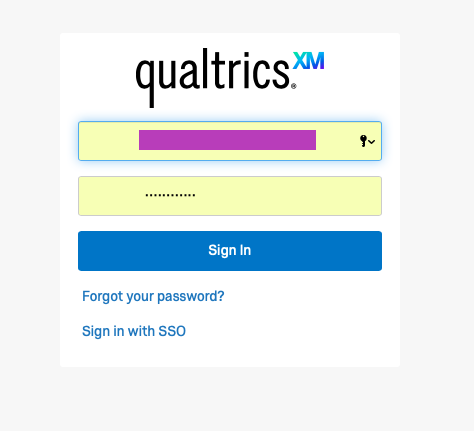
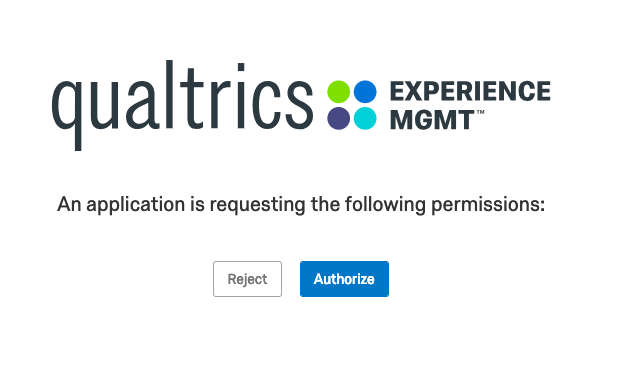
Here are the screens the user sees as the application posts to Qualtrics to obtain the access_token.
Expired Token Server Response
Access Tokens are valid for 60 minutes (3600 seconds) . After expiration, you will receive the error below. At that point use the refresh_token. A refresh token can be used one time. It is valid for one year.
{
  "meta": {
    "error": {
      "errorCode": "AUTH_6.0",
      "errorMessage": "invalid_client"
    },
    "httpStatus": "401 - Unauthorized",
    "requestId": "bed93eee-a684-44b7-8cdc-128251874a45"
  }
}
Import SSL Key
Obtain an SSL certificate and then import it to a Java keystore as shown below. You cannot use a self-signed certificate. Below is how we imported the certificate for this demonstration.
sudo openssl pkcs12 -export -in bundle.crt -inkey sampleslistener_com.key -out samplebrand.com -name sampleslistener

keytool -importkeystore -deststorepass xxxx -destkeypass xxxx -destkeystore keystore.jks -srckeystore samplebrand.com -srcstoretype PKCS12 -srcstorepass xxx -alias sampleslistener

sudo keytool -importkeystore -srckeystore keystore.jks -destkeystore keystore.jks -deststoretype pkcs12