Additional Security
Qualtrics Public API offers industry standard Authentication and Authorization. For customers who are interested in further security measures for their calls to the Public API there are a few additional options available for them.
URL whitelisting with CName check against Qualtrics SSL cert
For enhanced security, many network administrators restrict the traffic they allow to the internet using a feature called “Outbound URL Whitelisting.” This feature restricts the URLs an API client can access. Typically the network firewall or forward proxy provides this feature.
For all outbound traffic, the firewall checks whether the caller can access the “Server Name" in the request URL. If so, the firewall forward the request to the destination. Otherwise, the firewall blocks the traffic. This practice enforces a policy of “least privilege” by only allowing API clients to connect to authorized destinations. and it improves security by preventing API clients from connecting to malicious or unauthorized destinations.
To use URL whitelisting on encrypted traffic, the firewall must support the use of the Server Name Indication (SNI) TLS extension. When considering URL whitelisting, we recommend consulting your firewall vendor to ensure they support SNI. Before enabling URL Whitelisting, we suggest starting with a “log only” mode on your firewall to verify all necessary URLs have been allowed.
If you would like to use URL whitelisting on your firewall, you will need to obtain a Qualtrics Certification Public Key and configure your firewall to use that public key for traffic to Qualtrics servers. Please log a support ticket to get the Public Key and for help getting URL whitelisting up an running.
IP address Allowlisting
Qualtrics User Management allows setting restrictions on the IP addresses from which a user can sign in.
Here's a link to the Support Page on user permissions. Within that page, there is a bullet item called Allowed IP Addresses that contains the instructions on how to set these for a user.
You can also apply these restrictions to the user account that is making API calls. Please contact a brand admin to enable this feature (in the Admin Organization Settings' Public API tab) to apply the same IP address restrictions for API calls. (Note the restriction will be the same values configured in the above UI.) The permissions set within the UI will also apply to API calls once a brand admin enables the feature. (Note: it is not possible to set different IP restrictions between the UI and API).
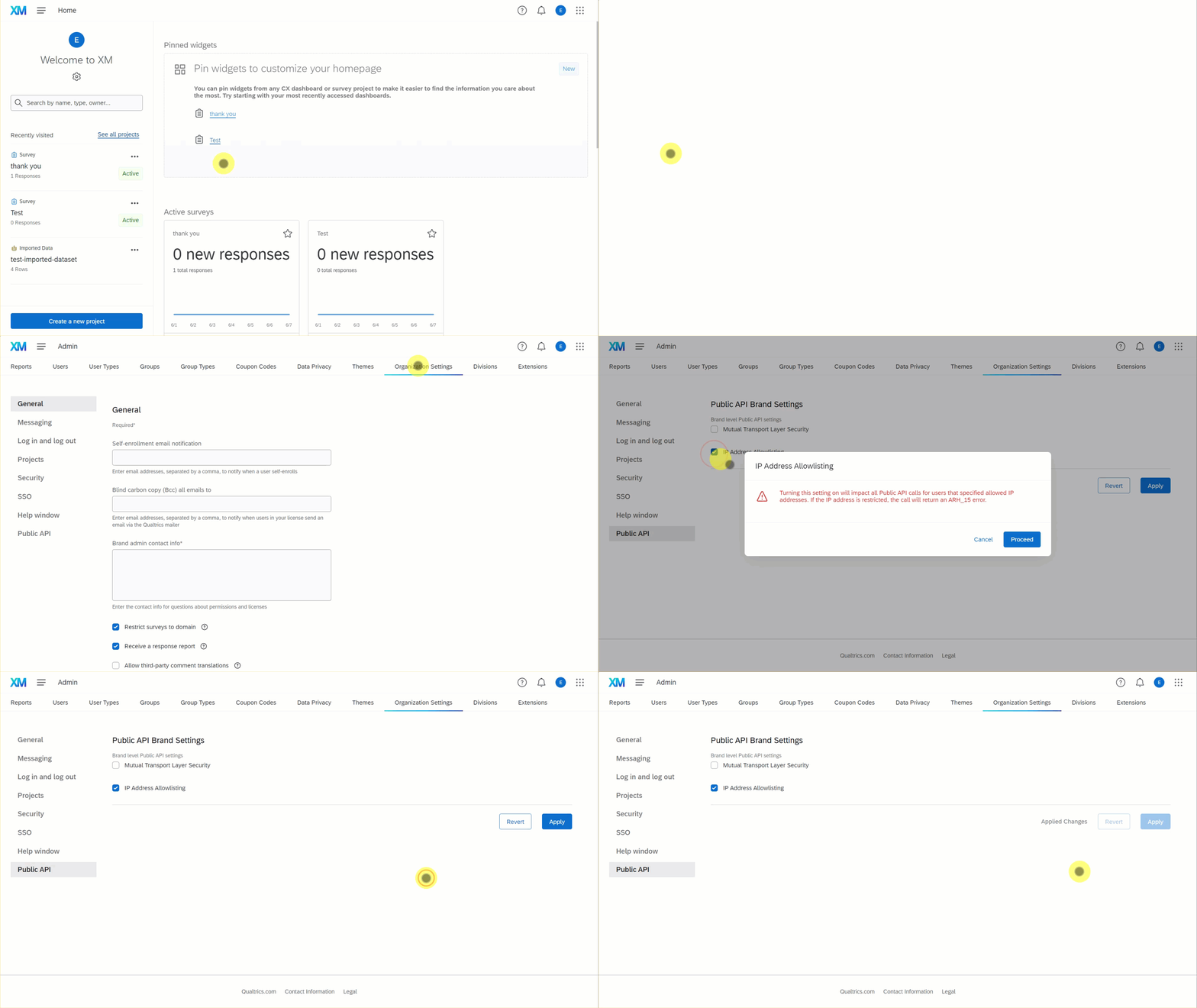
To enable IP address allowlisting from the Organization Setting screen:
- From the Qualtrics Home Screen, select Admin > Organization Settings > Public API.
- Select IP Address Allowlisting. A confirmation box with warning message appears.
- Read the warning message then select Proceed to confirm your choice.
- Select Apply to apply the change.
Outbound Allow Listing
"Outbound IP allow list" cannot be used
Due to Qualtrics’ use of a highly distributed content delivery network, it is not possible to use an “Outbound IP allow list” for access to any *.qualtrics.com site. This restriction includes vanity domains.
Some customers may have Outbound Allow listing requirements for accessing the platform from their corporate environment. Outbound allow listing restricts the websites users in a corporate environment are able to access. Outbound allow listing to Qualtrics is not supported and highly discouraged.
Qualtrics uses a highly distributed content delivery network and web application firewall (provided by our vendor Akamai). The web application firewall detects and prevents malicious traffic and prevents DDoS attacks. Because this is an absolutely critical functionality, bypassing the WAF is not an option. The content delivery network uses an extremely large number of IP addresses. Because of this, it is not possible for customers to perform IP Allow Listing to enable access to the platform.
While IP Allow Listing the Akamai CDN is not possible, it is possible to allow listing based on a Hostname (i.e., “ca1.qualtrics.com”). To do this, the customer's firewall must support the use of the “Server Name Indication” TLS Extension or perform outbound TLS decryption to inspect the HTTP Host header. The customer’s IT team is responsible for configuration and testing of such a deployment. The Qualtrics engineering team is not able to offer direct support for a customer attempting to implement listing based on a Hostname.
Mutual Transport Layer Security (mTLS)
Mutual Transport Layer Security (mTLS) authentication ensures both the API caller and Qualtrics Public API servers encrypt and secure traffic in both directions. This adds an additional layer of security on top of the standard API authentication mechanisms (such as API Token or OAuth).
Setting up mTLS is an involved process that requires coordination with Qualtrics API Engineering team. For specific instructions on setting up mTLS, review the Mutual Transport Layer Security instruction guide.