Things to Know About the API
This is a collection of useful things to know about the Qualtrics API.
Code and Qualtrics Support
Our support team does not offer assistance or consultation on custom coding, but you can always try asking our community of dedicated users. If you’d like to know more about our custom coding services you can commission, please contact your Qualtrics Account Executive.
Getting Your Developer API Token
Using the API Token is Less Secure than OAuth
There is a simpler way to authorize when calling your API, and API Token. This is NOT suggested for production use due to it being less secure and more difficult to maintain for your code. However, when getting to know the API, you may find this simpler method easier to use. You can find or create your API token by logging into Qualtrics using your Brand ID's login page and visiting your account settings page. Navigate as shown below:
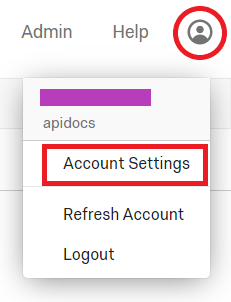
Once you are on the settings page, navigate to the Qualtrics IDs page and find the API table that looks like this:
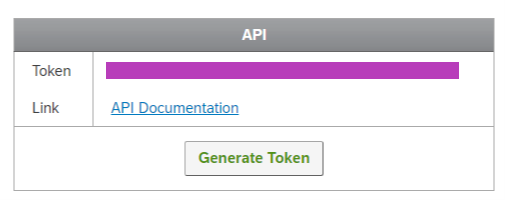
If the token, marked over in purple above, already exists, you'll need to copy it for your use in API calls. The "Generate Token" button will generate a new token every time you push it. It will overwrite and invalidate the token that existed before, thereby breaking any code that used it.
Generate Token Replaces API Token
If you already have an API token, use care because "Generate Token" will replace it with a new one. From then on any existing API calls will not work until they are updated to use the new token.
Where the documentation in this guide calls for an OAuth Bearer Token, you would instead use a simplified call that simply sends the API Token as a Basic Authentication token named X-API-TOKEN. The example below shows this use for Who Am I.
curl -H 'X-API-TOKEN: {yourtokenhere}' -X GET https://{yourdatacenterid}.qualtrics.com/API/v3/whoami
import urllib.request #default module for Python 3.X

url = 'https://{yourdatacenterid}.qualtrics.com/API/v3/whoami'
header = {'X-API-TOKEN': '{your API Token Here}'}

req = urllib.request.Request(url,None,header) #generating the request object

handler = urllib.request.urlopen(req) #running the request object

print(handler.status) #print status code
print(handler.reason)

data = handler.read()
print (data)
Use Care When Sharing Your API Token
The API Token is never shared in clear text from Qualtrics, and the only way it can be accessed is by a user authenticating with Qualtrics and navigating to the page above. However, once you have it in clear text, it is your responsibility to keep it safe. Your API Token is the Key to the Throne, and anyone in possession of it can manipulate your experience management through this API.
Keep it Safe.
Key Rotation
We highly recommend you rotate your API-token regularly (once a year) to help prevent theft. The best way to manage key rotation is to switch from X-API-TOKEN to OAuth 2.0, which includes automatic token expiry. Follow our OAuth 2.0 guide for a seamless transition without downtime.
Note: Rotating X-API-TOKEN will expire the current token and likely cause downtime.
If you have many people using your APIs, use OAuth Authencation to keep control of who can do what when.
Large Result Sets and Pagination
Many of the API calls you make will have a large number of items returned in the results. In order to make this easier to deal with, the Qualtrics API automatically paginates the results of large requests. There are two types of pagination you may find in Qualtrics APIs:
Numerical Id Based Pagination
If the underlying pagination is based on a numeric Id, you should see a pageSize and an offset parameter you can add to the query string (you may also receive this from the result as shown below):
- offset: page number the caller wants
- pageSize: size of each page
The recommended page size is <= 100, and the maximum page size is usually 500
You should find a object like below in the response for a paginated result:
{
  "links": {
    "prev" : {
      "href": "<REST URL TO PREVIOUS PAGE>"
    },
    "next": {
      "href": "<REST URL TO NEXT PAGE>"
    }
  },
  "result": {
    "<your return value here>"
  }
}
Use value returned by the "links": { "next: { field
Always use the value returned by the
"links": { "next: {field if it exists. This will avoid breaking changes if pagination schemes are changed.
Token Based Pagination
Some underlying data may use token based pagination, i.e. the uniqueId of last response. If this is the case for the API you're calling, you should find a pageSize and a skipToken parameter you can use in the query string: .
- skipToken: The id of the last value returned.
- pageSize: size of each page
The recommended page size is <= 100, and the maximum page size is usually 500
When this happens, you will receive part of the result, followed by a nextPage URL. In order to get the rest of the results, you send an HTTP GET request to the given URL, and continue doing so until you receive a nextPage URL set to null. Pseudo code below:
GET results from API
ProcessResults()
while (nextPage != null){
    GET results from nextPage URL
    ProcessResults()
}
Idempotent Requests
Some requests within the Qualtrics API enforce idempotency for safely retrying requests without accidentally performing the same operation twice. For example, if a request to adjust the incentive points for a contact fails due to a network connection error, you can retry the request with the same idempotency key to guarantee that the adjustment only happens once.
We will always send back the same response for requests made with the same key.
Dates and Times
The Qualtrics APIs uses dates and time values which follow the ISO 8601 standard. Each value represents a specific point in time.
In general, although the ISO 8601 standard specifies many different date and time formats, the typical date and time value specifies the date as YYYY-MM-DD (where YYYY indicates a four-digit year, MM is a two-digit month, and DD is the two-digit day of the month) followed by the character "T" and then the time as hh:mm:ss (where hh is a two-digit hour in military time format [00-23, no AM or PM], mm is the two-digit minutes past the hour, and ss is the two-digit seconds) followed by the character Z which indicates UTC. Instead of Z, a time zone offset from UTC can be indicated as plus (+) or minus (-) followed by HH:mm.
The following shows examples of ISO 8601 dates and times:
2016-04-01T07:31:43Zrepresents April 1, 2016 at 7:31:43 AM UTC.2017-02-07T14:02:11-08:00represents February 7, 2017 at 2:02:11 PM in the PST time zone (UTC minus 8 hours).
All date and time values returned by the APIs are expressed in UTC unless the API allows you to return values in local time. For example, Create Response Export has the useLocalTime parameter that, if set to true, causes the times in the responses to be expressed in the time zone set in the admin user interface. See Managing Your Account for more information.
Object Order in the JSON Format
According to json.org: "An object is an unordered set of name/value pairs." As JSON objects are by definition unordered, the ordering of attributes is not guaranteed to be stable and changes to this ordering of JSON objects are not breaking changes.
Using the Wrong Data Center
API calls using OAuth must be made to the data center where the client_id and client_secret were created. If the call goes to the incorrect data center, you will receive an error in the meta of the response:
{
  "meta": {
    "httpStatus": "401 - Unauthorized",
    "error": {
      "errorMessage": "Unrecognized X-API-TOKEN.",
      "errorCode": "DCD_7"
    },
    "requestId": ""
  }
}
If you use the less secure X-API-TOKEN and call the wrong data center, you may receive the response above, or your request may be proxied to the correct data center. A proxied call could significantly extend the time it takes for you to receive a response. You will know your request was proxied since the meta field will contain the following notice:
{
  "result": {},
  "meta": {
    "httpStatus": "200 - OK",
    "requestId": "b698813c-bde1-4734-85e6-931b2db3e83a",
    "notice": "Request proxied. For faster response times, use this host instead: yourdatacenterid.qualtrics.com"
  }
}
Breaking Changes
Occasionally, we must remove product capabilities to ensure our products can meet new scenarios and use cases. A “Breaking Change” is a change that may require you to make changes to your application in order to avoid disruption to your integration.
See Qualtrics’ API Evolution Philosophy to learn more about how we handle breaking and non-breaking changes to our APIs.