Embed Insights Plugin Guide
Objectives
This guide helps you:
- Learn the details of Embed Insights Plugins
- Understand the different types of insights that can be embedded
Prerequisites
Before continuing with this guide we recommend that you review and complete these guides:
Before continuing with this guide we recommend you review and complete the .
Also you will need to have license and access to the following:
- Resource being embedded e.g. dashboards
- Qualtrics Public APIs
Lastly, A successful integration from your system to Qualtrics requires that:
- Your system supports OAuth 2.0 based authentication (Creating access tokens and refreshing).
- Your system supports an iframe on the end user UI page.
Supported Features
These Qualtrics features can be embedded into external systems.
| Type | Features |
|---|---|
| Dashboard Widgets | Breakdown Bar, Breakdown Table, Breakdown Trends, Focus Areas, Gauge Chart, Image, Image Slideshow, Key Drivers, Map View, Multiple Source Table, Number Chart, Pie Chart, Pivot Table, Record Grid, Response Ticker, Rich Text Editor, Scatter Plot, Simple Chart, Simple Table, Star Rating, Trend Chart, Twitter, Word Cloud, Text IQ Table, Text IQ Bubble Chart |
| EX Dashboard Widgets | Bubble Plot, Demographics Breakout, Engagement Summary, Heat Map, High Low Table, Response Rates |
| XiD | Profile Card |
Glossary
| Term | Explanation |
|---|---|
| Brand | Another name for a Qualtrics instance. Typically denoted via the URL e.g. brand.qualtrics.com |
| Data center | The physical location of your Qualtrics brand/instance based on geographic regions. You can find this for your brand in the Qualtrics account settings (Finding Qualtrics IDs) |
| Proxy URL / Resource URL | A full URL that can be directly inserted to an iframe or opened as a new page that will allow direct access to a Qualtrics widget without any login. (Authentication handled prior). |
Tips and Tricks
- When initially testing or setting up a proof-of-concept, it’s best to use API Token or client credentials authentication as it simplifies the authentication process.
- When considering how users will connect their account, be sure you can support OAuth2 Authorization code grant flow. This requires storing refresh and access tokens for a specific user, which is a non-trivial process.
- Sessions last for 15 minutes, after which time a new session will be needed and the resource URL refreshed to ensure updates can still propagate. Your application will need to either automatically refresh the page or widget for the user or require the, to refresh it manually.
Embedding Flow
This section outlines a straightforward example flow of embedding a Qualtrics out-of-the-box Dashboard/Reporting Widget or XiD Profile Card from a third-party developer perspective.
Setup Phase
This part of the flow outlines both development and configuration for allowing components to be embedded into a third-party system. The main considerations are as follows:
Authentication connections
OAuth 2.0 connections will need to be configured to allow service-to-service communication (client credentials) or individual user communication (authorization code).
Which of these will depend on your use case and requirements, but the authentication connection will need to be established from your system.
Backend Service Communication and UX
At its core your platform needs to:
- Obtain a valid OAuth 2.0 access token. If the existing token is expired, then a new one must be obtained via the refresh token.
- Make an HTTP request to create and return a new embedding session. This request may take in additional context based on the user.
- Parse the
resourceUrlfrom the create session HTTP response. - Use the
resourceUrlas thesrcof the iframe to load the Qualtrics asset into your platform UX.
How users in your system configure and deploy this functionality is ultimately up to how you decide to implement it to best meet your use case.
Usage phase
These high-level steps outline what would occur when users of your platform load a page with a Qualtrics Embed Insights Plugin configured in it. Your system would:
- Locate and use the appropriate OAuth 2.0 credential (user specific or service to service) to authenticate a HTTPS request to Qualtrics for an Embed Session.
- Process business logic and show appropriate errors to the user e.g. access control
- Parse the
resourceUrlfrom the HTTP response from step #1. - Pass the
resourceUrlvalue to your UI and set it as thesrcof the iframe. - The user then can view and interact with the loaded Qualtrics Embed Insights widget
Integration
This section provides more details into interacting with and integrating the Qualtrics Embed Insights Plugin into your system.
Overview
The integration can be summarized by the below sequence diagram.
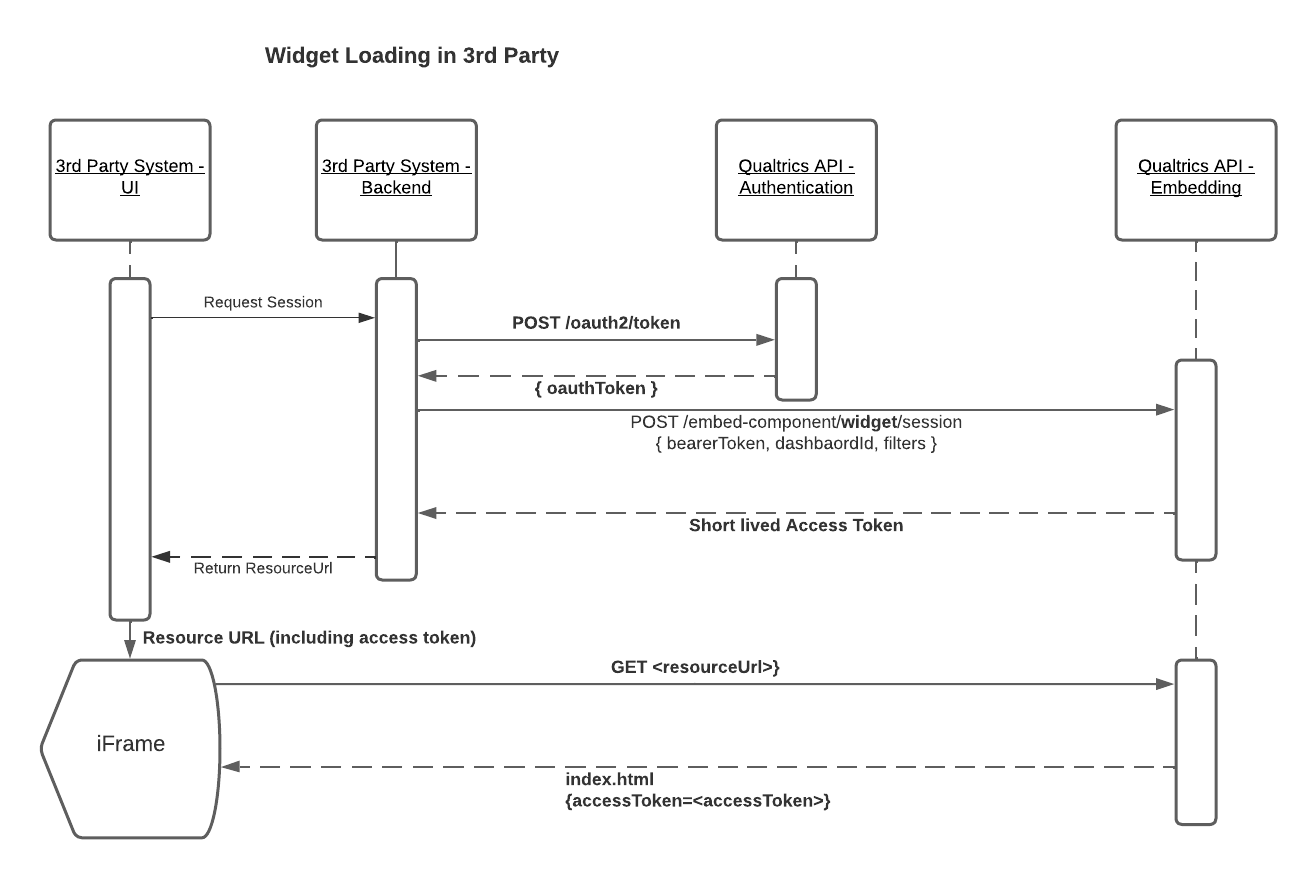
The flow consists of:
- Generate a valid OAuth2 access token for the user that is viewing the embedded widget
- Call the session endpoint with the OAuth2 token from step 1 to generate a resource URL that consists of a single-use access token. This token allows the specified link to access the resource as the authenticated Oauth2 user and has a 15 minute time-to-live (TTL)
- Load the content within an embedded context in an iframe using the unique URL from step 2
Authentication
In order to authenticate your system with Qualtrics to perform embedding, you must perform OAuth 2.0 authentication for the users you wish to connect. Please see these guides on obtaining an OAuth 2.0 client and usage:
- Client Credentials
- Ideal for a service account you wish to use for all embedding
- Authorization Code
- For allowing individual users to authenticate with their Qualtrics account and see data specific to them
Your system will need to ensure it can manage OAuth 2.0 flows for both service accounts (client credentials) and individual users (authorization code).
Embedding API
The below table outlines the currently
| Name | Resource | Methods | Endpoint | Auth Type |
|---|---|---|---|---|
| Create Dashboard Session | dashboard | POST | /API/v3/embedded-insights/dashboards/:dashboardId/sessions | OAuth 2.0 (header) |
| Create Widget Session | widget | POST | /API/v3/embedded-insights/dashboards/:dashboardId/widgets/:widgetId/sessions | OAuth 2.0 (header) |
| Create A Profile Card Session | profile card | POST | /API/v3/embedded-insights/profile-cards/:contactId/sessions | OAuth 2.0 (header) |
Create Session
This endpoint is the main interaction between your platform and Qualtrics for the purpose of embedding. Here you will request the resource you wish to embed, the relevant IDs, filters, dimensions etc. If a valid request as part of the response will be a valid resourceUrl that will allow you to view the Qualtrics component with any additional authentication.
- A valid
resourceUrlwill have a time to live (TTL) of 15 minutes. After the TTL expires, all further HTTP requests made with thatresourceUrlwill fail and your system must generate a new session. - The create session request must be made from a backend source. Making this request from the front end (UI) will expose credentials in the form of OAuth 2.0 tokens.
Endpoints
Qualtrics Reporting Widget API
Description
Generate a temporary session URL which can be embedded to allow read access to a widget from another system.
Learn more about this endpoint from our Public API documentation
Syntax
method: POST
endpoint: /API/v3/embedded-insights/dashboards/:dashboardId/widgets/:widgetId/sessions
headers: {
  Authorization: String,
  App-Id: String
}
parameters: {
  dashboardId: String,
  widgetId: String
}
Optional Body Parameters
body: {
  dimensions: {
    height: String,
    width: String
  },
  filter: [{
    <filterKey: String> : {
      type: String,
      value: String
    }
  }]
}
Examples
{
  method: POST
  endpoint: "https://iad.qualtrics.com/API/v3/embedded-insights/dashboards/619fd157bcd7880010b8e7d7/widgets/Widget_b6a1de62-d41a-4b6f-bf45-21efa7a639f2/sessions"
  headers: {
    Authorization: "Bearer GENERATED_BEARER_TOKEN",
    App-Id: "OWNED_APP_ID",
    Content-Type: "application/json"
  }
  body: {
    dimensions: {
      height: "600",
      width: "300"
    },
    filter: [{
      "Region" : {
        type: "GenericValue",
        value: "NA"
      }
    }]
  }
}
curl -X POST -H "content-type: application/json" -H "Authorization: Bearer GENERATED_BEARER_TOKEN" -H "App-Id: OWNED_APP_ID" -d '{"dimensions": { "height": "600", "width": "800"}}' https://iad.qualtrics.com/API/v3/embedded-insights/dashboards/619fd157bcd7880010b8e7d7/widgets/Widget_b6a1de62-d41a-4b6f-bf45-21efa7a639f2/sessions
curl -X POST -H "content-type: application/json" -H "Authorization: Bearer GENERATED_BEARER_TOKEN" -H "App-Id: UNIQUE_APP_ID" -d '{ "filter": { "Region": {"value": "NA", "type": "GenericValue"}}, "dimensions": { "height": "600", "width": "800"}}' https://iad.qualtrics.com/API/v3/embedded-insights/dashboards/619fd157bcd7880010b8e7d7/widgets/Widget_b6a1de62-d41a-4b6f-bf45-21efa7a639f2/sessions
{
  "result": {
    "resourceUrl":"https://brandId.iad1.qualtrics.com/embed-component/v1/widget/proxy/reporting-dashboard?encodedFragment=%2Fdashboard%2F61927eeed2ffc3001073da31%2Fwidget%2FWidget_b3e919e5-906f-4424-b106-59b5136211f&width=800&height=568&accessToken=168727e9fb9f115d7496758f7d4fe664cc7134482c5ed892637cc9f029c02b98#/dashboard/61927eeed2ffc3001073da31/widget/Widget_b3e919e5-906f-4424-b106-59b513621b1f?width=800&height=568"
  },
  "meta":{
    "statusCode":"201 - Created",
    "requestId":"91e2f957-236c-4648-98ff-94128449668b"
  }
}
Qualtrics Reporting Dashboard API
Description
Generates a temporary session URL which can be embedded to allow read access to a dashboard from another system.
Learn more about this endpoint from our Public API documentation.
Syntax
{
  method: POST
  endpoint: /API/v3/embedded-insights/dashboards/:dashboardId/sessions
  headers: {
    Authorization: String,
    App-Id: String
  }
  parameters: {
    dashboardId: String
  }
}
Examples
{
  method: POST
  endpoint: "https://iad.qualtrics.com/API/v3/embedded-insights/dashboards/619fd157bcd7880010b8e7d7/sessions"
  headers: {
    Authorization: "Bearer GENERATED_BEARER_TOKEN",
    App-Id: "UNIQUE_APP_ID",
    Content-Type: "application/json"
  }
}
curl -X POST -H "content-type: application/json" -H "Authorization: Bearer GENERATED_BEARER_TOKEN" -H "App-Id: UNIQUE_APP_ID" https://iad.qualtrics.com/API/v3/embedded-insights/dashboards/619fd157bcd7880010b8e7d7/sessions
{
  "result": {
    "resourceUrl":"https://brandId.iad1.qualtrics.com/embed-component/v1/widget/proxy/reporting-dashboard?encodedFragment=%2Fdashboard%2F61927eeed2ffc3001073da31&accessToken=168727e9fb9f115d7496758f7d4fe664cc7134482c5ed892637cc9f029c02b98#/dashboard/61927eeed2ffc3001073da31"
  },
  "meta": {
    "statusCode":"201 - Created",
    "requestId":"91e2f957-236c-4648-98ff-94128449668b"
  }
}
Qualtrics Profile Card API
Description
Generate a temporary session URL which can be embedded to allow read access to a profile card from another system.
Learn more about this endpoint from our Public API documentation
Syntax
method: POST
endpoint: /API/v3/embedded-insights/profile-cards/:contactId/sessions
headers: {
  Authorization: String,
  App-Id: String
}
parameters: {
  contactId: String
}
Examples
{
  method: POST
  endpoint: "https://iad.qualtrics.com/API/v3/embedded-insights/profile-cards/CID_0GNoW205jn4fsvY/sessions"
  headers: {
    Authorization: "Bearer GENERATED_BEARER_TOKEN",
    App-Id: "UNIQUE_APP_ID",
    Content-Type: "application/json"
  }
}
curl -X POST -H "content-type: application/json" -H "Authorization: Bearer GENERATED_BEARER_TOKEN" -H "App-Id: UNIQUE_APP_ID" https://iad.qualtrics.com/API/v3/embedded-insights/profile-cards/CID_0GNoW205jn4fsvY/sessions
{
  "result": {
   "resourceUrl": "https://brandId.iad1.qualtrics.com/embed-component/v1/profile-card/proxy/app/profile-card?contactId=CID_0pO2dlxNAQi4uIm&accessToken=397f8fb7bc83f66b9e4a18b93691148e10126a559b69bab376bf42f78809205e"
  },
  "meta": {
    "requestId": "12dc0be1-1dad-4a77-b829-b832faa9fac3",
    "httpStatus": "201 - Created"
  }
}
Proxy Request
The entrypoint/prefix for a given embedded resource will be provided as part of a valid session request.
A proxy request must contain an accessToken in the URL as a query string to correctly authenticate. It is a query string to allow it to be used in iframe by directly adding the resourceUrl to the src property.
Errors
Error cases & response
Session Creation
Session creation authenticates the OAuth 2.0 authenticated request and returns a resourceUrl which is used directly as a page location or the src of an iframe.
Content-type of response is application/json. Response contains a meta object $.meta.error.styledHtmlErrorMessage that contains a HTML user friendly error that the third party app can directly show to the user which includes a requestId.
The requestId can be used by Qualtrics to help get further information when troubleshooting is required.
| Error | Error Code | Description |
|---|---|---|
| Bad Request | 400 | Returned when creating a session when incorrect input data is provided. |
| Unauthenticated | 401 | Returned when a request with an invalid or missing OAuth 2.0 token is provided. |
| Unauthorized | 403 | Returned when the authenticated user does not have access to Embed components. |
| Rate Limit | 429 | Too many requests, reduce load and try again a bit later. |
Component Loading
Any error that occurs after a session is created and resourceUrl provided, the status code of the request will be set and the response will be the styledHtmlErrorMessage as described from the session request. This will be a human-friendly message.
| Error | Error Code | Description |
|---|---|---|
| Bad Request | 400 | If any part of the request is malformed or invalid. |
| Unauthenticated | 401 | No access token provided or is invalid. |
| Unauthorized | 403 | The access token expired or was generated for a different resource. |
| Rate Limit | 429 | Too many requests, reduce load and try again later. |