Survey Response Import Guide
Here we show how to import survey responses into Qualtrics. The assumption is that you have created the survey in Qualtrics and have created some other mechanism to gather responses. But you need to use a specific format in order to import those responses into Qualtrics.
There is not an API to give the survey structure in the format required for the input. So the procedure is to download a .csv file of the survey from the Data and Analysis screen to get the structure. Then you will have to write a program to provide responses in the same format and then call the Survey Response Import API to load those into Qualtrics.
Download Survey Structure
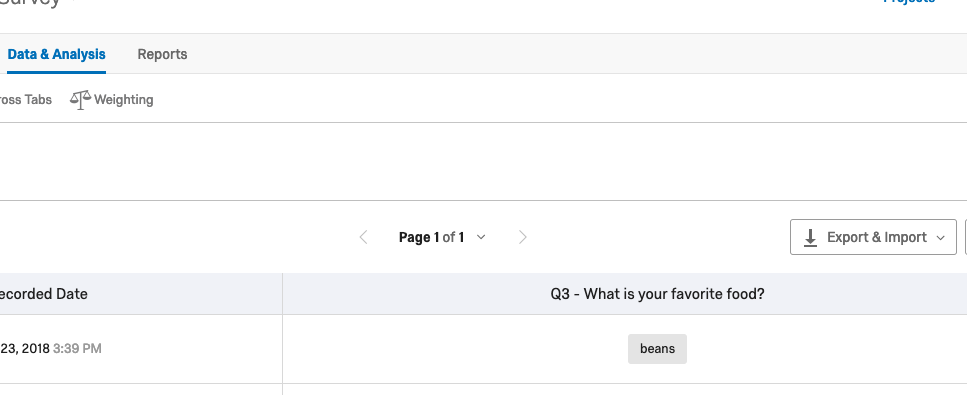
If you have no responses to your survey yet, you need to complete the survey at least once on Qualtrics.com. Once you have one or more responses to the survey, you can download them in .csv format. This will provide you the structure you need for the import. The first three lines are required headers. Lines after that are data. You can use the structure of the .csv. to see how to format the responses you wish to import.
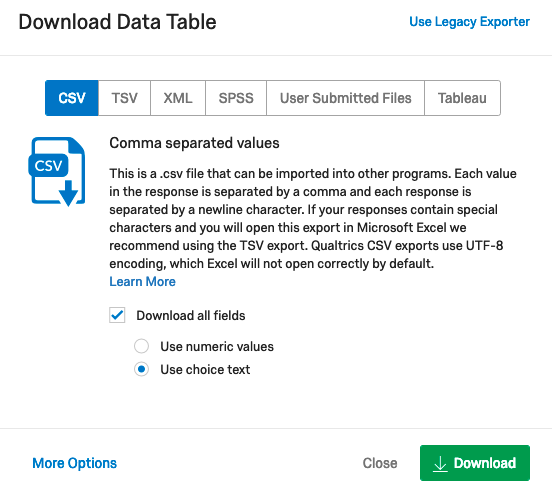
Pick the CSV button and then click Download-
The resulting file will look something like this. Next import this into Google Sheets or Microsoft Excel so that you can more easily see the columns.
StartDate,EndDate,Status,IPAddress,Progress,Duration (in seconds),Finished,RecordedDate,ResponseId,RecipientLastName,RecipientFirstName,RecipientEmail,ExternalReference,LocationLatitude,LocationLongitude,DistributionChannel,UserLanguage,Q1_1,Q1_2,Q1_3,Q3
Start Date,End Date,Response Type,IP Address,Progress,Duration (in seconds),Finished,Recorded Date,Response ID,Recipient Last Name,Recipient First Name,Recipient Email,External Data Reference,Location Latitude,Location Longitude,Distribution Channel,User Language,Are you happy with our service? - Delivery was good,Are you happy with our service? - Price is good,Are you happy with our service? - Product arrived undamaged,What is your favorite food?
"{""ImportId"":""startDate"",""timeZone"":""Europe/Berlin""}","{""ImportId"":""endDate"",""timeZone"":""Europe/Berlin""}","{""ImportId"":""status""}","{""ImportId"":""ipAddress""}","{""ImportId"":""progress""}","{""ImportId"":""duration""}","{""ImportId"":""finished""}","{""ImportId"":""recordedDate"",""timeZone"":""Europe/Berlin""}","{""ImportId"":""_recordId""}","{""ImportId"":""recipientLastName""}","{""ImportId"":""recipientFirstName""}","{""ImportId"":""recipientEmail""}","{""ImportId"":""externalDataReference""}","{""ImportId"":""locationLatitude""}","{""ImportId"":""locationLongitude""}","{""ImportId"":""distributionChannel""}","{""ImportId"":""userLanguage""}","{""ImportId"":""QID1_1""}","{""ImportId"":""QID1_2""}","{""ImportId"":""QID1_3""}","{""ImportId"":""QID3""}"
2018-08-08 13:19:59,2018-08-08 13:20:07,IP Address,213.170.48.166,100,8,True,2018-08-08 13:20:07,R_XSAgJXJtB6JykOR,,,,,40.416702270508,-3.6838073730469,anonymous,EN,Strongly Agree,Agree,Neither agree nor disagree,
Import Structure into Spreadsheet to View more Clearly.
There are too many columns to show on one screen here, so we show them using several images.
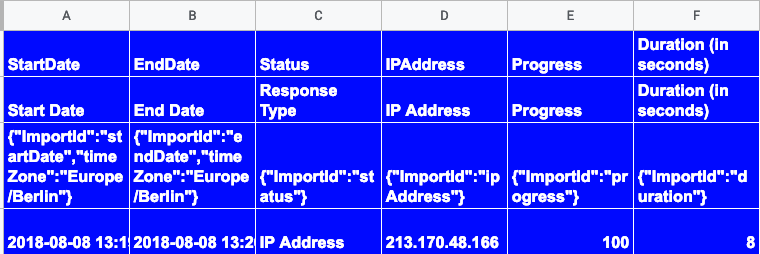
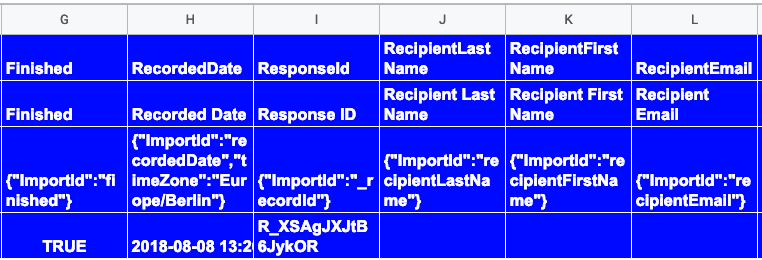
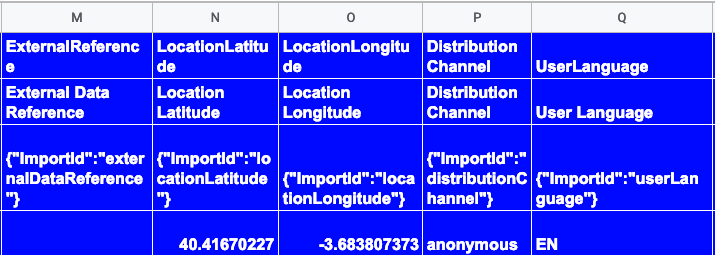
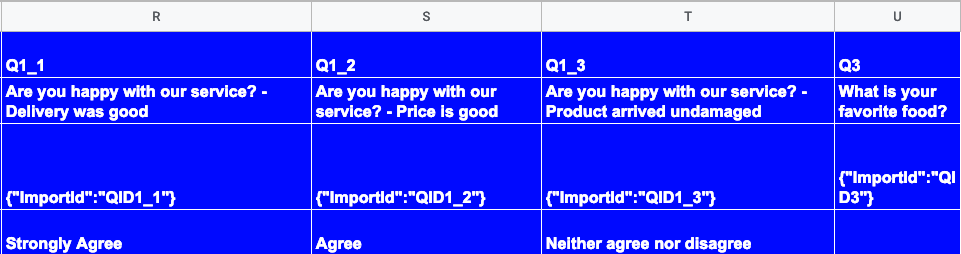
The columns A through Q are the same for all surveys. The next columns are questions. Below is a survey with one matrix type question and one multiple choice.
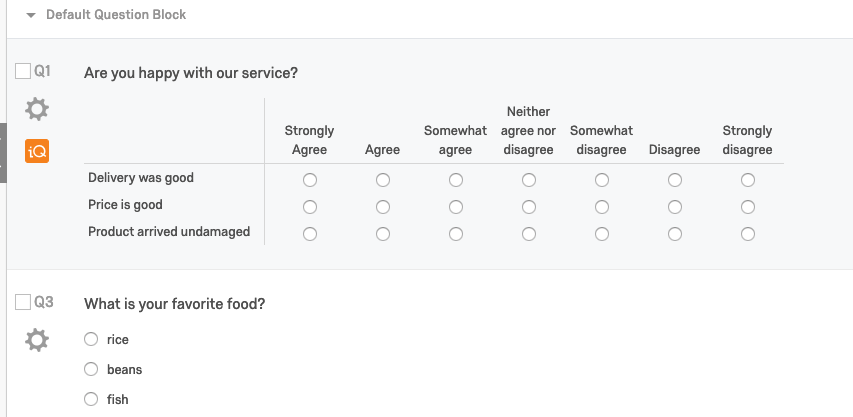
You’ll notice the first question here is a matrix table, so the data is actually subdivided into four separate columns, one for each of the three matrix statements and one for the simpler question.
- Delivery Was Good
- Price is Good
- Product Arrived Undamaged
- What is your Favorite Food
In the spreadsheet these are shown as:
Q1_1, Q1_2, Q1_3, and Q3.
Here is what that survey looks like in Qualtrics.
Python Code to Generate Responses
You can use this program to debug your own.
The code below reads the survey definition and then randomly picks from the possible answers to fill in these columns. For columns A through Q it generates a random value bases upon the column name and type.
To run this:
-
Create a config file called config.yaml with the surveyId and put it in the same folder as the Python code.
-
Rename the downloaded file, which is long and has spaces, survey.csv and put it in the same folder as the Python code.
-
Run the program with the command line argument (survey downloaded csv) (number of records to create).. It will create the output in a file calls responses.csv.
-
Import response.csv with this curl command:
curl -X POST -H 'X-API-TOKEN: <API Key>'
    -H 'Content-Type: text/csv; charset=UTF-8'
    --data-binary '@responses.csv'
    'https://co1.qualtrics.com/API/v3/surveys/(survey_ID)/import-responses'
It will respond like this. Notice the progress ID as you will need that below to retrieve the status.
{"result":{"progressId":"31c4bf2f-3a77-4ab3-98e1-8ecc147ab16d","percentComplete":0.0,"status":"inProgress"},"meta":{"requestId":"f636820d-13cf-4b54-b16f-064cc8a65673","httpStatus":"200 - OK"}}
surveyId: "SV_9HX9sLOh2vPCMZf"
Code and Qualtrics Support
Our support team does not offer assistance or consultation on custom coding, but you can always try asking our community of dedicated users. If you’d like to know more about our custom coding services you can commission, please contact your Qualtrics Account Executive.
import string
import yaml
import os
import requests
import simplejson as json
from datetime import timedelta
import datetime
import time
import random
import struct
import socket
import sys

def strGenerator(size):
    return ''.join(random.choice(string.ascii_lowercase) for _ in range(size))

def genAnswer(questionNumber,survey):
    for s in survey:
        for q in s.getQuestionNumber():
            if (questionNumber == q):
               possibleAnswers=s.getChoiceText()
               return possibleAnswers[random.randint(0,len(possibleAnswers)-1)]

def addHeader(line1,line2,line3,f):

    l = line1.strip('\').split(",")
    row = []
    f.write(line1)
    f.write(line2)
    f.write(line3)

def addColumns():

    row = []

    # StartDate
    row.append((datetime.datetime.now() + timedelta(days=random.randint(-20, -10))).strftime('%Y-%m-%d %H:%M:%S'))

    # EndDate
    row.append((datetime.datetime.now() + timedelta(days=random.randint(-10, -1))).strftime('%Y-%m-%d %H:%M:%S'))

    # Status
    row.append("IP Address")

    # IPAddress
    row.append("10." + str(random.randint(0,254)) + "." + str(random.randint(0,254)) + "." + str(random.randint(0,254)))

    # Progress
    row.append(100)

    # Duration (in seconds)
    row.append(random.randint(5, 35))

    # Finished
    row.append("TRUE")

    # RecordedDate
    row.append((datetime.datetime.now() + timedelta(days=random.randint(-10, -1))).strftime('%Y-%m-%d %H:%M:%S'))

    # RespondId
    row.append("RS_"+ strGenerator(14))

   # RecipientFirstName

    row.append(strGenerator(random.randint(3, 7)))

   # RecipientLastName

    row.append(strGenerator(random.randint(3, 7)))

   # RecipientEmail

    row.append(strGenerator(random.randint(3, 7)) + "qualtrics.com")

  # ExternalReference
    row.append("")

   # LocationLatitude
    row.append(random.uniform(-180,180))

   # LocationLongitude
    row.append(random.uniform(-180,180))

    # DistributionChannel
    row.append("anonymous")

    # UserLanguage
    row.append("EN")

    return row

def writeRow(f,row):

    line = ""
    for r in row:
        line=line + str(r) + ","

    l = line[:-1]
    l = l + '\'
    f.write(l)

def addRows(line1,f,survey):

    l = line1.strip('\').split(",")

    row = addColumns()

    for i in range(17,len(l)):
        answer = genAnswer(l[i],survey)
        row.append(answer)
    writeRow(f,row)

class Question():


    def __init__(self,questionId):
        self.questionText = "";
        self.questionId = questionId
        self.questionNumber = []
        self.choiceText = []
        self.subQuestions = []

    def addQuestionType(self,questionType):
        self.questionType = questionType['type']

    def addQuestionText(self,questionText):
        self.questionText = questionText

    def addChoiceText(self,choiceText):
        for k,v in choiceText.items():
            self.choiceText.append(v['description'])

    def addQuestionNumber(self,exportColumnMap):
        for k,v in exportColumnMap.items():
            if v['question'] == self.questionId:
                self.questionNumber.append(k)

    def addSubQuestions(self,subQuestions):
        for k,v in subQuestions.items():
            self.subQuestions.append(v['description'])

    def getQuestionText(self):
        return self.questionText

    def getChoiceText(self):
        return self.choiceText

    def getQuestionNumber(self):
        return self.questionNumber

    def getQuestionId(self):
        return self.questionId

    def getQuestionType(self):
        return self.questionType

    def getSubQuestions(self):
        return self.subQuestions

    def getQuestion(self):
        return self

def readStructure(surveyId, apiToken, dataCenter):

    headers = {'X-API-TOKEN': apiToken}

    url = "https://" + dataCenter + ".qualtrics.com/API/v3/surveys/" + surveyId

    response = requests.get(url, headers=headers)

    d = json.JSONDecoder()
    res = d.decode(response.text)

    r = res['result']


    questions = r['questions']
    exportColumnMap=r['exportColumnMap']

    survey = []

    for k, v in questions.items():
        question = Question(k)
        question.addQuestionNumber(exportColumnMap)
        question.addChoiceText(v['choices'])
        survey.append(question)
        question.addQuestionType(v['questionType'])
        if question.getQuestionType() == "Matrix":
            question.addSubQuestions(v['subQuestions'])

    return survey

def main():

    try:
        apiToken = os.environ['APIKEY']
        dataCenter = os.environ['DATACENTER']
    except KeyError:
        print("set environment variables APIKEY and DATACENTER")
        sys.exit(2)

    try:
        numLines = sys.argv[2]
        file = sys.argv[1]
    except IndexError:
        print ("usage:  <survey file>, <number of responses to generate>")
        sys.exit(2)

    config = yaml.load(open('config.yaml'))
    surveyId = config['surveyId']
    survey = readStructure(surveyId, apiToken, dataCenter)

    i = open(file,"r")
    lines = i.readlines()
    i.close()

    out = open("responses.csv","w")

    addHeader(lines[0],lines[1],lines[2],out)

    for i in range(1,int(numLines)):
        addRows(lines[0],out,survey)

    out.close()


if __name__ == "__main__":
    main()
Creates this file:
StartDate,EndDate,Status,IPAddress,Progress,Duration (in seconds),Finished,RecordedDate,ResponseId,RecipientLastName,RecipientFirstName,RecipientEmail,ExternalReference,LocationLatitude,LocationLongitude,DistributionChannel,UserLanguage,Q1_1,Q1_2,Q1_3,Q3
Start Date,End Date,Response Type,IP Address,Progress,Duration (in seconds),Finished,Recorded Date,Response ID,Recipient Last Name,Recipient First Name,Recipient Email,External Data Reference,Location Latitude,Location Longitude,Distribution Channel,User Language,Are you happy with our service? - Delivery was good,Are you happy with our service? - Price is good,Are you happy with our service? - Product arrived undamaged,What is your favorite food?
"{""ImportId"":""startDate"",""timeZone"":""Europe/Berlin""}","{""ImportId"":""endDate"",""timeZone"":""Europe/Berlin""}","{""ImportId"":""status""}","{""ImportId"":""ipAddress""}","{""ImportId"":""progress""}","{""ImportId"":""duration""}","{""ImportId"":""finished""}","{""ImportId"":""recordedDate"",""timeZone"":""Europe/Berlin""}","{""ImportId"":""_recordId""}","{""ImportId"":""recipientLastName""}","{""ImportId"":""recipientFirstName""}","{""ImportId"":""recipientEmail""}","{""ImportId"":""externalDataReference""}","{""ImportId"":""locationLatitude""}","{""ImportId"":""locationLongitude""}","{""ImportId"":""distributionChannel""}","{""ImportId"":""userLanguage""}","{""ImportId"":""QID1_1""}","{""ImportId"":""QID1_2""}","{""ImportId"":""QID1_3""}","{""ImportId"":""QID3""}"
2019-02-06 16:03:46,2019-02-20 16:03:46,IP Address,75.158.16.92,100,22,TRUE,2019-02-20 16:03:46,RS_tsgzpgpumptvor,cut,lkg,ealqualtrics.com,,-73.4154993016592,-158.406828770645,anonymous,EN,Disagree,Somewhat disagree,Somewhat agree,rice
Get Import Progress
Having loaded the responses.csv as shown below, note the progress ID and then use the next curl to retrieve the progress.
curl -X POST -H 'X-API-TOKEN: <API Token>'
    -H 'Content-Type: text/csv; charset=UTF-8'
    --data-binary '@responses.csv' 'https://co1.qualtrics.com/API/v3/surveys/SV_5gX7HWxwYs6Jt3f/import-responses'
{
  "result": {
    "progressId": "c9cccfe6-f05a-4248-a9fb-c913c5dee2b7",
    "percentComplete": 0,
    "status": "inProgress"
  },
  "meta": {
    "requestId": "f433c48d-0b7a-49b7-81c4-8724b787832d",
    "httpStatus": "200 - OK"
  }
}
curl -H 'X-API-TOKEN: <API Token>'
'https://co1.qualtrics.com/API/v3/surveys/SV_5gX7HWxwYs6Jt3f/import-responses/c9cccfe6-f05a-4248-a9fb-c913c5dee2b7'
Will give a response:
{
  "result": {
    "percentComplete": 100,
    "status": "success"
  },
  "meta": {
    "requestId": "67769750-1fb0-4535-8cd9-de5c74577b66",
    "httpStatus": "200 - OK"
  }
}
If you encounter a failing call
The requestId is unique to the call that was executed. If you contact support about an error, please be sure to provide the requestId and the timestamp of the request so that they can help investigate the reason for the call failure.
If you to go back and look at the Data and Analysis screen you would see now that any records you have imported will say imported in the Response Type field:
