Example Use Cases Walkthrough
Overview
Visit our Add Survey Translations Walkthrough for many examples in how to localize questions in your survey.
Create a New Survey
This example shows how to create a new survey with the default content. We will use the Create Survey API endpoint.
After you run the code below, note the surveyId of the newly-created survey under the Response tab. Use this in the remaining examples below
Code and Qualtrics Support
Our support team does not offer assistance or consultation on custom coding, but you can always try asking our community of dedicated users. If you’d like to know more about our custom coding services you can commission, please contact your Qualtrics Account Executive.
import os
import requests

# Setting user Parameters
apiToken = "API_TOKEN" # Replace with Account API Token
dataCenter = "ca1"

baseUrl = "https://{0}.qualtrics.com/API/v3/survey-definitions".format(
    dataCenter)
headers = {
    "x-api-token": apiToken,
    "content-type": "application/json",
    "Accept": "application/json"
}

data = {"SurveyName": "My New Survey","Language": "EN","ProjectCategory": "CORE"}

response = requests.post(baseUrl, json=data, headers=headers)
print(response.text)
{
  "meta": {
    "httpStatus": "200 - OK",
    "requestId": "da053721-f1d5-4f2e-9ea1-cea7fb4bc7e0"
  },
  "result": {
    "SurveyID": "SV_096ecQyLMysaaEZ",
    "DefaultBlockID": "BL_39n992mTOU9QkHr"
  }
}
Retrieve an Existing Survey
Retrieving an existing survey's definition will provide us with a good template and starting point for various data models we want to work with. In this case we want to focus in on the question's data model definition.
In the code below, we use the Get Survey Definition API call to show its structure. Replace the surveyId with one of your surveys, which you can find on the Account Settings/Qualtrics IDs screen. Also provide your own apiToken and datacenter.
import os
import requests

# Setting user Parameters
apiToken = "API_TOKEN" # Replace with Account API Token
dataCenter = "ca1"

surveyId = "SV_0CkgAM0nY3GsB1j"

baseUrl = "https://{0}.qualtrics.com/API/v3/survey-definitions/{1}".format(
    dataCenter, surveyId)
headers = {
    "x-api-token": apiToken,
}

response = requests.get(baseUrl, headers=headers)
print(response.text)
{
  "meta": {
    "httpStatus": "200 - OK",
    "requestId": "b9e500ac-2f4e-43ee-8342-f6e1dc89e92c"
  },
  "result": {
    "QuestionCount": "1",
    "SurveyOptions": {
      "BackButton": "false",
      "SaveAndContinue": "true",
      "SurveyProtection": "PublicSurvey",
      "BallotBoxStuffingPrevention": "false",
      "NoIndex": "Yes",
      "SecureResponseFiles": "true",
      "SurveyExpiration": "None",
      "SurveyTermination": "DefaultMessage",
      "Header": "",
      "Footer": "",
      "ProgressBarDisplay": "None",
      "PartialData": "+1 week",
      "ValidationMessage": "",
      "PreviousButton": " ← ",
      "NextButton": " → ",
      "SkinLibrary": "europa",
      "SkinType": "MQ",
      "Skin": "microsoft32",
      "NewScoring": 1,
      "SkinQuestionWidth": 700,
      "SurveyLanguage": "EN",
      "ActiveResponseSet": "RS_ewDWhKWxXr7Hi6h",
      "SurveyStartDate": null,
      "SurveyExpirationDate": null,
      "SurveyCreationDate": "2018-12-11T10:58:10Z"
    },
    "SurveyID": "SV_0CkgAM0nY3GsB1j",
    "SurveyName": "Base Survey",
    "SurveyStatus": "Inactive",
    "LastModified": "2018-12-11T10:58:27Z",
    "BrandID": "europa",
    "OwnerID": "UR_3fIVFlGaWYcfVml",
    "LastAccessed": null,
    "CreatorID": "UR_3fIVFlGaWYcfVml",
    "LastActivated": null,
    "Questions": {
      "QID1": {
        "QuestionText": "Color?",
        "DataExportTag": "Q1",
        "QuestionType": "MC",
        "Selector": "SAVR",
        "SubSelector": "TX",
        "Configuration": {
          "QuestionDescriptionOption": "UseText"
        },
        "QuestionDescription": "Color?",
        "Choices": {
          "1": {
            "Display": "red"
          },
          "2": {
            "Display": "blue"
          }
        },
        "ChoiceOrder": [
          1,
          2
        ],
        "Validation": {
          "Settings": {
            "ForceResponse": "OFF",
            "ForceResponseType": "ON",
            "Type": "None"
          }
        },
        "Language": [],
        "NextChoiceId": 3,
        "NextAnswerId": 1,
        "QuestionID": "QID1",
        "QuestionText_Unsafe": "Color?"
      }
    },
    "Blocks": {
      "BL_bIzOgRURoPySeRD": {
        "Type": "Default",
        "Description": "Default Question Block",
        "ID": "BL_bIzOgRURoPySeRD",
        "BlockElements": [
          {
            "Type": "Question",
            "QuestionID": "QID1"
          }
        ]
      },
      "BL_23Kw7S0fu0vR99H": {
        "Type": "Trash",
        "Description": "Trash / Unused Questions",
        "ID": "BL_23Kw7S0fu0vR99H"
      }
    },
    "ResponseSets": {
      "RS_ewDWhKWxXr7Hi6h": "Default Response Set"
    },
    "SurveyFlow": {
      "Flow": [
        {
          "ID": "BL_bIzOgRURoPySeRD",
          "Type": "Block",
          "FlowID": "FL_2"
        }
      ],
      "Properties": {
        "Count": 2
      },
      "FlowID": "FL_1",
      "Type": "Root"
    },
    "Scoring": {
      "ScoringCategories": [],
      "ScoringCategoryGroups": [],
      "ScoringSummaryCategory": null,
      "ScoringSummaryAfterQuestions": 0,
      "ScoringSummaryAfterSurvey": 0,
      "DefaultScoringCategory": null,
      "AutoScoringCategory": null
    },
    "ProjectInfo": {
      "SurveyID": "SV_0CkgAM0nY3GsB1j",
      "ProjectCategory": "CORE",
      "ProjectType": null,
      "CompositionType": null,
      "ContentBundle": null
    },
    "BrandBaseURL": "https://europa.qualtrics.com"
  }
}
Run this code then look at the Response tab above to preview the response structure. This is how your survey is currently structured.
Looking back at the structure of the survey we used as a template we see that the survey has one question found in the JSON path at result.Questions.QID1. Let's use this as a starting point for updating future questions in this survey.
Add Question to Survey
Changing the surveyId to reference your newly-created survey, run this code below to add a new question that copies your existing one we just retrieved to your new survey.
import requests

# Setting user Parameters
apiToken = "API_TOKEN" # Replace with Account API Token
dataCenter = "ca1"

surveyId = "SV_096ecQyLMysaaEZ"

baseUrl = "https://{0}.qualtrics.com/API/v3/survey-definitions/{1}/questions".format(
    dataCenter, surveyId)

questionDef = {
  "QuestionText": "Color?",
  "DataExportTag": "Q1",
  "QuestionType": "MC",
  "Selector": "SAVR",
  "SubSelector": "TX",
  "Configuration": {
    "QuestionDescriptionOption": "UseText"
  },
  "QuestionDescription": "Color?",
  "Choices": {
    "1": {
      "Display": "red"
    },
    "2": {
      "Display": "blue"
    }
  },
  "ChoiceOrder": [
    "1",
    "2"
  ],
  "Validation": {
    "Settings": {
      "ForceResponse": "OFF",
      "ForceResponseType": "ON",
      "Type": "None"
    }
  },
  "Language": [],
  "NextChoiceId": 3,
  "NextAnswerId": 1,
  "QuestionID": "QID1",
  "QuestionText_Unsafe": "Color?"
}

headers = {
   'accept': "application/json",
   'content-type': "application/json",
   "x-api-token": apiToken,
}

response = requests.post(baseUrl, json=questionDef, headers=headers)

print(response.text)
{
  "meta": {
    "httpStatus": "200 - OK",
    "requestId": "4bd77a34-fe90-496b-b209-afbc0c1ffacb"
  },
  "result": {
    "QuestionID": "QID1"
  }
}
Notice that the response tells us what ID the new Question was added as. In this case it is QID1. You may want to keep track of which questions are which.
Updating a Question
Of course, we usually won't want to just copy questions exactly. Here we update QID1 on our new survey.
Modify the JSON as shown below. Specifically, we will:
- Add another option to the Choices key
- Add the new answer choice key to the ChoiceOrder array
- Increment the NextChoiceId from 3 to 4
- Change the QuestionText value from "Color?" to "What is your favorite color?"
The updated JSON for our question definition looks like this:
{
  "QuestionText": "What is your favorite Color?",
  "DataExportTag": "Q1",
  "QuestionType": "MC",
  "Selector": "SAVR",
  "SubSelector": "TX",
  "Configuration": {
    "QuestionDescriptionOption": "UseText"
  },
  "QuestionDescription": "Color?",
  "Choices": {
    "1": {
      "Display": "red"
    },
    "2": {
      "Display": "blue"
    },
    "3": {
      "Display": "purple"
    }
  },
  "ChoiceOrder": [1, 2, 3],
  "Validation": {
    "Settings": {
      "ForceResponse": "OFF",
      "ForceResponseType": "ON",
      "Type": "None"
    }
  },
  "Language": [],
  "NextChoiceId": 4,
  "NextAnswerId": 1,
  "QuestionID": "QID1",
  "QuestionText_Unsafe": "Color?"
}
We now use the Update Question API endpoint.
import requests

# Setting user Parameters
apiToken = "<API Token>"
dataCenter = "co1"

surveyId = "SV_096ecQyLMysaaEZ"
questionID = "QID1"

baseUrl = "https://{0}.qualtrics.com/API/v3/survey-definitions/{1}/questions/{2}".format(
    dataCenter, surveyId, questionID)

data = {
  "QuestionText": "What is your favorite Color?",
  "DataExportTag": "Q1",
  "QuestionType": "MC",
  "Selector": "SAVR",
  "SubSelector": "TX",
  "Configuration": {
    "QuestionDescriptionOption": "UseText"
  },
  "QuestionDescription": "Color?",
  "Choices": {
    "1": {
      "Display": "red"
    },
    "2": {
      "Display": "blue"
    },
    "3": {
      "Display": "purple"
    }
  },
  "ChoiceOrder": [1, 2, 3],
  "Validation": {
    "Settings": {
      "ForceResponse": "OFF",
      "ForceResponseType": "ON",
      "Type": "None"
    }
  },
  "Language": [],
  "NextChoiceId": 4,
  "NextAnswerId": 1,
  "QuestionID": "QID1",
  "QuestionText_Unsafe": "Color?"
}

headers = {
   'accept': "application/json",
   'content-type': "application/json",
   "x-api-token": apiToken,
   }

response = requests.put(baseUrl, json=data, headers=headers)

print(response.text)
{
  "meta": {
    "httpStatus": "200 - OK",
    "requestId": "b1f4f422-c812-4d7a-9b61-66c7a428042f"
  }
}
We can use the Get question endpoint to verify the question was changed.
import requests

# Setting user Parameters
apiToken = "API_TOKEN" # Replace with Account API Token
dataCenter = "ca1"

surveyId = "SV_096ecQyLMysaaEZ"
questionId = "QID1"

baseUrl = "https://{0}.qualtrics.com/API/v3/survey-definitions/{1}/questions/{2}".format(
    dataCenter, surveyId, questionId)

headers = {
   'accept': "application/json",
   'content-type': "application/json",
   "x-api-token": apiToken,
}

response = requests.get(baseUrl, json=questionDef, headers=headers)

print(response.text)
{
  "meta": {
    "httpStatus": "200 - OK",
    "requestId": "0025e254-c493-4508-9631-94735a000c31"
  },
  "result": {
    "ChoiceOrder": [
      "1",
      "2",
      "3"
    ],
    "Choices": {
      "1": {
        "Display": "red"
      },
      "2": {
        "Display": "blue"
      },
      "3": {
        "Display": "purple"
      }
    },
    "Configuration": {
      "QuestionDescriptionOption": "UseText"
    },
    "DataExportTag": "Q1",
    "Language": [],
    "NextAnswerId": 1,
    "NextChoiceId": 4,
    "QuestionDescription": "Color?",
    "QuestionID": "QID1",
    "QuestionText": "What is your favorite Color?",
    "QuestionType": "MC",
    "Selector": "SAVR",
    "SubSelector": "TX",
    "Validation": {
      "Settings": {
        "ForceResponse": "OFF",
        "ForceResponseType": "ON",
        "Type": "None"
      }
    },
    "QuestionText_Unsafe": "What is your favorite Color?"
  }
}
Updating a Question Part 2 Adding Display Logic
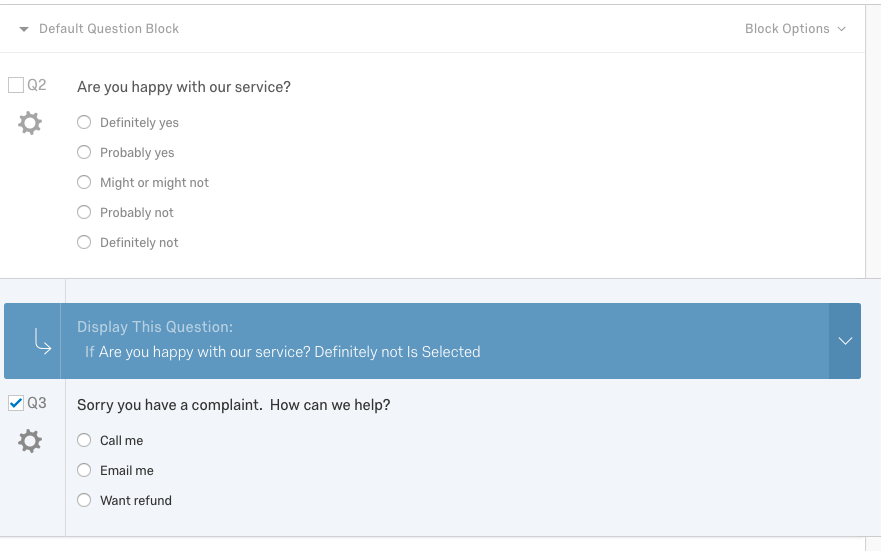
We can add display logic to a question. This logic controls the survey taking experience for conditionally displaying a question based on the answer to a different question.
For example, we have a survey below with the question Are you happy with our service?. If the answer is Definitely not we follow up with a question Sorry you have a complaint. How can we help?"
If that were entered manually via the Qualtrics Survey Editor it would look like this:
 The JSON question structure is:
  ...
  "Questions": {
    "QID2": {
      "QuestionText": "Are you happy with our service?",
      "DataExportTag": "Q2",
      "QuestionType": "MC",
      "Selector": "SAVR",
      "SubSelector": "TX",
      "Configuration": {
        "QuestionDescriptionOption": "UseText"
      },
      "QuestionDescription": "Are you happy with our service?",
      "Choices": {
        "1": {
          "Display": "Definitely yes"
        },
        "2": {
          "Display": "Probably yes"
        },
        "3": {
          "Display": "Might or might not"
        },
        "4": {
          "Display": "Probably not"
        },
        "5": {
          "Display": "Definitely not"
        }
      },
      "ChoiceOrder": ["1", "2", "3", "4", "5"],
      "Validation": {
        "Settings": {
          "ForceResponse": "OFF",
          "ForceResponseType": "ON",
          "Type": "None"
        }
      },
      "Language": [],
      "NextChoiceId": 6,
      "NextAnswerId": 1,
      "QuestionID": "QID2",
      "QuestionText_Unsafe": "Are you happy with our service?"
    },
    "QID3": {
      "QuestionText": "Sorry you have a complaint.  How can we help?",
      "DataExportTag": "Q3",
      "QuestionType": "MC",
      "Selector": "SAVR",
      "SubSelector": "TX",
      "Configuration": {
        "QuestionDescriptionOption": "UseText"
      },
      "QuestionDescription": "Sorry you have a complaint. How can we help?",
      "Choices": {
        "1": {
          "Display": "Call me"
        },
        "2": {
          "Display": "Email me"
        },
        "3": {
          "Display": "Want refund"
        }
      },
    }
  },
  ...
We want to display question QID3 if the answer to QID2 is Choice 5 "Definitely not". This is done by adding the following definition to our question using the Update Question API endpoint:
  ...
  "DisplayLogic": {
    "0": {
      "0": {
        "LogicType": "Question",
        "QuestionID": "QID2",
        "QuestionIsInLoop": "no",
        "ChoiceLocator": "q://QID2/SelectableChoice/5",
        "Operator": "Selected",
        "QuestionIDFromLocator": "QID2",
        "LeftOperand": "q://QID2/SelectableChoice/5",
        "Type": "Expression",
        "Description": "<span class="ConjDesc">If</span> <span class="QuestionDesc">Are you happy with our service?</span> <span class="LeftOpDesc">Definitely not</span> <span class="OpDesc">Is Selected</span> "
      },
      "Type": "If"
    },
    "Type": "BooleanExpression",
    "inPage": false
  },
  ...
Some Display Logic fields to note are:
| Field | Description |
|---|---|
| QuestionID | What question to depend on for the logic calculation |
| QuestionIDFromLocator | What question to depend on for the logic calculation |
| LeftOperand | This is a locator, which defines the source for which choice |
| q://QID2/SelectableChoice/5 | |
| Operator | This defines the boolean logic we apply (resulting in True or False) after retrieving the source. There are many types of operators depending on the source. |
Learn more about Logic Fields.
Add Quota to Survey
Quotas allow you perform actions, such as stopping further responses, once a Quota has been completed. This example will show you how to add a new Quota using the Create Quota Group and Create Quota API endpoints.
Add a Quota Group
Before we add a Quota we need a Quota Group to put it in. Quota Groups manage how Quota's counts will be incremented when multiple Quotas within in the Quota Group are satisfied by a single response. Run this code below to add a new Quota Group to the Survey.
import requests

# Setting user Parameters
apiToken = "API_TOKEN" # Replace with Account API Token
dataCenter = "ca1"

surveyId = "SV_1234567890abcdef"

baseUrl = "https://{0}.qualtrics.com/API/v3/survey-definitions/{1}/quotagroups".format(
    dataCenter, surveyId)

quotaGroupDef = {
  "Public": false,
  "Name": "Name Of Your Quota Group",
  "MultipleMatch": "PlaceInAll"
}

headers = {
   "accept": "application/json",
   "content-type": "application/json",
   "x-api-token": apiToken,
}

response = requests.post(baseUrl, json=quotaGroupDef, headers=headers)

print(response.text)
{
    "meta": {
        "httpStatus": "200 - OK",
        "requestId": "83299a00-fdef-42f7-9673-0dc92fce3443"
    },
    "result": {
        "QuotaGroupID": "QG_1234567890abcdef"
    }
}
Add a Quota
Run this code below using the quotaGroupId returned in the response from creating a quota. In the quota definition, Occurrences sets how many responses must satisfy the Quota before the QuotaAction is taken. In this case, once 100 respondents have selected "Definitely Not", no more responses will be gathered and active survey sessions will be redirected to the end of the survey.
import requests

# Setting user Parameters
apiToken = "API_TOKEN" # Replace with Account API Token
dataCenter = "ca1"

surveyId = "SV_1234567890abcdef"
quotaGroupId = "QG_1234567890abcdef"

baseUrl = "https://{0}.qualtrics.com/API/v3/survey-definitions/{1}/quotas?quotaGroupId={2}".format(
    dataCenter, surveyId, quotaGroupId)

quotaDef = {
  "Name": "Quota Name",
  "Occurrences": 100,
  "Logic": {
    "0": {
      "0": {
        "LogicType": "Question",
        "QuestionID": "QID2",
        "QuestionIsInLoop": "no",
        "ChoiceLocator": "q://QID2/SelectableChoice/5",
        "Operator": "Selected",
        "QuestionIDFromLocator": "QID2",
        "LeftOperand": "q://QID2/SelectableChoice/5",
        "Type": "Expression",
        "Description": "<span class="ConjDesc">If</span> <span class="QuestionDesc">Are you happy with our service?</span> <span class="LeftOpDesc">Definitely not</span> <span class="OpDesc">Is Selected</span> "
      },
      "Type": "If"
    },
    "Type": "BooleanExpression",
    "inPage": false
  },
  "LogicType": "Simple",
  "QuotaAction": "EndCurrentSurvey",
  "ActionInfo": {
    "0": {
      "0": {
        "ActionType": "EndCurrentSurvey",
        "Type": "Expression",
        "LogicType": "QuotaAction"
      },
      "Type": "If"
    },
    "Type": "BooleanExpression"
  },
  "QuotaRealm": "Survey",
  "QuotaSchedule": null,
  "EndSurveyOptions": {
    "EndingType": "Default",
    "ResponseFlag": "QuotaMet",
    "SurveyTermination": "DefaultMessage"
  }
}

headers = {
   "accept": "application/json",
   "content-type": "application/json",
   "x-api-token": apiToken,
}

response = requests.post(baseUrl, json=quotaDef, headers=headers)

print(response.text)
{
    "meta": {
        "httpStatus": "200 - OK",
        "requestId": "382a00d9-f778-4063-aa95-faf91f3d1dd6"
    },
    "result": {
        "QuotaID": "QO_1234567890abcdef",
        "QuotaGroupID": "QG_1234567890abcdef"
    }
}
Notice that the response tells us the ID of both the new Quota and the Quota Group it was created in. You may want to keep track of these IDs.
You may have also noticed that the Logic in the Quota definition uses the same structure as Question Display Logic. Logic in Quotas though is limited to Logic based on Questions, Embedded Data, or other Quotas. Learn more about Logic Fields
Publish a Survey
In order to collect responses to your survey, you will need to publish it first.
We can create a new survey version using the Create Version API endpoint. This lets us make changes to a survey and roll them back if needed.
Automatic Versioning
Qualtrics attempts to preserve the work you have done with every change you make. After every API call we check for differences between your latest survey definition and the last saved version. If it has changed, and we haven't created a version in the last 5 minutes, we automatically create one for you.
Before you can collect responses, you must publish and activate your survey. The example below shows how to publish a survey by creating a new Version with the Published flag set to true. Respondents will only see the most recently published version and each survey can only have one active Published version at a time. All previously published versions will be remembered in case you need to review that at any point. Learn more
import requests

# Setting user Parameters
apiToken = "API_TOKEN" # Replace with Account API Token
dataCenter = "ca1"

surveyId = "SV_096ecQyLMysaaEZ" # replace with your Survey ID

baseUrl = "https://{0}.qualtrics.com/API/v3/survey-definitions/{1}/versions".format(
    dataCenter, surveyId)

data = {
  "Description": "2018 New Survey Version",
  "Published": True
}

headers = {
   'accept': "application/json",
   'content-type': "application/json",
   "x-api-token": apiToken,
}

response = requests.post(baseUrl, json=data, headers=headers)

print(response.text)
{
  "meta": {
    "httpStatus": "200 - OK",
    "requestId": "7999edd9-a232-4735-ae70-1c8cc7e30e09"
  },
  "result": {
    "metadata": {
      "surveyID": "SV_096ecQyLMysaaEZ",
      "versionID": "9223370492291465912",
      "versionNumber": 2,
      "description": "2018 New Survey Version",
      "userID": "UR_3fIVFlGaWYcfVml",
      "creationDate": "2018-12-11T21:21:49Z",
      "published": true,
      "wasPublished": true,
      "publishEvents": [
        {
          "date": "2018-12-11T21:21:50Z",
          "userID": "UR_3fIVFlGaWYcfVml"
        },
        {
          "date": "2018-12-11T21:44:25Z",
          "userID": "UR_3fIVFlGaWYcfVml"
        },
        {
          "date": "2018-12-11T21:44:55Z",
          "userID": "UR_3fIVFlGaWYcfVml"
        },
        {
          "date": "2018-12-11T21:53:41Z",
          "userID": "UR_3fIVFlGaWYcfVml"
        },
        {
          "date": "2018-12-11T21:58:24Z",
          "userID": "UR_3fIVFlGaWYcfVml"
        }
      ]
    }
  }
}
Run the code above and it responds:
{
  "meta": {
    "httpStatus": "200 - OK",
    "requestId": "939e7771-c83e-416a-a33c-0742e778616f"
  },
  "result": {
    "metadata": {
      "surveyID": "SV_24u59Prew3QvfeZ",
      "versionID": "9223370491469032062",
      "versionNumber": 3,
      "description": "2018 New Survey Version",
      "userID": "UR_8cRedheujEbcxgN",
      "creationDate": "2019-02-08T17:59:17Z",
      "published": true,
      "wasPublished": true,
      "publishEvents": [{
        "date": "2018-12-21T09:49:04Z",
        "userID": "UR_8cRedheujEbcxgN"
      }]
    }
  }
}