XM Discover API: Export API v2 Interactive Documentation
About Export API Interactive Documentation
You can access interactive Export API documentation embedded in the service.
Use the link that matches your region in the following table.
| Region | Documentation |
|---|---|
| NA customers | https://export-na.clarabridge.net/swagger-ui/index.html |
| EU customers | https://export-eu.clarabridge.net/swagger-ui/index.html |
Accessing Interactive Documentation
-
Once inside your region's embedded documentation, expand the export-controller header.
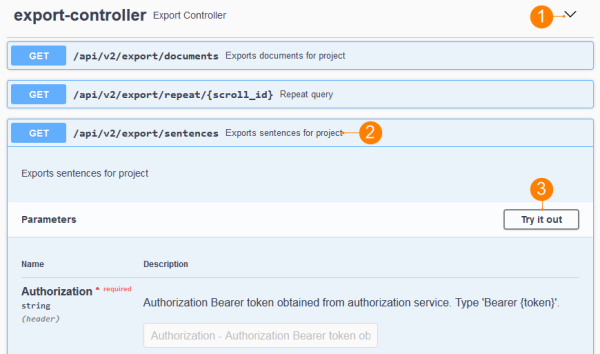
-
Choose your endpoint:
Endpoint Description GET api/v2/export/documents Export document-level feedback. GET api/v2/export/repeat/{scroll_id} Repeat your query. GET api/v2/export/sentences Export sentence-level feedback. Select the endpoint to expand an overview of the parameters that it supports.
-
To perform a test request, select Try it out in the Parameters header. Read the following section for details.
Trying Export API v2 Out
In addition to getting information on the supported parameters, you can use these endpoints to perform test requests.
Note: The API key is required to try the Export API out.
To perform a test request:
- Go to your region's embedded documentation as described in the beginning of this topic and expand the endpoint that you wish to test.
- Click Try it out in the Parameters header.
- Provide your API key in the Authorization box. This is the only required parameter.
- Fill out additional parameters that you wish to test.
Note: The scroll field should be left blank when first calling the Export API. The response will include a scroll_id after the returned data. To retrieve the next page of results, copy the scroll_id value into the scroll field, repeating this process until there are no more results.
- Select Execute.
- The API provides a response underneath endpoint's parameters.