XM Discover API: Export API v2 Authentication
About Export API Authentication
To use the Export API service, you need an API key. The API keys are project-specific and uniquely identify the project from which data is exported. You can generate the API key in Designer.
Getting the API Key
Note: Project Manager-level permissions are required to access the Export API tab.
- Sign in to Designer.
- Open the Admin tab.
- Switch to the Projects subpage, if necessary. For Project Managers, the Projects subpage is displayed by default.
- In the Actions column, click the Edit icon next to your project.
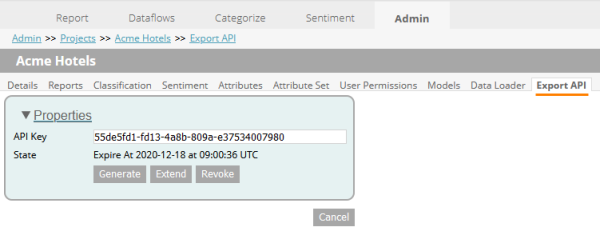
- Switch to the Export API mini tab.
- Here you can perform the following actions:
- See the current API key and its expiration date.
- Generate a new API key.
- Extend the expiration date of the current API key.
- Revoke the current API key.
Note: API key revoke can take up to 5 minutes to complete.
Using the API Key
To use the API key, you need to set the Authorization header for all requests you send to the Export API service. This header should contain the Bearer keyword and the API key separated by a white space as shown below.
Authorization: Bearer 55de5fd1-fd13-4a8b-809a-e37534007980
Key Expiration and Extension
Export API keys expire annually. You can see the exact expiration date in the Export API mini tab below the API Key box.
Our support team monitors the Export API tokens that are about to expire, and extends the token so that there is no disruption to the API connection.