The Qualtrics class lets your app communicate with Qualtrics App Feedback. The Qualtrics class is represented as a singleton, and the singleton is accessible through its shared property. You can initialize the Qualtrics singleton with the Brand, Project and Intercept IDs.
To utilize the SDK you'll need a Brand ID and a Project ID to initialize the Qualtrics class. This requires a Qualtrics account. If you do not have an account, please reach out to your Admin to either have an account provisioned or relay the IDs required to move forward.
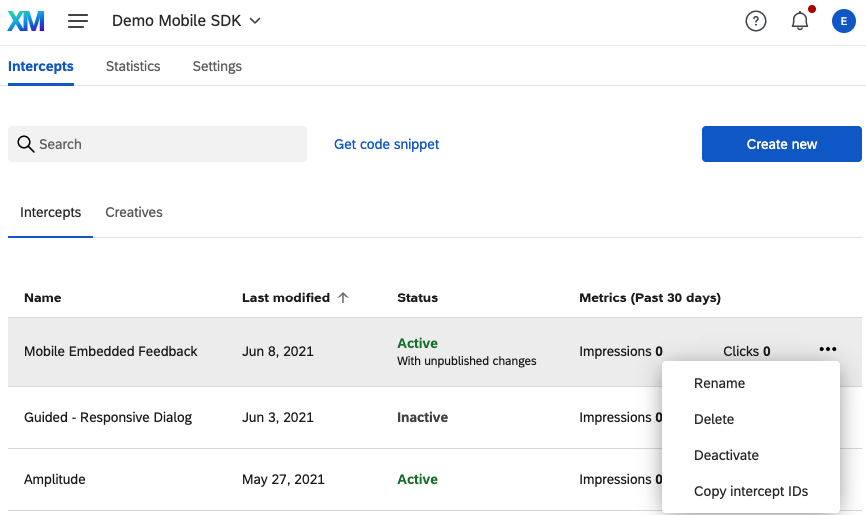
Log into your Qualtrics account, navigate to the desired App Feedback Project and choose Intercepts near the top left of the screen. You should see a screen similar to the following:
Click on the dropdown to the right of the desired Intercept and choose Copy Intercept IDs.
The iOS app first initializes the Qualtrics singleton with the brand ID, project ID and completion handler. You can do this in the app delegate (in didFinishLaunchingWithOptions).
When you want to display a creative, use the evaluateProject or evaluateIntercept method to check the Intercept's display logic on the server asynchronously. After evaluation of the Intercept is complete, the method calls the completion block which returns a TargetingResult object to indicate to the app whether the creative should be displayed.
The properties object stores values that can be used throughout the app. Values placed in the object could include information such as the number of times the user has navigated to a specified view controller, location information, latency times or other values that can be collected by the iOS device.
This method displays the specified creative in the specified view controller. Typically, you need to evaluate whether the creative should be displayed by evaluating an intercept's logic using the evaluateProject method. If a specific intercept is being evaluated using evaluateIntercept, then displayIntercept must be used rather than display. Additionally, if the value for autoCloseSurvey is set to true, then after the survey associated with the intercept has been taken, the underlying survey view will be closed without user interaction.
This method displays the creative associated with the passing Action Set for the given Intercept in the specified view controller. Typically, you need to evaluate whether the creative should be displayed by evaluating an Intercept's logic using the evaluateProject or evaluateIntercept methods
This method is used to bypass the creative and only show the target survey in the Qualtrics webview.
Tip
If you want to use Preventing Repeated Display with this function, you need to call TargetingResult.setLastDisplayTime(). Otherwise, the Prevent Repeated Display will not be respected.
This method asynchronously evaluates all Intercepts that have been initialized and calls the specified completion block with a dictionary of TargetingResult objects. The TargetingResult object indicates the result of the evaluation for each Intercept that has been initialized.
Tip
This method should be called asynchronously for best performance, usually done by wrapping the invocation in a DispatchGroup. Make sure that the evaluation resolves completely before display is invoked.
This method asynchronously evaluates the given Intercept and calls the specified completion block with a TargetingResult object. The TargetingResult object indicates the result of the evaluation for the given Intercept.
Tip
This method should be called asynchronously for best performance, usually done by wrapping the invocation in a DispatchGroup. Make sure that the evaluation resolves completely before displayIntercept is invoked.
This method asynchronously evaluates the current Intercept and calls the specified completion block with a TargetingResult object. The TargetingResult object indicates the result of the evaluation through the passed property.
You should call this method asynchronously by defining a wrapper function at the application level, shown in the examples below. The method's InitializationResult map (returned in the callback) indicates the state of initialization for each intercept. See IQualtricsCallback Interface for more information about implementing the callback.
Tip
This method should be called asynchronously for best performance. Make sure that the initializeProject function resolves completely before either evaluateProject or evaluateIntercept is invoked.
At the application entrypoint, define a function called initializeQualtrics that invokes the initializeProject function.
Then, simply call the initializeQualtrics function you just defined in a DispatchQueue. Do this wherever you want to perform the initialization, typically in your application's view controller.
let appDelegate:AppDelegate=UIApplication.shared.delegate as!AppDelegate DispatchQueue.global(qos:.background).async{ appDelegate.initializeQualtrics(brandId:"BRAND_ID", projectId:"PROJECT_ID", extRefId:"EXT_REF_ID") }
public func getInitializedIntercepts() -> [String]
Objective-C
- (NSString * _Nullable)getInitializedIntercepts;
This method returns an array of interceptIDs for all the Intercepts in the project that have been successfully initialized (i.e. the Intercept is published and active). This list can be used to evaluate a specific Intercept.
let initializedIntercepts =Qualtrics.shared.getInitializedIntercepts() for interceptID in initializedIntercepts { Qualtrics.shared.evaluateIntercept(for: interceptID,...) }
This method returns an array of interceptIDs for all the Intercepts in the project that have been evaluated and determined as passing. This list can be used to display a specific Intercept.
let passingIntercepts =Qualtrics.shared.getPassingIntercepts() for intercept in passingIntercepts { Qualtrics.shared.displayIntercept(for: intercept,...) }
This method initializes the Qualtrics singleton using the specified brand ID, project ID, Intercept ID and completion handler. You typically call this method in the app delegate's applicationDidBecomeActive method.
The method's InitializationResult (returned in the completion handler) indicates the state of initialization. See InitializationResult Class for more information.
This method accepts the Notification Response, passes it to the SDK to process, and generates the webView to display the target. This must be called in UNUserNotificationCenterDelegate didReceive function.
This method accepts the Notification Response, passes it to the SDK to process, and generates the webView to display the target. This must be called in UNUserNotificationCenterDelegate didReceiveNotificationResponse function.
Note: This API is used on iOS 10 and greater.
This method accepts the Notification Response, passes it to the SDK to process, and generates the webView to display the target. This must be called in UNUserNotificationCenterDelegate didReceiveLocalNotification function.
Note: This API is used on iOS 9.
This method accepts the Notification Response, passes it to the SDK to process, and generates the webView to display the target. This must be called in UNUserNotificationCenterDelegate willPresent function.
public func setEmbeddedFeedbackDialogCloseListener(listener: (() -> Void)?)
Objective-C
public func setEmbeddedFeedbackDialogCloseListener(listner: @escaping (() -> Void))
This method accepts a callback which is invoked whenever the Mobile Embedded Feedback Dialog is closed.
Once a listener is invoked once, it will not be invoked again and the function needs to be called again with a new or same listener.
The Properties class allows you to store values that are sent back to the server and can be used as embedded data in surveys. For more information about using property values in surveys, see Using Embedded Data.
Sets the string value for the specified key. The value is sent back to the server and can be used in the Intercept. For an example, see Using Embedded Data
Sets the double value for the specified key. The value is sent back to the server and can be used in the Intercept. For an example, see Using Embedded Data
Sets the current system time to the specified key. The value is sent back to the server and can be used in the Intercept. For an example, see Using Embedded Data
This method is the default initializer for this view controller. The URL is typically obtained from the getSurveyUrl method in the TargetingResult class.
This method returns the link to the survey in the current creative. The link can be used by app code to display the survey in a UIWebView instead of calling displayWithCurrentView.
This property indicates the state of the server-side evaluation of the Intercept. If it is YES (Objective-C) or true (Swift), the creative should be displayed.
This method records a click that is reported back to the server. It is associated with the Intercept that was used to initialize the Qualtrics singleton. You can view the click statistics in the View Stats tab for the Intercept. For more information, see User Analytics with the Mobile App SDK.
This method reports an impression associated with the Intercept when initializing the Qualtrics object (using the initializeWithIntercept method) back to the server. The impressions are reported in the View Stats tab for that Intercept in the server user interface. For more information, see User Analytics with the Mobile App SDK.
Sets the last displayed time of a TargetingResult to the current time this function is called. This function is already called automatically when an Intercept is displayed, but it can be used in custom use cases where the Qualtrics display function is not used to display the Intercept.
The TargetingResultStatus enum returns a status in the TargetingResult returned from the evaluateTargetingLogicWithCompletion method. It is accesed using the TargetingResult.getTargetingResult method.
Not Available in Objective-C
This enum and the getTargetingResult method are not available in Objective C.
The targeting logic passed, but the Intercept sampling rate prevented the survey invitation from appearing.
multipleDisplayPrevented
The survey invitation has a Prevent Repeated Display option set. This prevents the survey invitation from appearing again for a specified time period.
error
An error occurred when attempting to evaluate targeting logic. Use the getError method on the TargetingResult object to determine more about this error.