SDK Configuration
During initialization, you can configure the SDK using the options listed in the table below. If not specified, the SDK will use default values.
Platform Guides
- iOS - Automatic Initialization
- iOS - Manual Initialization
- Android - Automatic Initialization
- Android - Manual Initialization
- React Native
Configuration Options
| Feature | Key | Data Type | Default Value |
|---|---|---|---|
| Screen Name Auto Capture (UIKit) | ScreenAutoCaptureUIKit | Boolean | YES |
| Screen Name Auto Capture (SwiftUI) | ScreenAutoCaptureSwiftUI | Boolean | YES |
| Button Auto Capture (UIKit) | ButtonAutoCaptureUIKit | Boolean | YES |
Without Screen Name Auto Capture, your development teams will need to manually code every screen change event for the SDK.
With Screen Name Auto Capture, method swizzling is used on UIViewController for viewDidAppear and viewDidDisappear methods.
Button Auto Capture detects taps on UIKit controls (UIButton and UIBarButtonItem). A button is captured only when it has a non-empty accessibilityIdentifier; taps on buttons without one are ignored. SwiftUI buttons are not supported.
Apply Configuration
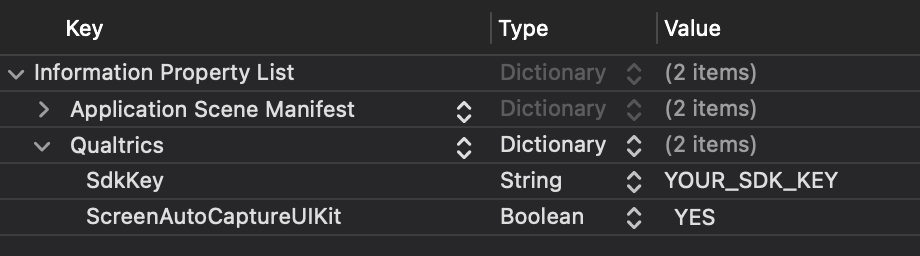
Add entries to the Qualtrics dictionary in Info.plist using the corresponding keys and data types.
Configuration Options
| Feature | Key | Data Type | Default Value |
|---|---|---|---|
| Screen Name Auto Capture (UIKit) | screenAutoCaptureUIKit | Bool | true |
| Screen Name Auto Capture (SwiftUI) | screenAutoCaptureSwiftUI | Bool | true |
| Button Auto Capture (UIKit) | buttonAutoCaptureUIKit | Bool | true |
Without Screen Name Auto Capture, your development teams will need to manually code every screen change event for the SDK.
With Screen Name Auto Capture, method swizzling is used on UIViewController for viewDidAppear and viewDidDisappear methods.
Button Auto Capture detects taps on UIKit controls (UIButton and UIBarButtonItem). A button is captured only when it has a non-empty accessibilityIdentifier; taps on buttons without one are ignored. SwiftUI buttons are not supported.
Apply Configuration
Create a QualtricsConfiguration object and pass it to the initialization call.
import QualtricsExperience

let configuration = QualtricsConfiguration(
    screenAutoCaptureUIKit: true,
    screenAutoCaptureSwiftUI: true,
    buttonAutoCaptureUIKit: true
)

Qualtrics.initialize(sdkKey: "YOUR_SDK_KEY", configuration)
Configuration Options
| Feature | Key | Data Type | Default Value |
|---|---|---|---|
| Screen Name Auto Capture (Activities) | qualtrics_screen_auto_capture_activities | bool | true |
| Screen Name Auto Capture (Fragments) | qualtrics_screen_auto_capture_fragments | bool | true |
| Screen Name Auto Capture (Navigation API) | qualtrics_screen_auto_capture_navigation_api | bool | true |
| Screen Name Auto Capture (Jetpack Compose) | qualtrics_screen_auto_capture_compose | bool | true |
| Button Auto Capture (Views) | qualtrics_button_auto_capture_views | bool | true |
Jetpack Compose: After enabling it, call Qualtrics.captureComposeNavigation(navController) with your NavController to track screen changes (see SDK Setup – Collect Screen Names).
Without Screen Name Auto Capture, your development teams will need to manually code every screen change event for the SDK.
Button Auto Capture detects taps on Android View buttons (Button and ImageButton). A button is captured only when it has an android:id; its resource entry name is used as the button identifier, and taps on buttons without an id are ignored. Jetpack Compose buttons are not supported.
Apply Configuration
Add entries to the qualtrics_config.xml file using the corresponding keys and data types.
<?xml version="1.0" encoding="utf-8"?>
<resources>
   <string name="qualtrics_sdk_key">YOUR_SDK_KEY</string>
   <bool name="qualtrics_screen_auto_capture_activities">true</bool>
   <bool name="qualtrics_screen_auto_capture_fragments">true</bool>
   <bool name="qualtrics_screen_auto_capture_navigation_api">true</bool>
   <bool name="qualtrics_screen_auto_capture_compose">true</bool>
   <bool name="qualtrics_button_auto_capture_views">true</bool>
</resources>
Configuration Options
| Feature | Key | Data Type | Default Value |
|---|---|---|---|
| Screen Name Auto Capture (Activities) | screenAutoCaptureActivities | Boolean | true |
| Screen Name Auto Capture (Fragments) | screenAutoCaptureFragments | Boolean | true |
| Screen Name Auto Capture (Navigation API) | screenAutoCaptureNavigationApi | Boolean | true |
| Screen Name Auto Capture (Jetpack Compose) | screenAutoCaptureCompose | Boolean | true |
| Button Auto Capture (Views) | buttonAutoCaptureViews | Boolean | true |
Jetpack Compose: After enabling it, call Qualtrics.captureComposeNavigation(navController) with your NavController to track screen changes (see SDK Setup – Collect Screen Names).
Without Screen Name Auto Capture, your development teams will need to manually code every screen change event for the SDK.
Button Auto Capture detects taps on Android View buttons (Button and ImageButton). A button is captured only when it has an android:id; its resource entry name is used as the button identifier, and taps on buttons without an id are ignored. Jetpack Compose buttons are not supported.
Apply Configuration
Create a QualtricsConfiguration object and pass it to the initialization call.
val configuration = QualtricsConfiguration(
    screenAutoCaptureActivities = true,
    screenAutoCaptureFragments = true,
    screenAutoCaptureNavigationApi = true,
    screenAutoCaptureCompose = true,
    buttonAutoCaptureViews = true
)

Qualtrics.initialize("YOUR_SDK_KEY", activity, configuration)
The React Native SDK does not expose configuration options at this time. Screen Name Auto Capture is controlled by calling enableScreenAutoCapture with your navigation ref (see SDK Setup). No other configuration is needed.
Button Auto Capture is not supported for React Native. To report button taps in a React Native app, use the manual reportButtonTap method instead (see Manual Button Taps).