XM Discover API: Setting API Rate Limits
About API Rate Limits
To support optimal performance while working with the APIs, System Administrators can perform API rate limiting at the account level. This enables a smooth processing of calls.
API rate limits are configured through the Admin tab in Designer.
How to Set API Rate Limits
Note: An administrator permission is required to perform this action.
- Open the Admin tab.
- Select Edit next to the account you wish to modify.
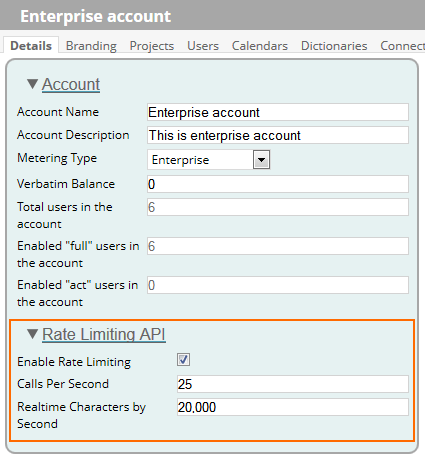
- In the Rate Limiting API section select Enable Rate Limiting and adjust the following settings:
| Setting | Description |
|---|---|
| Calls Per Second | Define how many API calls can be performed from one account per second per server. This restriction applies to all XM Discover API web services. The default value is 25. |
| Realtime Characters by Second | Define how many real-time characters can be received from one account per second per server. This restriction applies only to Real-time API services. The default value is 20,000. |
Rate Limiting Options Compared
A Realtime Characters by Second restriction is different from Calls Per Second, as it is applied at the message level. Here is an example of system behavior assuming it is configured to 20,000 characters per second:
First, a real-time request of 40,000 characters arrives → ACCEPT
If another request arrives in less than 2 seconds → REJECT (with RATE_LIMIT error response)
If another request arrives after 2 seconds → ACCEPT
Note: The Enable Rate Limiting option in account details determines whether rate limiting is enabled or disabled. If this option is cleared, all server resources will be used without limitation.